Key Takeaways
- Every FMCSA-registered ELD must support one of two transfer options, telematics (web services and email) or local (USB 2.0 and Bluetooth), under the ELD technical standard Appendix A.
- At a roadside stop, the safety official chooses which transfer method to use, and FMCSA advises carriers that drivers should be ready to support whichever method gets selected.
- During a Bluetooth transfer, the ELD does not send the file straight to the officer’s device. It routes the data through FMCSA’s web service using the officer’s internet connection, according to FMCSA guidance.
- If cellular limitations block a web services or email transfer, the officer verifies hours of service from the ELD’s display screen or printout instead, according to FMCSA guidance.
- An ELD must be able to produce records covering the current 24-hour period plus the previous 7 consecutive days on request, under the ELD technical standard Appendix A.
- CVSA’s 2026 International Roadcheck placed ELD tampering and log integrity as a primary inspection focus, according to CVSA.
- A driver who cannot show the required records through any transfer method or display can face a citation for no record of duty status under 49 CFR 395.8(a)(1), which can lead to an out-of-service order.
- FMCSA has removed 79 ELD devices from its registered list since January 2025, with the most recent 12-device removal confirmed May 20, 2026, giving carriers using those devices until July 20, 2026 to replace them.
Introduction
Your driver gets waved into a weigh station, and within a minute or two, a DOT officer walks up to the cab and asks for the ELD records. This is the moment your compliance either holds up in under a minute or turns into a delay that eats into the day and puts your fleet’s record at risk.
Most fleet owners know their drivers need an ELD. Fewer know exactly how the data gets from the tablet in the cab to the officer’s laptop, or what your driver is supposed to do if a Bluetooth pairing hangs or the cell signal drops at a rural inspection site. That gap is where avoidable violations happen, not because the driver did anything wrong, but because nobody walked through the actual transfer steps before it mattered.
Below, you’ll find both approved transfer categories, telematics and local, broken down step by step: exactly how each one works during a roadside stop, who controls the process, and what your driver should do if the first attempt fails. It also covers why 2026 enforcement has put more weight on this specific part of compliance.
If your fleet has run into a transfer issue at roadside before, or you just want to walk through how it works on your own device, reach out to us and we will walk through it with you directly.
What Data Transfer Methods Does an FMCSA ELD Have to Support?
Every FMCSA-registered ELD has to support at least one full transfer option out of two categories: telematics, which uses web services and email, or local, which uses USB 2.0 and Bluetooth.
This split exists because trucking routes vary. A long-haul driver crossing rural stretches with no cell coverage cannot rely on a device that only transfers wirelessly, and a device built around local transfer solves that since it only needs the officer’s internet connection, not the truck’s. Manufacturers pick at least one full option when they register a device, which is why we build the Geosavi ELD to run both USB and Bluetooth local transfer alongside telematics, so if a signal issue blocks one path, your driver has another one ready without needing to switch devices or call anyone first.
Your driver needs to know which methods their specific device supports before they are standing at a weigh station being asked to demonstrate one, and that is a five-minute check you can do once rather than something to figure out under pressure.
How Does Telematics Transfer Work (Web Services and Email)?
Telematics transfer sends the ELD output file wirelessly, either through a direct web services connection or as an email attachment, and it requires your device to have its own working internet connection at the moment of the stop.
With web services, the officer gives your driver a routing code, the ELD connects independently to the internet, and the file goes to an FMCSA server where the officer’s software retrieves it using that code. With email, the officer requests the file be sent as an attachment to a preprogrammed FMCSA email address built into the device by the vendor, again referencing a routing code the officer provides.
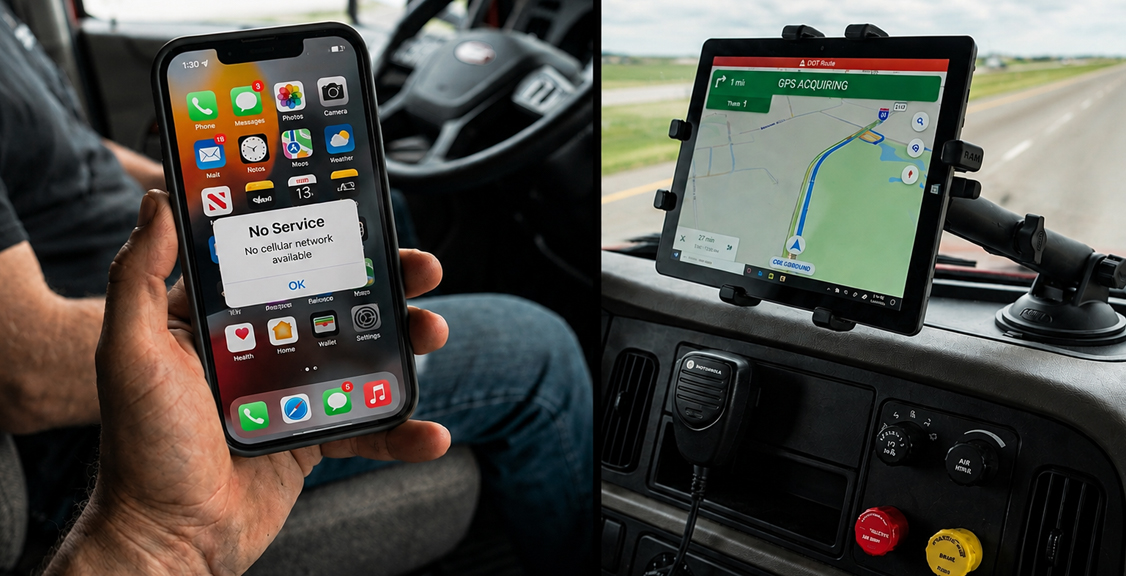
The catch with telematics is connectivity. A device that depends on Wi-Fi being present at the roadside, or that only covers a small area, does not meet FMCSA’s requirement for a telematics ELD, since the whole point is that the device connects on its own wherever the stop happens. If your driver runs routes through mountain passes or wide-open stretches of desert, that is worth checking against your device’s actual cellular performance, not just the spec sheet.
How Does Local Transfer Work (USB and Bluetooth)?
Local transfer moves the ELD file through a direct USB connection or a Bluetooth pairing, and unlike telematics, it does not require your driver’s device to have its own internet connection at all.
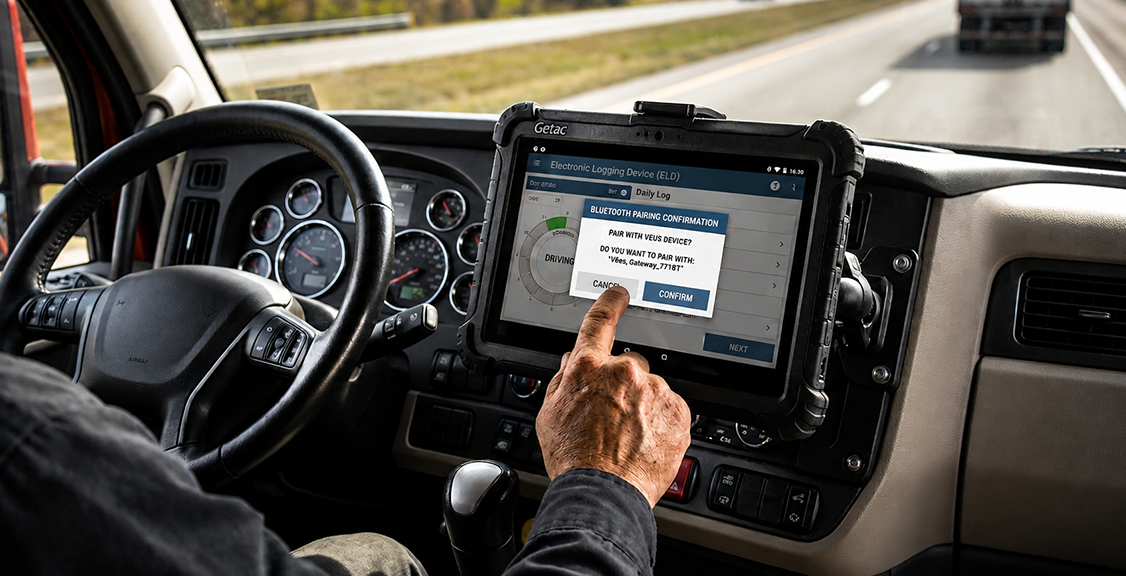
For USB, the officer provides a secure USB device, your driver plugs it into the ELD, and the file transfers directly onto that hardware for the officer to review on their own computer. For Bluetooth, the process works differently from what most drivers expect, since the ELD pairs with the officer’s device over Bluetooth but does not send the file directly through that connection. Instead, it uses the officer’s internet access to submit the file to FMCSA’s web service, the same backend that telematics transfer uses, so Bluetooth here works as a bridge for the officer’s connection rather than a direct peer-to-peer file transfer.
That distinction matters practically, because if the officer’s device has poor cellular reception, a Bluetooth transfer can still fail even though the pairing itself worked fine, since the file still needs to reach FMCSA’s server. Your driver should not assume a successful pairing means a completed transfer, and watching for the confirmation on the ELD screen is the only way to know the file actually went through.
Who Decides Which Transfer Method Is Used at a Roadside Stop?
The safety official conducting the inspection chooses the transfer method, not your driver, and your driver’s job is to be ready to support whichever one the officer requests.
This is a common misunderstanding, since some drivers assume they can offer their preferred method, usually whichever one they have used before. In practice, the officer selects between the available options based on their own equipment and the type of ELD in the vehicle, telematics (web services or email) for a telematics-type device, or local (USB or Bluetooth) for a local-type device. A driver who has only practiced one method and gets asked for the other is at a real disadvantage, fumbling through an unfamiliar menu while the officer waits.
This applies to every driver required to run an ELD, including drivers on shorter local routes who see roadside stops less often than long-haul drivers do. If your fleet has drivers covered by our local drivers ELD guide, the same transfer rules still apply any time they are pulled into an inspection lane. Before your driver ever gets pulled into an inspection lane, they should complete one test transfer using every method their device supports. That single run-through, done once in the yard, removes the most common and most preventable cause of a failed transfer at roadside, a driver who has genuinely never used the function before.
What Happens If the Transfer Fails or Your Signal Drops?
If an electronic transfer fails, your driver falls back to showing the ELD’s display screen or a printout, and the officer verifies hours of service compliance directly from that record instead of the transmitted file.
Cellular limitations that block a web services or email transfer do not automatically create a violation. According to FMCSA guidance, when connectivity prevents an electronic transfer, the official reviews the display or printout to confirm the driver’s hours of service, which is why every ELD, regardless of which transfer methods it supports, still needs a working display your driver can hand over or turn toward the window if requested.
Where this becomes a real problem is when the display itself cannot show the required records, current day plus the previous 7 consecutive days, or when the device is malfunctioning entirely. That situation can lead to a citation for no record of duty status under 49 CFR 395.8(a)(1), and depending on the officer’s judgment, an out-of-service order until the driver can produce paper logs or a reconstructed record covering the required period.
The practical takeaway for your fleet is that transfer failure and display failure are two different problems. A blocked transfer with a working display is usually a non-event, while a blocked transfer with no usable display is where compliance risk actually sits, along with the maximum civil penalties described under the FMCSA civil penalty schedule.
What Should Your Driver Do to Prepare Before an Inspection?
Your driver should run one practice transfer through every method their ELD supports before their first day on the road, and repeat that test any time the device, app, or phone changes.
A short checklist covers most of what matters: know which transfer methods the device supports, confirm the device pairs with an unfamiliar Bluetooth connection and not just the ones already saved, keep the instruction sheet required under 49 CFR 395.22(h) in the vehicle, and know how to pull up the display for the current day plus the previous 7 days without searching through menus under pressure. You can find more setup answers in our ELD FAQ if any of these steps are unfamiliar on your specific device.
None of this takes long to set up once, and it removes almost all of the confusion that turns a routine stop into a longer one.
Why Does CVSA’s 2026 Roadcheck Make Transfer Reliability More Important?
CVSA’s 2026 International Roadcheck ran from May 12 to 14 with ELD tampering as the driver focus area, meaning officers were specifically trained to scrutinize how ELD data holds up under transfer and review, not just whether a device is present.
CVSA recorded 58,382 falsification violations in 2024, a number that reflects how much weight ELD data carries in an inspection now compared to years ago. A device that transfers cleanly, on the first attempt, through whichever method the officer requests, reflects well on your fleet’s overall compliance picture, while a device that stalls, produces errors, or requires multiple attempts draws more attention to the log itself, which is exactly the scrutiny CVSA’s 2026 International Roadcheck was built around.
This is also tied to a separate but related enforcement trend. FMCSA has removed 79 ELD devices from its registered list since January 2025, with the most recent 12-device removal confirmed May 20, 2026, giving carriers using those devices until July 20, 2026 to replace them. A device pulled from the FMCSA-registered ELD list stops being compliant regardless of how well it used to transfer data, so checking that list on a regular basis matters just as much as knowing how the transfer process itself works.
ELD Transfer Method Comparison
| Feature | Web Services | USB 2.0 | Bluetooth | |
|---|---|---|---|---|
| Category | Telematics | Telematics | Local | Local |
| Internet needed on the ELD itself | Yes, direct connection | Yes, direct connection | No | No, uses officer’s connection |
| Who provides the connection | Your device’s own carrier signal | Your device’s own carrier signal | Officer’s USB device | Officer’s internet access |
| Common failure point | Weak or no cell signal | Weak or no cell signal | Physical port or cable issue | Officer’s signal, not the pairing itself |
| Speed at roadside | Fast when signal is strong | Fast when signal is strong | Fast, no signal dependency | Depends on officer’s connection |
| Best suited for | Routes with reliable cell coverage | Routes with reliable cell coverage | Any route, including remote areas | Any route, if officer supports it |
| Backup if this method fails | Switch to email, USB, or Bluetooth | Switch to web services, USB, or Bluetooth | Switch to Bluetooth or telematics | Switch to USB or telematics |
Questions to Ask Before You Choose an ELD Provider
Does the device support all four transfer methods, or just one?
A device limited to telematics only leaves your driver stuck if cell coverage drops at the inspection site. Ask the vendor to confirm web services, email, USB, and Bluetooth all work on the actual hardware you would be buying, not just on paper.
What happens if the transfer fails during an actual inspection?
Ask the vendor to walk you through their malfunction and backup procedure step by step. A vendor who cannot answer this clearly in a sales call is not one you want to find out about at 2 a.m. on the road.
Is support available around the clock, including weekends?
Roadside stops do not follow business hours. Confirm the provider offers 24-hour, 7-day support and that your driver has a direct number, not a general form.
Has the device been tested pairing with a range of third-party Bluetooth devices?
Officer laptops vary. A device that only pairs reliably with the vendor’s own testing equipment can behave differently in the field. Ask what testing the vendor has done here.
How will you find out if this device gets removed from FMCSA’s registered list?
Devices get removed regularly, 79 since January 2025 as of the most recent count. Ask the vendor exactly how and when they would notify you, and what the replacement timeline looks like.
Can the app run on more than one device type?
If your drivers use a mix of company tablets and personal phones, confirm the ELD app supports both, and that transfer requirements apply the same way regardless of which device is running it.
Is there a written instruction sheet required in the vehicle?
Under 49 CFR 395.22(h), drivers must carry an instruction sheet covering malfunction reporting. Confirm the vendor provides this as a standard part of the setup, not an extra step you have to build yourself.
What is the total cost, including any fees tied to data transfer or connectivity?
Some providers add fees for cellular data used during telematics transfer. Compare current device and plan pricing in the Geosavi shop and store before you commit to a plan.
About ELDs and Road Safety
Does my driver choose the transfer method during an inspection?
No, the safety official selects the method based on their own equipment and the type of ELD in the vehicle, and your driver’s role is to be ready to support whichever method gets requested.
What is the difference between telematics and local transfer?
Telematics transfer, web services or email, requires the ELD to connect to the internet on its own. Local transfer, USB or Bluetooth, does not, since it relies on the officer’s connection or a direct cable link instead.
Can Bluetooth transfer data directly to the officer’s device?
No, Bluetooth pairing gives the ELD access to the officer’s internet connection, and the file still routes through FMCSA’s web service the same way a telematics transfer would.
What happens if the cell signal is too weak for a telematics transfer?
The officer reviews the ELD’s display screen or a printout instead to verify hours-of-service compliance, according to FMCSA guidance.
How many days of records does the ELD need to produce?
The current 24-hour period plus the previous 7 consecutive days, under the ELD technical standard Appendix A.
What happens if the device cannot show any usable records at all?
Your driver can face a citation for no record of duty status under 49 CFR 395.8(a)(1), and depending on the circumstances, an out-of-service order until the required records can be produced another way.
Does a failed transfer count as a violation by itself?
Not automatically, since a blocked electronic transfer with a working display or printout is generally resolved by the officer reviewing that display directly. The bigger risk is a device that cannot show any usable record at all.
Does this apply the same way to box trucks and smaller commercial vehicles?
Yes, any vehicle that meets the commercial motor vehicle definition under 49 CFR Part 390.5 and requires an ELD follows the same transfer rules, covered in more detail in our box truck ELD guide.
About Choosing the Right ELD Provider
Why does it matter if an ELD supports all four transfer methods?
Routes vary in cell coverage, and officer equipment varies too. A device limited to one method leaves your driver with no backup if that specific method fails at a given stop.
How do I know if my current ELD is still FMCSA-registered?
Check the device against the FMCSA-registered ELD list directly, since FMCSA regularly removes devices, 79 since January 2025 as of the most recent count.
What should I ask about support hours before buying an ELD?
Confirm the provider offers support around the clock, seven days a week, since inspections and breakdowns do not follow a set schedule. We provide 24-hour, 7-day technical support as a standard part of the platform.
Is a tablet-based ELD as reliable as a hardwired one for data transfer?
Yes, provided the device is built for commercial vehicle conditions. The Geosavi tablet is SAE J1455 certified, meaning it is built to handle the temperature swings, vibration, and shock common in truck cabs, and it connects via J1939, J1708, or OBD-II depending on your vehicle.
What if I want to try a device before committing?
Ask whether the provider offers a money-back guarantee. We include a 30-day money-back guarantee on the ELD platform, giving your fleet time to confirm the transfer process works the way you expect before you are locked in.
Where can I get help setting up transfer testing for my drivers?
Our support team can walk your drivers through a practice transfer on your specific device before it ever matters at roadside.
Are there separate log book requirements for local drivers using this kind of ELD?
Some local operations qualify for short-haul exemptions, which our local drivers log books guide covers in more detail, though the transfer requirements in this guide still apply to any driver running an ELD.
Conclusion
Getting ELD data transfer right is not about memorizing every technical detail of web services or Bluetooth pairing. It comes down to your driver knowing which methods their device supports, practicing each one before it matters, and understanding that the officer picks the method, not them. That single habit, one practice run before the first day on the road, removes most of the confusion that turns a routine stop into a longer one.
With CVSA’s 2026 Roadcheck putting ELD tampering front and center, and FMCSA continuing to pull non-compliant devices from its registered list, transfer reliability is not a small detail anymore. It is part of how your fleet’s compliance record gets judged at every stop, and a device that transfers cleanly on the first try reflects that back to the officer standing at your driver’s window.
If you want an ELD built to handle web services, email, USB, and Bluetooth transfer on one device, with support available any hour your drivers are on the road, you can explore the Geosavi ELD platform or run the numbers on a Geosavi price calculator to see what it costs to switch.