Key Takeaways
- Most trucks built after 2000 use the 9-pin J1939 port, the current standard for Class 7 and Class 8 vehicles, according to FMCSA’s ELD program.
- J1708 is the older 6-pin protocol found mainly in pre-2000 engines and some legacy fleet vehicles still on the road.
- Medium-duty trucks in the 10,001 to 26,000-pound range often connect through the OBD-II port, sometimes called the OBD plug, instead of J1939 or J1708.
- The FMCSA technical standard for ELD-to-engine communication is spelled out in Appendix A to Subpart B of Part 395.
- If a Bluetooth link to the engine control module drops for more than 30 minutes in a 24-hour period, the ELD must log an engine synchronization malfunction under 49 CFR 395.34.
- A device that isn’t on the FMCSA-registered ELD list doesn’t count as compliant, even if the engine connection itself works fine.
- FMCSA removed 10 more devices from that list on July 9, 2026, giving carriers until September 8, 2026 to replace them, on top of 79 devices removed since January 2025.
- Mounting rules for portable ELDs are covered under 49 CFR 395.22(g).
Introduction
An ELD can’t record hours of service on its own unless it’s actually connected to your truck’s engine control module, since that link is what lets it pull real data like engine hours, vehicle movement, and miles driven, instead of relying on a driver to type it in. That connection runs through one of three diagnostic ports: J1939, J1708, or the OBD plug.
If you’re an owner-operator, this usually comes down to one question: will the ELD you’re looking at actually plug into your truck. If you run a fleet with a mix of truck ages and weight classes, the stakes are a little higher, since a device built for one port won’t read data from a truck using a different one. Finding that out mid-installation costs you time you didn’t plan to lose.
Below, you’ll find what each port is, which trucks typically use it, how to check what’s on your own vehicles, and what the rules say when that connection drops. Once you know your port type, matching it to the right ELD hardware is straightforward, and that’s exactly what comes next, step by step.
Not sure which port your truck or fleet uses? We’re happy to walk through it with you, just give us a call at (800) 261-4361.
Engine Connection Basics
An ELD connects to your engine control module through a diagnostic port using J1939, J1708, or the OBD plug, and that connection is what lets the device pull driving data automatically instead of depending on manual entry. Without it, the device is just an app with no way to confirm the truck is actually moving.
The FMCSA technical standard covers exactly what data an ELD has to pull from the engine and how it has to record it, laid out in the ELD technical standard Appendix A. That standard requires the ELD to record engine power status, vehicle motion status, and odometer or engine hour data pulled straight from the ECM, not typed in by the driver. This is the part that separates a real ELD from a logging app running on a phone with no engine link at all. For a closer look at everything your ELD pulls from the engine and how that data moves into your back office, our ELD data management guide covers it in more depth.
Most setups use a cable that runs from the diagnostic port to a small hardware module, which then talks to a phone, tablet, or dedicated display over Bluetooth or a direct wire. Some heavy-duty installs run the cable straight into the ELD unit with no wireless step at all. Either way, the physical port on your dash is where the whole thing starts, and which port you have determines everything else about your setup.
What Is the J1939 Diagnostic Port?
J1939 is the 9-pin diagnostic port used on most Class 7 and Class 8 trucks built after 2000, and it’s the connection standard your ELD provider will assume you have unless you tell them otherwise. It runs on a CAN bus network, which moves engine data faster and more reliably than the older serial protocols it replaced.
You’ll usually find the 9-pin connector under the dash on the driver’s side, sometimes labeled with a black or green Deutsch-style plug. The color matters a little: black connectors are the older Type 1 style, green connectors are the newer Type 2 style used on 2013 and newer trucks, but both carry the same J1939 data.
If you’re driving or running mostly newer highway tractors, this is almost certainly what you’re working with. It’s the port most ELD hardware is designed around first, which usually means more provider options and fewer compatibility surprises. Older trucks are a different story, which is where the next port comes in.
What Is the J1708 Diagnostic Port?
J1708 is the older 6-pin diagnostic protocol found mainly on trucks built before 2000, running over a slower serial connection instead of the CAN bus network J1939 uses. It’s less common today, but it hasn’t disappeared. Some legacy fleet vehicles, older specialty trucks, and certain agricultural or municipal vehicles still run it.
The pre-2000 engine exemption under 49 CFR 395.8(a)(1)(iii) exists partly because engines built before that point often can’t communicate with an ELD at all, which is a separate situation from a J1708 truck that connects fine but uses the older protocol. Having a working J1708 port doesn’t make you exempt. You still need a device built to read that connector.
Not every ELD on the market supports J1708. It’s worth checking that the specific model reads J1708 data and not just J1939 before you buy hardware for an older truck. Mixing this up is one of the more common installation mistakes fleets run into, especially when a mixed fleet needs to cover both older and newer equipment at once.
What Is the OBD Plug and Which Trucks Use It?
The OBD plug, formally known as OBD-II, is the 16-pin diagnostic port most people know from passenger cars, and it’s the connection used on lighter commercial vehicles that don’t have a J1939 or J1708 port built in. Medium-duty trucks in the 10,001 to 26,000-pound range are the most common place you’ll see it in a commercial fleet setting.
This matters for anyone running box trucks, cargo vans, or smaller delivery vehicles alongside heavier equipment. A device built only for J1939 won’t plug into the OBD plug without an adapter cable, and not every adapter is reliable enough for daily compliance use. If your fleet includes lighter vehicles, our box truck ELD guide covers how weight class affects which rules and which hardware apply. If you’re not sure whether a vehicle needs an ELD at all, our article on which trucks require electronic logs breaks that down by weight class and use case.
Some providers sell a single ELD unit with interchangeable cables for J1939, J1708, and the OBD plug, which is worth asking about directly if your fleet spans more than one vehicle class. That kind of setup is exactly what makes mixed fleets easier to manage from a single account.
How Do You Know Which Port Your Truck Has?
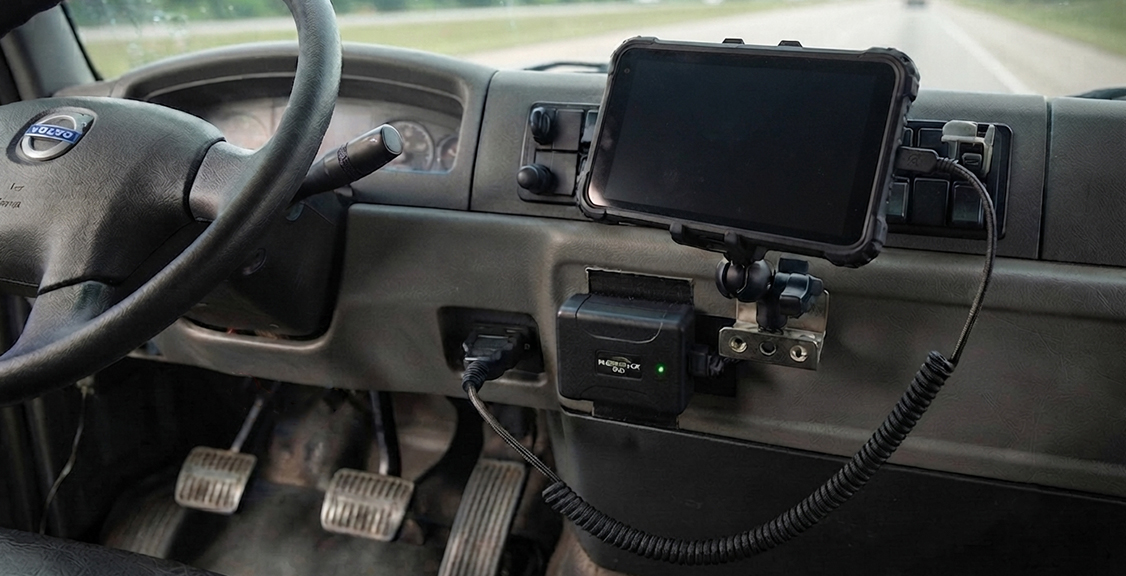
Now that you know the three port types, the next step is checking what’s actually on your truck or trucks. The fastest way is to look at the manufacture year and check under the dash near the steering column, where the diagnostic connector is almost always mounted. A 9-pin round connector means J1939. A 6-pin connector means J1708. A rectangular 16-pin connector means the OBD plug.
If you can’t tell by looking, your owner’s manual will list the diagnostic connector type, and most dealership service departments can confirm it in a few minutes over the phone. For mixed fleets, it helps to build a simple list of vehicle year, make, and port type before reaching out to any ELD provider, since that one piece of information speeds up the entire ordering process.
Volvo and Mack trucks are a common exception worth flagging separately. Some models use a 16-pin J1962 connector that looks like the OBD plug but actually carries J1939 data, which means they need a specific adapter cable rather than a standard OBD cable. If you run Volvo or Mack equipment, mention that directly when confirming hardware compatibility with your provider.
What Happens If the ELD Loses Connection to the Engine?
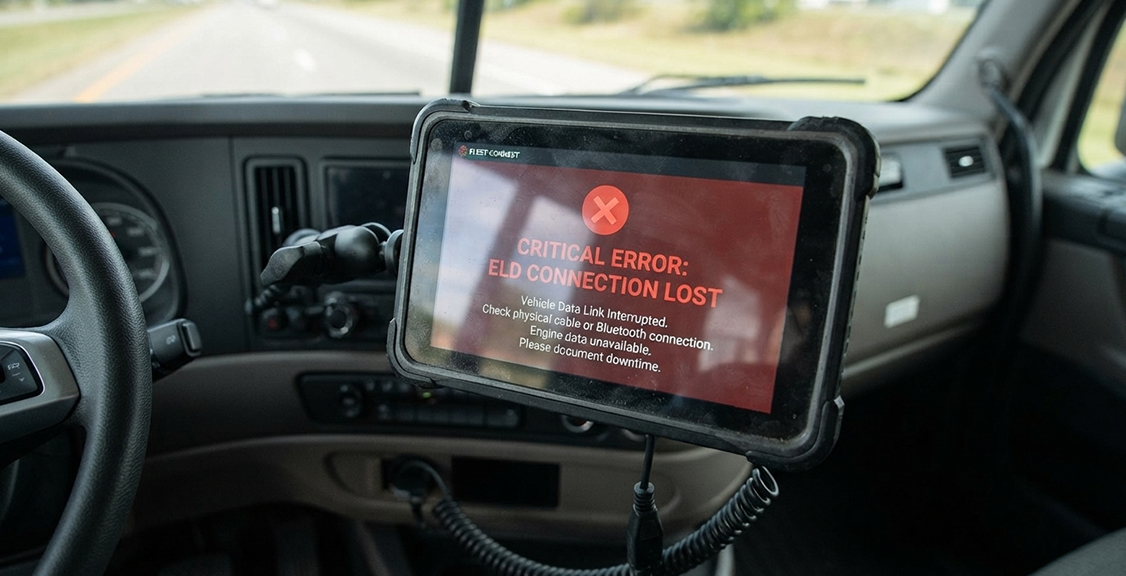
Once your ELD is installed and connected, staying connected matters just as much as the initial setup. If the ELD’s link to the engine control module drops for more than 30 minutes total within a 24-hour period, the device is required to record an engine synchronization malfunction, and that’s a compliance event you have to document, not just fix quietly. This rule applies whether the connection runs over a hardwired cable or Bluetooth.
A loose cable, a damaged port, or a Bluetooth pairing issue can all trigger this. When it happens, the driver has to note it and switch to manual data entry until the connection is restored, and the carrier has a set window to get the ELD repaired or replaced under 49 CFR 395.34. Our article on how ELDs support safer driving goes deeper into how consistent engine data ties into overall fleet safety, not just paperwork. If you need to know exactly how long you can run on paper before it becomes a bigger problem, our guide on paper log transition rules covers those deadlines in detail.
Connection problems tend to show up more in older trucks with worn J1708 ports or aftermarket wiring that wasn’t installed cleanly. If you’ve had recurring drops, it’s worth having a technician check the physical connector before assuming the ELD hardware itself is at fault.
How Do We Handle These Connections?
With all three port types covered, the last piece is knowing what we actually support. We build our hardware to plug into whichever diagnostic port your truck has, so whether you’re running one truck or a mixed fleet of older and newer equipment, you’re not stuck juggling separate providers for separate vehicle classes. That covers the range most drivers and fleets actually run: highway tractors on the newer 9-pin connector, legacy equipment on the older 6-pin protocol, and medium-duty trucks on the OBD plug.
Our tablet is also built to handle daily trucking conditions, not just office use, with an IP54 weatherproof rating and a design rated for extreme temperatures. That matters if you park overnight in extreme heat or run routes through dusty conditions, since a consumer-grade tablet tends to wear out faster in those settings. We back it with a 30-day money-back guarantee and 24-hour, 7-day technical support, so if something feels off with the connection, there’s someone to call, day or night.
If you already looked at what we offer, the next step is just letting us know what ports your trucks use. From there, we can match hardware to your fleet in just a few minutes on the phone.
Port Comparison Table
Here’s how the required display and transfer options compare, so you know which one fits a given situation at roadside.
| Feature | J1939 | J1708 | OBD Plug |
|---|---|---|---|
| Pin count | 9-pin | 6-pin | 16-pin |
| Typical vehicle age | 2000 and newer | Before 2000 | Medium-duty, varies |
| Network type | CAN bus | Serial (RS-485) | CAN bus (newer models) |
| Common vehicle class | Class 7 and 8 | Legacy heavy-duty | 10,001 to 26,000 lb |
| Connector shape | Round Deutsch-style | Round Deutsch-style | Rectangular |
| Data speed | Fast | Slower | Fast |
| Volvo/Mack note | Standard fit | Rare on these brands | 16-pin variant may carry J1939 data |
Questions Before You Buy
These questions are specific to the engine connection itself. If you’re weighing the bigger purchase decision, our full ELD buyer’s guide covers contract terms, pricing, and driver experience in more detail.
Does the ELD support the exact port my truck or trucks use?
Get J1939, J1708, or OBD plug support confirmed in writing before you order, not just verbally. Ask specifically about older engines if any part of your fleet was built before 2000.
What happens if I have mixed vehicle classes?
Some providers sell interchangeable cables, others require separate hardware for heavy-duty and medium-duty vehicles. Ask whether one account can manage both types of connections.
Is the device on the FMCSA-registered list right now?
Devices get removed from the FMCSA-registered ELD list throughout the year, most recently 10 devices on July 9, 2026. Check the list yourself rather than taking a sales rep’s word for it.
What’s the process if the engine connection drops?
Ask how the device handles engine synchronization malfunctions and how fast you’ll be notified if one occurs. A slow notification process turns a fixable problem into a compliance risk.
Does the provider offer support if installation gets complicated?
Volvo and Mack adapters, older J1708 trucks, and mixed fleets all add complexity, and it helps to know what kind of installation support is available through Support before you buy.
How does the ELD document engine data at the roadside?
Ask how the device presents engine connection status to a DOT officer, since inspectors may ask about malfunction history. Our ELD and DVIR integration guide explains how engine data ties into vehicle inspection records more broadly.
What if my truck has an unusual or custom diagnostic setup?
Older specialty vehicles, retrofitted engines, or non-standard wiring can complicate a standard install. Ask for a straight answer about whether your specific setup has been tested, not just whether the protocol is supported in general.
Ready to compare pricing once you know your port type? Run the numbers through the price calculator for a breakdown matched to your fleet.
Common Questions
With the buying questions covered, here are the shorter questions drivers and fleet managers ask most often about how ELDs connect.
About ELDs and Engine Connections
Do all ELDs work with all three ports?
No. Some devices only support J1939, and you need to confirm J1708 or OBD plug compatibility separately if your fleet needs it. Always check the specific model, not just the brand.
Can I use one ELD account across trucks with different ports?
Yes, as long as your provider supports interchangeable cables or offers separate hardware for each port type under the same account. Confirm this before ordering for a mixed fleet.
What port do most new trucks use in 2026?
Most Class 7 and 8 trucks built in recent years use the 9-pin J1939 port. Lighter commercial vehicles more often use the OBD plug.
Does a bad connection mean my ELD isn’t compliant?
Not immediately, but an unresolved engine synchronization malfunction becomes a compliance problem if it isn’t documented and fixed within the required window under 49 CFR 395.34.
Can I install the diagnostic cable myself?
Many drivers plug in the cable themselves since it’s designed for that, but Volvo and Mack adapter setups or older J1708 trucks sometimes benefit from a technician’s help to confirm the right connector.
About Choosing the Right Connection Setup
Can a J1939 device be adapted to work on a truck with an OBD plug?
Sometimes, with the right adapter cable, but not every adapter holds up to daily use. Confirm with your provider whether they support and warranty adapter cables, or whether they recommend port-specific hardware instead.
How do I know if a provider’s hardware fits my truck before I buy?
Ask for the exact port type supported and confirm your truck’s diagnostic connector matches. A reliable provider will ask about your fleet’s vehicle years before recommending hardware.
Does hardware for the OBD plug cost more than J1939 hardware?
Pricing varies by provider more than by port type. Ask for a full breakdown by vehicle class rather than assuming one connector type costs more.
Can I switch ELD providers without changing my diagnostic cables?
Sometimes, but cable compatibility depends on both the old and new provider’s hardware design. Confirm with the new provider before assuming your existing cables will work.
Does connector type affect how fast data transfers at a roadside stop?
No. Data transfer speed at inspection depends on the transfer method, web services, email, USB, or Bluetooth, not on whether your truck uses J1939, J1708, or the OBD plug. All three port types support compliant data transfer once connected.
Conclusion
Getting the right ELD hardware starts with knowing what port your truck actually has. J1939 covers most modern heavy-duty trucks, J1708 still shows up on older equipment, and the OBD plug handles the medium-duty range. Mixing this up during ordering is one of the most avoidable delays in the whole compliance process, whether you’re one driver or managing twenty trucks.
Enforcement in 2026 isn’t getting any looser. FMCSA pulled 10 more non-compliant devices from its registered list on July 9, 2026, adding to the 79 removed since January 2025, and an ELD that can’t hold a steady connection to the engine risks logging a malfunction you then have to explain at roadside. Knowing your port type, confirming your provider supports it, and understanding what happens if the connection drops puts you ahead of most drivers and fleets that get caught off guard.
Ready to match hardware to your truck or fleet? Send us a note through the contact form on our site, or call (800) 261-4361 and we’ll walk through your setup together.