Key Takeaways
- An ELD must be integrally synchronized with the commercial vehicle’s engine, but FMCSA does not require one particular physical connector or a direct wired connection.
- The ELD must automatically obtain engine power status, vehicle motion status, vehicle miles, and engine hours through a compatible vehicle interface.
- J1939 and J1708 describe vehicle data communications; the familiar 9-pin, 6-pin, and 16-pin shapes are connectors. Connector shape alone does not prove which protocol is available.
- A 9-pin connector is common on many heavy-duty vehicles, a 6-pin connector is common on older heavy-duty vehicles, and a 16-pin J1962 connector is common on lighter vehicles, but model-specific exceptions are normal.
- The pre-2000 ELD exception depends on the vehicle or engine model year under current FMCSA guidance, not simply on whether a truck has a J1708 connection.
- An engine synchronization malfunction occurs when connectivity to any required engine data source is lost for more than 30 cumulative minutes during a 24-hour period across all driver profiles.
- The driver must report a qualifying malfunction within 24 hours, and the carrier generally has 8 days to repair, service, or replace the ELD under 49 CFR 395.34.
- Before buying hardware, confirm the exact vehicle year, make, model, engine, connector, supported protocol, cable part number, and device registration on the FMCSA ELD list.
Introduction
An ELD needs reliable access to required engine data so it can automatically record when the engine is powered, when the vehicle is moving, how many miles it travels, and its engine hours. That access may use a cable, a vehicle data adapter, a supported wireless link, or a combination of those components.
J1939, J1708, and OBD-II are often discussed as if they were three interchangeable plugs. They are not. J1939 and J1708 are communication standards, while 9-pin, 6-pin, and 16-pin describe common connector formats. A connector that physically fits still may not expose the protocol or data the ELD expects.
For one truck, the practical question is whether the provider has tested the exact year, make, model, engine, connector, and cable. For a mixed fleet, record those details for every vehicle before ordering hardware. That prevents a visually similar connector from turning into an installation delay.
This guide explains the common interfaces, how to identify them accurately, and what FMCSA requires when engine synchronization is interrupted. For model-specific help, call (800) 261-4361.
Engine Connection Basics
FMCSA’s ELD technical standard in Appendix A requires integral synchronization with the commercial vehicle’s engine. The ELD must automatically obtain engine power status, vehicle motion status, vehicle miles, and engine hours.
Integral synchronization does not require one universal plug or a direct physical cable from the display to the engine control module. A typical installation uses a vehicle interface module connected to the diagnostic network and a tablet or phone used as the driver display. The interface and display may communicate through Bluetooth or a cable, provided the complete registered ELD meets the technical standard.
That distinction matters when shopping for an ELD. The tablet is not the engine interface by itself, and a connector adapter does not automatically translate one vehicle protocol into another. The provider must support the vehicle’s data network, connector, cable, and ELD configuration.
For a closer look at how engine information becomes usable fleet data, see our ELD data management guide.
What Are J1939 and the 9-Pin Connector?
SAE J1939 is a family of standards used for communication across vehicle networks, commonly over a CAN bus. Many heavy-duty commercial vehicles expose J1939 data through a round 9-pin diagnostic connector, but J1939 is the data network, not the connector itself.
Nine-pin connectors also have different keying, pin assignments, and network-speed support. Black and green connectors are useful visual clues, but they are not a substitute for checking the vehicle documentation and the ELD provider’s approved cable list.
Do not choose hardware from vehicle class or model year alone. Confirm the exact truck and engine configuration, especially when the vehicle has been repowered, modified, or fitted with an aftermarket diagnostic harness.
What Are J1708/J1587 and the 6-Pin Connector?
SAE J1708 is an older serial vehicle-network standard, commonly used with J1587 messaging. It is frequently associated with the round 6-pin diagnostic connector found on older heavy-duty vehicles, although the connector shape and the protocol should still be verified separately.
A working J1708/J1587 interface does not create an ELD exemption. FMCSA’s pre-2000 exception is based on the vehicle or engine model year under current guidance. A vehicle that does not qualify for that exception still needs a compliant ELD when the driver is otherwise subject to the mandate, even if the truck uses an older data network.
Not every ELD supports J1708/J1587. Confirm that the specific registered device, vehicle interface, and cable are approved for the truck rather than relying on a general claim that the provider supports older vehicles.
What Is the OBD Plug and Which Trucks Use It?
A 16-pin J1962-style connector is commonly called the OBD-II or OBD plug. It is familiar from passenger vehicles and is also used on many light- and medium-duty commercial vehicles.
The physical shape does not tell you every protocol available at the connector. Depending on the vehicle, a 16-pin connector may carry OBD-II data, CAN data, manufacturer-specific information, or heavy-duty data through a model-specific implementation. That is why a generic 16-pin adapter may fit physically but still fail to deliver the required engine information to the ELD.
This interface is common in box trucks, vans, pickups, and other lighter commercial vehicles, but weight class alone does not identify the connector. Confirm the vehicle configuration and ELD requirement separately. Our box truck ELD guide explains when those vehicles may need electronic logs.
Geosavi offers vehicle cables for J1939, J1708, and OBD connections, but compatibility should be confirmed for the specific vehicle before hardware ships.
How Do You Know Which Port Your Truck Has?
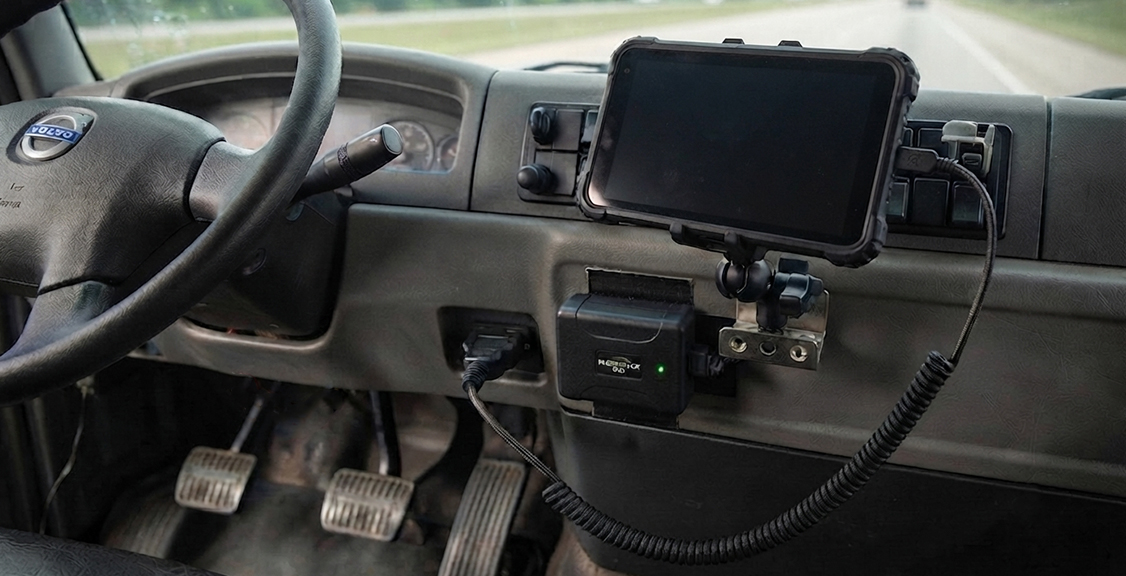
Start with the year, make, model, engine, and VIN, then inspect the diagnostic connector and compare it with the owner’s manual or service information. Record the connector shape, color or keying, and location, but do not use appearance as the only compatibility test.
A round 9-pin connector often indicates a J1939-capable heavy-duty interface. A round 6-pin connector often indicates an older J1708/J1587 installation. A rectangular 16-pin connector often indicates a J1962-style interface. Each description is a clue, not a guarantee.
Some vehicle models use a 16-pin connector while carrying data that requires a model-specific heavy-duty adapter. Repowered vehicles, glider kits, specialty equipment, and aftermarket wiring can also differ from the normal setup for their model year.
Before ordering, send the provider the vehicle details and, when requested, a clear photo of the connector. Ask for the supported interface and cable part number in writing.
What Happens If the ELD Loses Connection to the Engine?
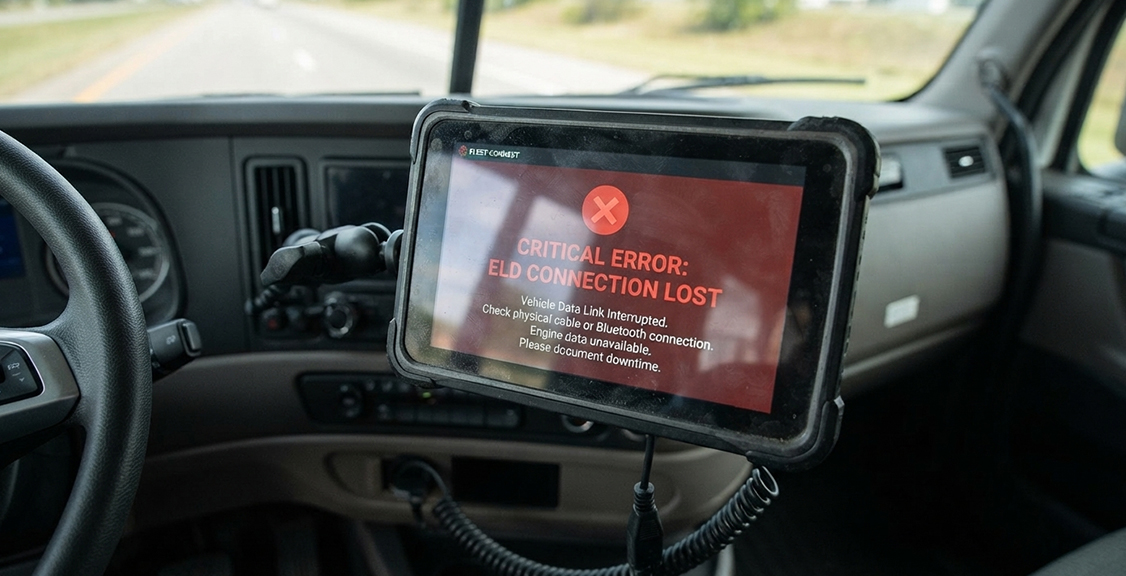
An ELD first records an engine synchronization data diagnostic event when it cannot acquire updated values from a required engine data source within the technical standard’s timing requirement. If connectivity to any required source is lost for more than 30 cumulative minutes during a 24-hour period across all driver profiles, the ELD must record an engine synchronization compliance malfunction.
The response depends on whether the malfunction prevents accurate HOS recording or presentation. The driver must notify the carrier in writing within 24 hours when the malfunction does not resolve automatically. If required records cannot be retrieved, the driver must reconstruct the current 24-hour period and the previous 7 consecutive days. Paper logs or another compliant method are required while the malfunction prevents accurate HOS recording.
The carrier generally must repair, service, or replace the malfunctioning ELD within 8 days of discovering the condition or receiving the driver’s notice, whichever occurs first. FMCSA’s malfunction guidance explains the procedure and the limited extension process.
Check the cable seating, connector condition, power, adapter, and vehicle wiring before assuming the display or ELD software is defective. Repeated disconnects should be diagnosed using the provider’s instructions or a qualified technician.
How Do We Handle These Connections?
Geosavi’s published hardware options include cables for J1939, J1708, and OBD connections, allowing one fleet account to cover different vehicle interfaces when the correct hardware is selected for each truck.
The Geosavi hardware page also lists a Bluetooth-connected ELD, an IP54 rugged tablet designed for extreme temperatures, a 30-day money-back guarantee, and 24-hour technical support. Those product features do not replace the need for a compatibility check: the exact vehicle interface, cable, and registered ELD configuration still need to match.
Build a fleet connection inventory before ordering. For each vehicle, list the year, make, model, engine, VIN, connector type, current cable, and any non-standard wiring. That gives support enough information to recommend the correct setup and reduces avoidable installation returns.
Port Comparison Table
The terms below describe common configurations, not universal rules. Vehicle documentation and the provider’s approved compatibility list control.
| Feature | J1939 | J1708/J1587 | 16-Pin OBD/J1962 |
|---|---|---|---|
| What the term describes | Vehicle communication standards | Serial network and messaging standards | A connector format commonly used for onboard diagnostics |
| Common connector | Round 9-pin Deutsch-style | Round 6-pin Deutsch-style | Rectangular 16-pin J1962-style |
| Typical vehicle use | Many newer heavy-duty vehicles | Many older heavy-duty vehicles | Many light- and medium-duty vehicles; some model-specific heavy-duty uses |
| Network | Commonly CAN-based | Serial | Varies by vehicle; CAN is common on newer vehicles |
| What to verify | Connector keying, network support, cable, vehicle and engine | Protocol support, cable, vehicle and engine | Available protocol, pinout, adapter, vehicle and engine |
Questions Before You Buy
These questions focus on the vehicle interface. Our full ELD buyer’s guide covers contracts, pricing, support, and driver experience.
Does the ELD support my exact vehicle configuration?
Get compatibility confirmed for the year, make, model, engine, connector, protocol, and cable part number. A general claim of J1939, J1708, or OBD support is not enough for every vehicle.
What happens if I have mixed vehicle classes?
Ask whether the provider supplies different approved cables or vehicle-interface hardware under one fleet account and how equipment is assigned to each vehicle.
Is the exact ELD model currently registered?
Check the device on the FMCSA registered and revoked ELD lists. Registration status can change, so verify the exact device name and model rather than relying on a past purchase.
What happens if the engine data connection drops?
Ask how the device displays engine synchronization diagnostics and malfunctions, how the driver notifies the carrier, and how support tracks the 8-day repair deadline when 49 CFR 395.34 applies.
What installation support is available?
Ask what information or connector photos support needs, whether model-specific adapters are available, and when a qualified technician is recommended. Geosavi installation help is available through Support.
How does the ELD show engine-data problems at roadside?
The display and output file can identify malfunction and diagnostic events. Drivers should know where those indicators appear and how to present required records when a malfunction affects the logs.
What if the vehicle has a custom or unusual setup?
Repowered vehicles, specialty equipment, glider kits, and aftermarket wiring need a model-specific review. Ask whether that configuration has been tested before ordering.
Ready to compare pricing after confirming compatibility? Use the price calculator for a fleet estimate.
ELD Engine Connection FAQs
About ELDs and Engine Connections
Do all ELDs work with J1939, J1708, and OBD connections?
No. Compatibility depends on the registered ELD, vehicle interface, supported protocol, cable, and vehicle configuration. Confirm the exact model rather than only the provider brand.
Can I use one ELD account across trucks with different connections?
Often, if the provider supports the required vehicle interfaces and cables under the same fleet account. Each truck still needs the correct hardware assigned to it.
What connector do many newer heavy-duty trucks use?
Many use a round 9-pin connector with J1939 data, but the vehicle documentation and provider compatibility list should determine the cable.
Does a dropped engine connection immediately make the ELD noncompliant?
Not automatically. The ELD records a diagnostic event when required engine data is unavailable and an engine synchronization malfunction after more than 30 cumulative minutes of lost connectivity in 24 hours. The driver and carrier must then follow the applicable malfunction procedures.
Can I install the diagnostic cable myself?
Follow the ELD provider and vehicle manufacturer’s instructions. A straightforward approved cable may be user-installable, but damaged connectors, non-standard wiring, or model-specific adapters may require a qualified technician.
About Choosing the Right Connection Setup
Can a J1939 ELD be adapted to a truck with a 16-pin connector?
Sometimes, but a plug adapter alone does not guarantee protocol compatibility. Use only a provider-approved interface and cable confirmed for the specific vehicle.
How do I confirm the hardware fits before buying?
Provide the year, make, model, engine, VIN, connector details, and any modifications. Ask the provider to identify the supported interface and cable part number in writing.
Does OBD connection hardware always cost more than J1939 hardware?
No. Pricing depends on the provider, interface module, cable, and vehicle requirements. Compare the complete installed setup rather than the connector name.
Can I switch providers without changing diagnostic cables?
Sometimes, but cables and vehicle-interface modules are often provider- or device-specific. Confirm compatibility before reusing any existing hardware.
Does the engine connector determine roadside data-transfer speed?
No. The engine interface supplies vehicle data to the ELD. Roadside transfer uses the ELD’s supported web services, email, USB, or Bluetooth method and is a separate function.
Conclusion
The right ELD connection starts with the vehicle, not a connector label. J1939 and J1708 are communication standards, while 9-pin, 6-pin, and 16-pin describe common connector formats. The provider must support the complete combination of vehicle, engine, protocol, interface, cable, and registered ELD.
If required engine data is interrupted, treat the diagnostic or malfunction according to its actual effect on HOS recording. Drivers must report qualifying malfunctions within 24 hours, carriers generally have 8 days to correct them, and paper or another compliant recording method is required when accurate HOS records cannot be maintained electronically.
Before ordering, inventory the fleet and confirm compatibility in writing. To match Geosavi hardware to a truck or mixed fleet, use the contact form or call (800) 261-4361.