Key Takeaways:
- A complete GPS tracking system needs a suitable tracking device, positioning data, a way to transmit that data, and software that turns it into useful maps, alerts, and reports.
- Choose a vehicle, asset, or personal tracker based on power source, installation method, coverage, reporting frequency, durability, and the features you actually need.
- Many connected trackers use cellular service, so hardware price is only part of the cost; data plans, installation, maintenance, and support also matter.
- GPS accuracy varies with signal blockage, satellite geometry, atmospheric conditions, and receiver quality. Test the device in its real operating environment.
- Fleet managers may use GPS data for routing and operational analysis, but ordinary GPS tracking is not a substitute for a compliant ELD when federal Hours of Service rules require one.
What Do You Need for GPS Tracking?
At a minimum, GPS tracking requires a device that can determine its location, a power source, a way to send or store location data, and software that lets you view and use that information. Connected systems commonly transmit data over a cellular network, while some specialized devices use satellite or other communications.
The right setup depends on what you need to track. A fleet vehicle may use a hardwired or OBD-II device with frequent reporting and vehicle data. A trailer or piece of equipment may need a weather-resistant, battery-powered tracker with a longer reporting interval. Personal tracking requires additional attention to consent, privacy, battery life, and emergency features.
GPS does not provide the same accuracy in every setting. Buildings, trees, indoor use, satellite geometry, atmospheric conditions, and receiver quality can affect performance. The official GPS.gov accuracy guidance explains why field results can vary, so test any system in the places where it will actually operate.
Essential Components of a GPS Tracking System
A useful GPS tracking system combines compatible hardware, connectivity, power, and software. Evaluate them together: a durable device is not useful if it cannot connect in your service area, and frequent updates can shorten battery life or increase data use.

GPS Tracking Devices
GPS tracking devices are the core of any GPS tracking system. They come in various forms. Each form serves a specific purpose.
Vehicle Tracking Devices
These devices are designed to be installed in vehicles. They provide real-time location data, speed, and other information. They are commonly used by businesses to manage fleets of vehicles. They are also used by individuals to track personal vehicles. Some vehicle tracking devices offer additional features. These features include driver behavior monitoring and engine diagnostics.
Asset Tracking Devices
These devices are designed to be attached to valuable assets. These assets include equipment, tools, and cargo. They provide location data and other information, such as temperature and humidity. This helps businesses track their assets. It also helps prevent theft and loss. Asset tracking devices come in various form factors. These form factors include small, portable devices and ruggedized devices for harsh environments.
Personal Tracking Devices
These devices are designed to be worn or carried by individuals. They provide location data and other information, such as SOS alerts and activity tracking. They are commonly used to track children, elderly relatives, or pets. Some personal tracking devices also offer features like two-way communication and geofencing.
The choice of GPS tracking device depends on the specific needs and requirements of the user. Consider the type of object or person you need to track, the desired features, and the budget.
GPS Tracking Software
GPS tracking software is an essential component of any GPS tracking system. It receives location data from GPS tracking devices. It processes and displays this data in a user-friendly format. GPS tracking software offers a range of features and functionalities. These features and functionalities include:
Real-time Tracking – View the location of your tracked objects in real-time on a map.
Historical Tracking – Review past location data to see where your tracked objects have been.
Geofencing – Create virtual boundaries and receive alerts when a tracked object enters or exits a designated area.
Reporting – Generate reports on location data, including mileage, speed, and stops.
Alerts – Receive alerts for various events, such as speeding, low battery, or unauthorized movement.
GPS tracking software can be accessed through a web browser or a mobile app. Choose software that is user-friendly and offers the features you need. Some GPS tracking software providers offer different subscription plans. These plans vary in terms of features and price.
Cellular Connectivity
Cellular connectivity is essential for transmitting location data from the GPS tracking device to the GPS tracking software. Most GPS tracking devices use cellular networks to transmit data. This is similar to how mobile phones work. The GPS tracking device sends location data to a server over the cellular network. The server then processes the data. It makes it available to the user through the GPS tracking software.
The quality of cellular connectivity can affect the performance of the GPS tracking system. Choose a GPS tracking device with a reliable cellular connection. Consider the coverage area of the cellular network. Some GPS tracking devices use multiple cellular networks. This improves coverage and reliability.
Power Source
GPS tracking devices require a power source to operate. There are two main types of power sources for GPS tracking devices:
Battery-Powered
Battery-powered devices have a built-in battery. This battery provides power for a certain period of time. The battery life depends on the device and its usage. Battery-powered devices are typically used for tracking assets or personal tracking. They offer flexibility and portability.
Wired
Wired devices are connected to the vehicle’s power system. This provides a continuous power source. Wired devices are typically used for vehicle tracking. They offer a more permanent and reliable solution.
The choice of power source depends on the specific needs and requirements of the user. Consider the type of object or person you need to track, the desired features, and the installation environment.
Understanding the essential components of a GPS tracking system is important for choosing the right solution for your needs. Consider the different types of GPS tracking devices, software options, cellular connectivity, and power sources.
Carefully evaluating these components can help you implement an effective GPS tracking solution. This solution will satisfy your specific requirements and provide valuable location data.
Setting Up Your GPS Tracking System
Setting up a GPS tracking system can seem daunting for beginners. However, the process is often straightforward. You can have your GPS tracking system up and running in no time by following a few simple steps. This section provides guidance on how to set up a GPS tracking system, including choosing the right device, installation, software configuration, and testing.
Choosing the Right Device
The first step in setting up your GPS tracking system is choosing the right device. Consider your GPS tracking requirements and choose a device that satisfies those needs.
Tracking Needs – What do you need to track? Vehicles, assets, or people? The type of object you need to track will determine the type of device you need.
Budget – GPS tracking devices vary in price. Set a budget before you start shopping. This will help you narrow down your options.
Technical Expertise – Some devices are more complex to install and configure than others. Choose a device that matches your technical expertise. If you are a beginner, look for a device that is easy to set up and use.
Features – GPS tracking devices offer a variety of features. These features include real-time tracking, geofencing, and driver behavior monitoring. Choose a device with the features you need.
If you are unsure which device is right for you, consult with a GPS tracking expert. They can help you choose a device that fulfills your particular aims and budget.
Installation Process
The installation process for GPS tracking devices varies depending on the type of device.
Vehicle Tracking Devices – Vehicle tracking devices are typically installed in the vehicle’s OBD-II port or hardwired to the vehicle’s electrical system. The OBD-II port is a standard connector found in most vehicles. Hardwiring the device provides a more permanent and reliable solution.
Asset Tracking Devices – Asset tracking devices are typically attached to the asset using screws, magnets, or adhesive. Choose an installation method that is appropriate for the type of asset you are tracking.
Personal Tracking Devices – Personal tracking devices are typically worn or carried by the individual. Some devices are designed to be worn as a wristwatch or pendant. Others are small and portable, and can be carried in a pocket or backpack.
If you are not comfortable installing the device yourself, you can have it professionally installed. Many GPS tracking companies offer installation services.
Software Configuration
Once you have installed the GPS tracking device, you need to configure the GPS tracking software.
Account Creation – Create an account with the GPS tracking software provider. This will allow you to access the software and view your tracking data.
Device Registration – Register your GPS tracking device with the software. This will link the device to your account.
Basic Settings Configuration – Configure the basic settings of the software. This may include setting up geofences, alerts, and reporting preferences.
The specific steps for configuring the software vary depending on the provider. Consult the software documentation for detailed instructions.
Testing and Troubleshooting
After you have configured the software, test your GPS tracking system to guarantee it is working correctly.
Device Functionality – Verify that the device is transmitting location data. You can do this by checking the software to see if the device’s location is being updated.
Software Features – Test the software features, such as geofencing and alerts, to make sure they are working as expected.
Connectivity – Check the cellular connectivity of the device. Make sure it has a strong signal.
If you encounter any problems, consult the troubleshooting section of the software documentation. You can also contact the GPS tracking provider for assistance.
You can successfully set up your GPS tracking system and start tracking your vehicles, assets, or people. Remember, the specific GPS tracking requirements for vehicles may vary depending on the type of vehicle and its intended use. Always choose a GPS tracking system that accommodates your certain expectation and provides the features and functionality you require.
GPS Tracking Costs and Considerations
GPS tracking costs extend beyond the device itself. Compare the hardware, service plan, installation, accessories, maintenance, contract terms, and support as one total cost of ownership.

Device Costs
GPS tracking devices vary in price depending on several factors. These factors include:
Features – GPS tracking devices with more advanced features, such as real-time tracking, geofencing, and driver behavior monitoring, typically cost more than basic devices.
Durability – Devices built for harsh environments or heavy-duty use cost more than those made for standard applications. Greater durability and advanced features increase the price.
Brand Reputation – Well-known brands often charge higher prices for GPS tracking devices. These options deliver better quality, enhanced reliability, and superior customer support.
Device prices vary widely by connectivity, durability, sensors, installation type, and reporting capability. When comparing GPS tracking devices, choose the simplest hardware that reliably meets your operating requirements rather than relying on price alone.
Subscription Fees
Most GPS tracking systems require a subscription to access the software and cellular data services. Subscription fees vary depending on the provider and the features included in the plan.
Basic plans typically include real-time tracking, historical tracking, and geofencing. Premium plans may include additional features, such as driver behavior monitoring, vehicle diagnostics, and custom reporting.
Ask whether service is billed per device, how often location data is reported, how much history is retained, which alerts and reports are included, and whether activation, cancellation, or overage fees apply. Review current GPS tracking pricing against your reporting and support needs.
Installation Costs
The installation costs for GPS tracking devices vary depending on the complexity of the installation and whether you choose to do it yourself or hire a professional.
DIY Installation
If you are comfortable installing the device yourself, you can save on installation costs. Many GPS tracking devices come with detailed instructions and online tutorials to guide you through the process.
Professional Installation
Professional installation may be appropriate for hardwired devices, concealed installations, specialty equipment, or larger fleet rollouts. Request a quote based on the vehicle, device, installation location, and any required accessories.
Consider your technical expertise and the complexity of the installation when deciding whether to install the device yourself or hire a professional.
Maintenance and Support
GPS tracking systems require ongoing maintenance and support. This may include:
Battery Replacement – Battery-powered devices require periodic battery replacement. The frequency of battery replacement depends on the device and its usage.
Software Updates – GPS tracking software may require periodic updates to make sure there is optimal performance and security.
Technical Support – You may need to contact technical support for assistance with troubleshooting or configuration issues.
The costs of maintenance and support vary depending on the provider and the complexity of the system. Some providers offer free technical support and software updates. Others charge a fee for these services.
When choosing a GPS tracking system, consider the potential maintenance and support costs. Choose a provider that offers reliable and affordable support.
You can make informed decisions about your GPS tracking investment by understanding the various GPS tracking costs and considerations. Choose a system that addresses your expectations and budget.
Consider the device costs, subscription fees, installation costs, and maintenance and support requirements. You can implement a cost-effective and valuable GPS tracking solution by carefully evaluating these factors.
Advanced GPS Tracking Features and Applications
GPS tracking systems offer a range of advanced features and applications that go beyond basic location tracking. These features can provide valuable insights and benefits for both personal and business use. This section explores some of the advanced features and applications of GPS tracking, including real-time tracking, geofencing, data logging and reporting, and telematics and fleet management.
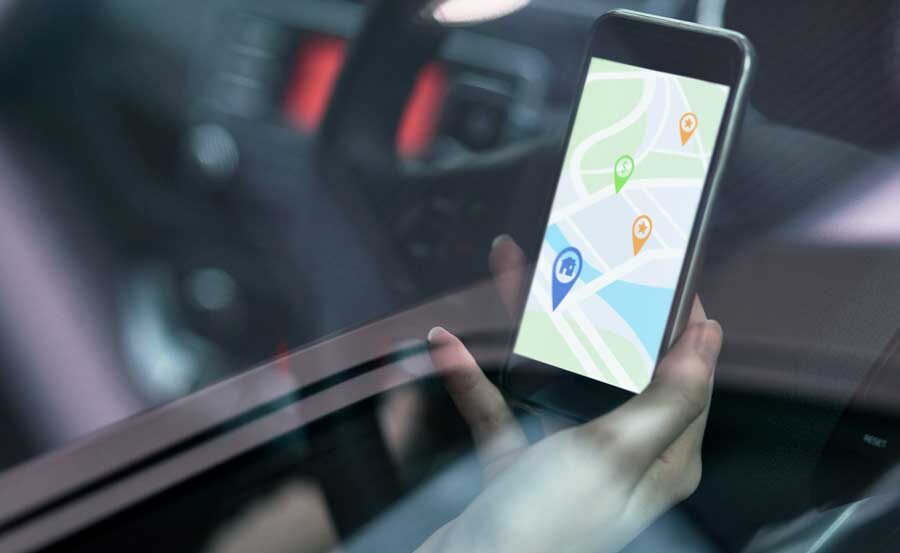
Real-time Tracking
Real-time tracking is a key feature of many GPS tracking systems. It allows users to monitor the location of their tracked objects in real-time. This means that you can see the exact location of your vehicle, asset, or person on a map, as it is happening. Real-time tracking has many benefits for both personal and business use.
Personal Use
Real-time tracking can provide peace of mind for parents who want to know the location of their children or elderly relatives. It can also be used to track the location of pets or valuable belongings.
Business Use
Real-time tracking is essential for businesses that need to monitor the location of their vehicles or assets. This can help improve efficiency, optimize routes, and prevent theft or loss.
Real-time tracking is a powerful tool that can provide valuable insights and benefits for a variety of users.
Geofencing
Geofencing is a feature that allows users to create virtual boundaries around a specific area. When a tracked object enters or exits the geofenced area, the system sends an alert to the user. This feature has many practical applications.
Security
Creating alerts for unauthorized entry or exit strengthens security. Businesses protect assets, and individuals monitor property with this effective technology.
Efficiency
Setting up alerts for arrivals and departures improves efficiency. Businesses use this technology to track deliveries and oversee employee activity.
Personal Use
Geofencing can be used for personal purposes, such as receiving alerts when a child arrives at school or leaves a designated safe zone.
Data Logging and Reporting
GPS tracking systems log data on the location, speed, and other metrics of tracked objects. This data can be used for historical analysis and reporting. Data logging and reporting provide valuable insights into past movements and trends.
Route Optimization – Analyze historical location data to identify inefficient routes or patterns and optimize delivery schedules or travel plans.
Performance Monitoring – Track the performance of vehicles or assets over time, identifying areas for improvement or potential maintenance needs.
Policy and compliance support – Use location and activity reports to support internal policies and operational reviews. For federally regulated Hours of Service records, standard GPS reports do not replace a compliant electronic logging device when an ELD is required. FMCSA explains that an ELD synchronizes with the vehicle engine to record driving time and records of duty status. See FMCSA’s ELD guidance.
Data logging and reporting can help businesses and individuals make more informed decisions based on historical location data.
Telematics and Fleet Management
Telematics is a broader term that encompasses GPS tracking and other technologies, such as vehicle diagnostics and driver behavior monitoring. Telematics is often used in fleet management applications to monitor and manage vehicles and drivers.
Driver Behavior Monitoring – Track driver behavior, such as speeding, harsh braking, and excessive idling, to identify areas for improvement and reduce risks.
Vehicle Diagnostics – Monitor the health and performance of vehicles, receiving alerts for potential maintenance needs or mechanical issues.
Fuel Management – Track fuel consumption and identify areas for improvement, such as optimizing routes or reducing idling time.
Telematics provides valuable insights into fleet operations, helping businesses improve efficiency, safety, and productivity.
The advanced features and applications of GPS tracking offer a range of benefits for both personal and business use. You can choose a GPS tracking system that caters to your specific goals and provides the insights you need to make informed decisions by understanding these features and applications.

GPS Tracking Requirements Checklist
Before selecting a system, confirm what you are tracking, where it operates, how often you need updates, and who will use the data. Then compare device type, installation, power, coverage, software features, data retention, alerts, reporting, privacy controls, support, and total cost.
For fleet use, also decide whether you need vehicle diagnostics, driver behavior information, maintenance data, or a separate compliant ELD workflow. Test the complete setup before deployment and document who can access the information.
Choose a GPS Tracking System with Geosavi
Geosavi helps businesses select GPS tracking devices, software, installation options, and service plans for their vehicles and assets. Explore Geosavi’s GPS tracking solutions or contact the support team to discuss coverage, features, installation, and pricing for your operation.