Key Takeaways
- Confirm that the exact ELD model still appears on FMCSA’s Registered ELDs list before installation. FMCSA can remove devices from the list when they no longer meet applicable requirements, so fleets should verify the device’s current registration status rather than relying solely on its status when it was purchased.
- ELD providers self-certify that their ELD models meet FMCSA’s technical specifications and register those models with FMCSA; FMCSA does not individually test and certify each ELD before it appears on the Registered ELDs list. Fleets should therefore verify that the exact ELD model remains on FMCSA’s current Registered ELDs list before installation.
- If the driver uses a portable ELD, it must be mounted in a fixed position during commercial motor vehicle operation and visible to the driver when seated in the normal driving position, as required by 49 CFR 395.22(g).
- After installation, the vehicle must contain the information required under 49 CFR 395.22(h), including the ELD user’s manual, required data-transfer and malfunction instruction sheets, and enough blank driver’s records-of-duty-status graph-grids to record duty status for at least eight days.
- Hours-of-service and recordkeeping violations can result in civil penalties under 49 CFR Part 386 and its applicable penalty schedule. Maximum penalty amounts vary by violation and may be adjusted for inflation, making proper ELD installation and compliance procedures important for fleets.
- CVSA’s 2026 International Roadcheck, held May 12–14, 2026, named ELD tampering, falsification, and manipulation as its driver focus area, following 58,382 falsification-of-record-of-duty-status violations recorded in 2025.
- Geosavi’s Compliance Now ELD solution supports vehicle connections designed for different truck configurations, including J1939, J1708, and OBD applications, so fleets should confirm the appropriate connection type for each vehicle before installation.
| Table of Contents |
|---|
| Registration Check |
| Hardware Compatibility |
| Driver Training Prep |
| Mounting and Placement |
| Post-Install Verification |
| Installation Comparison |
| Buyer Questions |
| Installation FAQs |
Introduction
Setting up a new ELD in every truck across a fleet is rarely as simple as unboxing hardware and plugging in a cable. Each truck has its own engine connector, its own cab layout, and often a driver who has never used that specific device before. Skip the groundwork, and the trouble usually does not show up right away. It shows up weeks later, as a cable that will not seat right, a mount that blocks part of the driver’s view, or a driver who cannot tell a malfunction warning from a routine alert.
Those small problems matter more than they look like at first. An ELD that is not working correctly can put a fleet in roughly the same spot as having no ELD at all in an inspector’s eyes. A truck can be technically equipped and still produce no usable duty status record if nobody checked the device after it went in. That gap, between owning the hardware and having a working, compliant system, is what this checklist is built to close.
This checklist walks through what to check before, during, and right after installing a new ELD: registration status, hardware fit, driver training, mounting rules, and a short verification step once everything is connected. It also compares handling installation with your own team against bringing in outside help, and covers the questions fleet managers tend to ask most before a rollout.
If you want a closer look at the hardware before ordering for your whole fleet, our ELD platform and hardware walks through what our ELD Compliance Now includes, and our support specialists are reachable at (800) 261-4361 if a question comes up along the way.
Why Does Checking FMCSA Registration Matter Before You Install a New ELD?
Confirm the exact device model still appears on the FMCSA registered ELD list before it goes into any truck, because a device that has been pulled from the list can leave your fleet non-compliant even while the hardware itself still works fine.
FMCSA periodically removes ELD models from its Registered ELDs list when the devices no longer meet applicable requirements. When FMCSA removes an ELD, the agency generally provides affected motor carriers and drivers with specific instructions and a replacement period in the removal notice. During that period, fleets should follow FMCSA’s instructions for maintaining compliant hours-of-service records and replace the removed device by the stated deadline. After the replacement deadline, continued use of the removed device does not satisfy the ELD requirement for a driver who is required to use an ELD and may result in a citation and applicable out-of-service enforcement.
Checking the list close to install day, rather than relying on the check done at the time of purchase, is the safer habit, since it closes the gap where a removal notice could slip past unnoticed between ordering hardware and putting it in a truck.
What Hardware Compatibility Should You Confirm Before Installing an ELD?
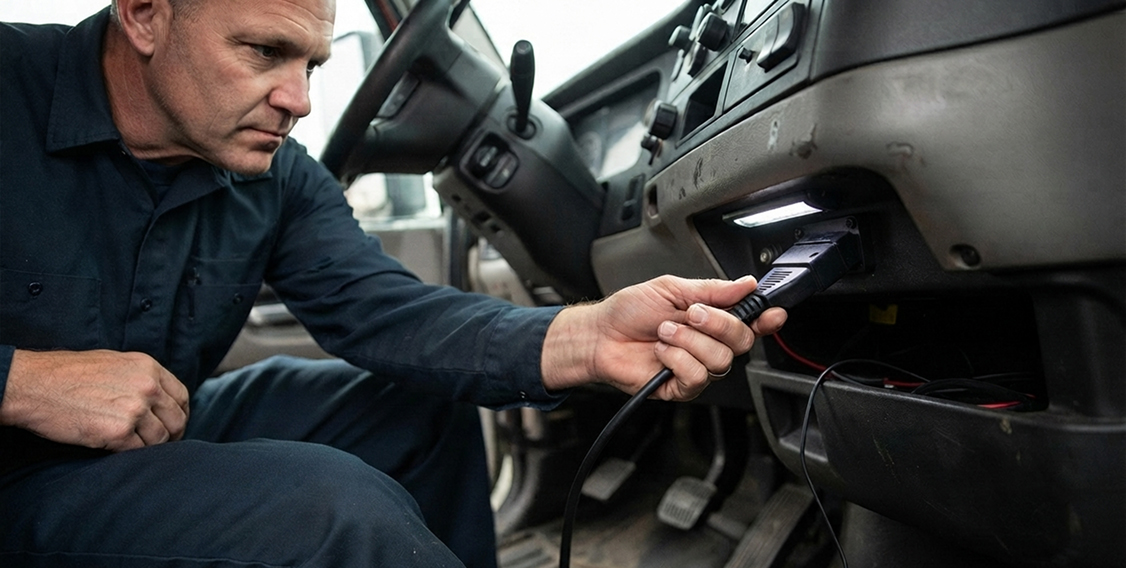
Once the device is confirmed as registered, the next thing to check is whether it actually fits the truck it is going into. Confirm the engine connector type, the available cab space, and the power source for each truck, because a mismatched cable is one of the most common reasons an install stalls.
Trucks built on different vehicle and engine platforms may require different connection types, so fleets should verify the correct cable or adapter for each vehicle before installation. Geosavi’s Compliance Now ELD solution supports vehicle connections designed for different truck configurations, including J1939, J1708, and OBD applications. Fleets should confirm compatibility for each vehicle before ordering or installing equipment rather than assuming every truck in the fleet uses the same connection. Checking connector requirements in advance can help prevent installation delays and avoid ordering incompatible hardware.
ELD providers self-certify that their ELD models meet FMCSA’s technical specifications and register those models with FMCSA rather than having FMCSA individually test and certify each device before registration. Because an ELD’s registration status can change, fleets should verify that the exact model remains on FMCSA’s current Registered ELDs list as part of the pre-installation check.
How Should You Prepare Driver Training Before the Rollout?
With the hardware confirmed and ordered, the next thing to line up is the people who will actually be using it every day. Walk every driver through login, malfunction indicators, and basic data transfer steps before the truck goes back into service, because a driver who cannot recognize a malfunction icon can end up driving for days on a device that stopped recording without ever knowing it happened.
Training does not need to take long to work well. A short session covering how to log in, what a malfunction alert looks like on that specific device, and how to pull up a printout or display for a roadside inspection generally covers what a driver is most likely to run into in the first few weeks. Rollouts that skip this step tend to bring more support calls in the first month, since problems that would take a few minutes to explain up front instead show up later as confused calls from the road. If a question comes up mid-training that a driver cannot answer right away, our Support is reachable 24 hours a day, 7 days a week.
What Mounting and Placement Rules Apply to Installing an ELD?
With drivers ready, the physical installation should account for the type of ELD being used and its placement in the cab. Under 49 CFR 395.22(g), if a driver uses a portable ELD, the device must be mounted in a fixed position during commercial motor vehicle operation and visible to the driver when seated in the normal driving position. Fleets should also position the device so the installation does not interfere with the driver’s safe operation of the vehicle.
After installation, confirm that the vehicle contains the information required under 49 CFR 395.22(h). This includes a user’s manual for the ELD, an instruction sheet describing the supported data-transfer mechanisms and the steps needed to transfer records to an authorized safety official, an instruction sheet describing ELD malfunction reporting requirements and recordkeeping procedures during a malfunction, and enough blank driver’s records-of-duty-status graph-grids to record duty status for at least eight days. Electronic versions of the required user’s manual and instruction sheets may be used when they are readily available in the vehicle.

How Do You Verify the ELD Is Working Correctly After Installation?
With the device mounted, wired, and documented, the last thing to do before the truck goes back on the road is confirm everything actually works together. Run a short test log after installation, confirming the device is transmitting data correctly and that its registered status still shows current.
That verification step generally takes only a short amount of time per truck, and catching a problem at installation is easier than discovering it later during a roadside inspection. Confirm that the ELD can generate and transfer the required records using the data-transfer methods supported by that device, and verify that the exact ELD model still appears on FMCSA’s current Registered ELDs list. Because registration status can change after purchase, fleets should make this check part of their ongoing compliance routine rather than treating registration as a one-time verification. For questions specific to an unusual fleet configuration or compliance situation, consult FMCSA guidance or a qualified compliance professional.
Self-Install vs Professional Install
With the checklist covered, the remaining decision most fleets face is who actually handles the physical install. That usually comes down to available staff time, how many trucks need converting at once, and what each option costs across your fleet size.
| Factor | Self-Install | Professional Install |
|---|---|---|
| Setup time per truck | Usually longer on the first truck, faster after that | Generally quicker per truck once scheduled |
| Technical skill needed | Basic comfort with vehicle wiring and mounts | Handled by someone trained on the specific device |
| Risk of connection mismatch | Higher if engine connector is not checked first | Lower, since installer typically checks connector type first |
| Fleet downtime | Depends on how many trucks are done at once | Can often be scheduled around routes |
| Support during setup | Relies on phone or chat support | Installer present to troubleshoot on site |
| Better for | Smaller fleets with time to test one truck first | Larger fleets installing across many trucks at once |
Questions to Ask Before Installing a New ELD
Whichever route you choose, these are the questions worth working through before the first truck gets touched.
Does the device currently appear on FMCSA’s registered ELD list, and when did you last confirm it?
A device that was registered at purchase is not guaranteed to still be registered months later. Confirm this close to the actual install date instead of relying on the check done during the original buying decision.
What engine connector type does each truck actually need?
Fleets with a mixed lineup of engine years and models often need more than one cable type. Checking connector type per truck before a bulk order avoids scrambling mid-rollout to source the right cable for a handful of outliers.
How will drivers be trained, and who is responsible for that training?
Training that falls through the cracks tends to surface later as support calls. Assigning a specific person and a specific short session per driver works better than treating training as self-explanatory.
Where will the device be mounted, and has that position been checked with a driver seated?
Mount positions that look fine from outside the cab do not always account for how a specific driver sits or how tall they are. A quick check with the actual driver in the seat, cab by cab, catches placement issues before they become a recurring complaint.
Is the required ELD information available in each truck?
Before the truck returns to service, confirm that the information required under 49 CFR 395.22(h) is available in the vehicle. This includes the ELD user’s manual, instructions for transferring ELD records to an authorized safety official, instructions covering ELD malfunction reporting and recordkeeping procedures, and enough blank driver’s records-of-duty-status graph-grids to record duty status for at least eight days. The user’s manual and instruction sheets may be provided electronically when they are readily available in the vehicle.
Will installation be handled with your own team or by an outside shop, and does that decision account for total fleet size?
Smaller fleets often handle installation with existing staff, while larger fleets converting many trucks at once may find outside help faster overall, even with the added labor cost.
Has a post-installation test log been run for each truck before it returns to regular service?
Skipping this step means the first real test of the device happens on the road, sometimes during an actual roadside inspection. A short test log per truck is a low-cost way to catch problems early.
What is the process if a device is found to be non-compliant or removed from the registered list after installation?
Having a documented plan for this scenario before it happens, rather than figuring it out during a removal notice, generally shortens the time between finding out about a problem and having it resolved. Our FAQ covers additional installation and setup questions.
Common Questions About ELD Installation
Installation Basics
How long does it typically take to install an ELD in one truck?
This varies depending on cab layout and whether the install is done with your own team or an experienced technician, though the time per truck generally drops once staff get into a rhythm across several trucks.
Does every truck need the exact same cable type?
Not necessarily. Trucks with different engine platforms often need different connector types, generally J1939, J1708, or OBD Plug, so it is worth confirming per truck rather than assuming a single cable fits the whole fleet.
Where should a portable ELD be mounted in the cab?
Under 49 CFR 395.22(g), if a driver uses a portable ELD, the device must be mounted in a fixed position during commercial motor vehicle operation and visible to the driver when seated in the normal driving position. Checking the placement with the driver actually seated in the cab can help confirm proper visibility and a practical installation location.
What does an ELD Compliance Now setup include?
A Geosavi Compliance Now ELD setup includes the ELD hardware, the appropriate vehicle cable or adapter for the truck’s supported connection type, and the equipment needed to operate the Compliance Now ELD solution. Because vehicle connection requirements can vary, fleets should confirm compatibility for each truck before installation.
Does installing a new ELD require taking a truck out of service for the day?
Generally not. Most installations are short enough to complete during a routine stop or between runs, though scheduling installation for a planned maintenance window works better than squeezing it in unplanned.
Compliance and Troubleshooting
How do I confirm a device is currently on FMCSA’s registered list?
You can check the current status directly through the FMCSA registered ELD list, searching by device or provider name.
What happens if a device gets removed from the registered list after my fleet has already installed it?
FMCSA generally provides a replacement window, commonly up to 60 days from a removal notice. During that window, a citation for no record of duty status under 49 CFR 395.8(a)(1) is generally less likely than after the window closes.
Do the required ELD instructions need to be physical printouts?
No. Under 49 CFR 395.22(h), the ELD user’s manual and the required instruction sheets may be provided electronically as long as they are readily available in the vehicle. The vehicle must also have enough blank driver’s records-of-duty-status graph-grids to record duty status for at least eight days.
How often should we recheck a device’s registered status after the initial installation?
There is no fixed interval set by regulation for this. Building a check into routine maintenance visits, rather than relying solely on the original installation-day confirmation, is a practical way to catch a removal before it becomes a problem.
What should a driver do if the ELD shows a malfunction indicator right after installation?
If the driver identifies an ELD malfunction, 49 CFR 395.34(a)(1) requires the driver to note the malfunction and notify the motor carrier in writing within 24 hours. If the malfunction prevents the ELD from accurately recording the driver’s hours-of-service data, the driver must reconstruct the required records of duty status and continue recording duty status on paper logs or another compliant method until the ELD is back in service. The driver should also follow the malfunction instructions required to be available in the vehicle under 49 CFR 395.22(h).
Conclusion
Setting up a new ELD in every truck comes down less to the hardware itself and more to the checks around it: registration, matching connectors, driver training, correct mounting, and verifying the device works before the truck leaves the yard. Skipping any one of these does not usually cause an immediate problem. It tends to surface weeks later, often during a roadside inspection when there is no time left to fix it quietly.
With CVSA continuing to flag log integrity as a focus area heading into 2026, and FMCSA continuing to remove non-compliant devices from its registered list throughout the year, a documented pre-installation process is one of the more straightforward ways a fleet can reduce its exposure to a problem that traces back to equipment rather than driver behavior.
If you’re planning a rollout and want to see what it would cost across your fleet, call (800) 261-4361 or check our Price calculator for a quick estimate.