Key Takeaways
- An electronic logging device synchronizes with a commercial motor vehicle’s engine to record required vehicle parameters and support a driver’s electronic record of duty status.
- The ELD automatically records driving when the vehicle reaches the configured motion threshold, which cannot be set above 5 mph. The rule does not require a 60-second delay before driving status begins.
- The federal ELD requirement generally applies to drivers who must prepare records of duty status under Part 395, subject to limited exceptions.
- FMCSA registration is based on the provider’s self-certification. Carriers must verify the exact device, model, software version, and identifier on the current registered list.
- A compliant ELD must support one complete roadside-transfer option: telematics or local transfer. It also provides either a compliant display or printout as the physical backup.
Introduction
What is an ELD and how does it work? An ELD is a system that synchronizes with a commercial vehicle’s engine, automatically captures required vehicle activity, and helps a driver create, certify, and transfer a record of duty status. It replaces handwritten driving-time entries for drivers who are subject to the federal ELD requirement.
An ELD does not decide whether a driver is legally on duty, exempt, using personal conveyance, or eligible for a special driving category. Drivers and carriers remain responsible for correct duty-status selections, annotations, certifications, exceptions, account management, and Hours of Service decisions.
What Is an Electronic Logging Device?
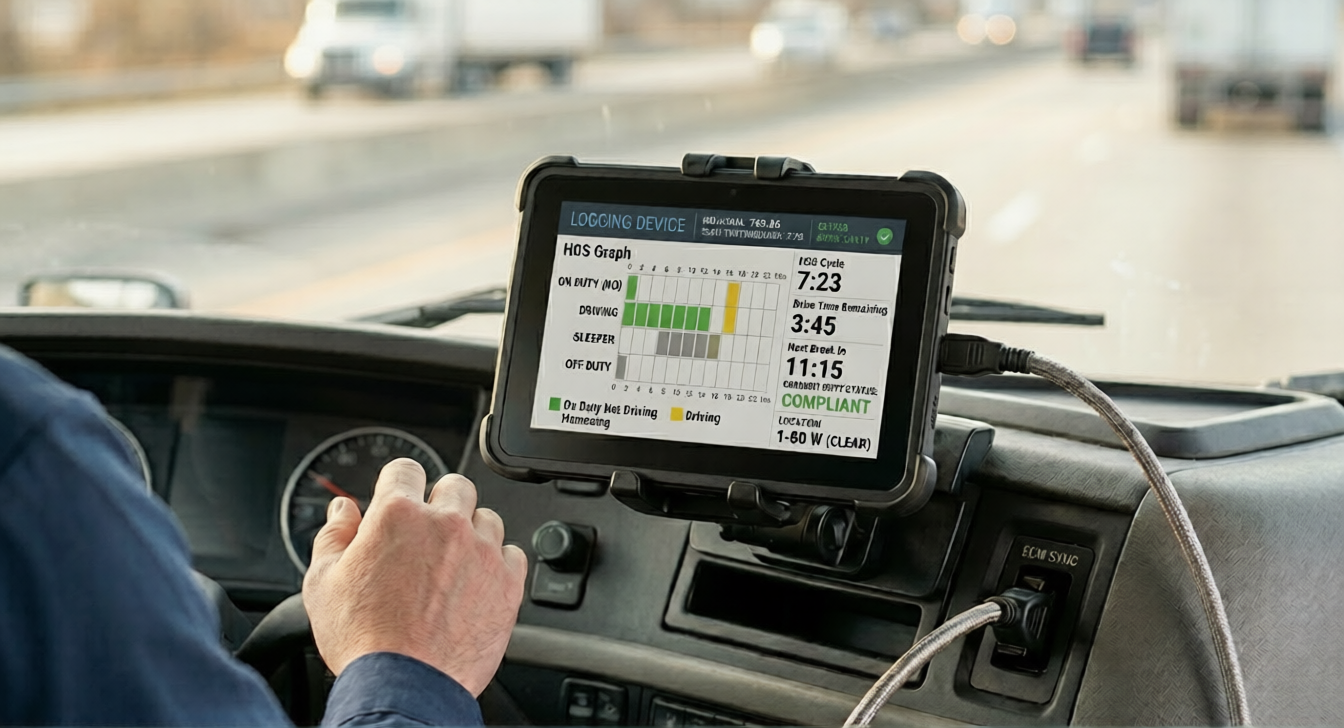
FMCSA describes an ELD as a recording device that synchronizes with the vehicle’s engine and supports entries related to a driver’s record of duty status. A compliant system includes the engine-synchronized recording function, driver interface, required records, roadside-transfer capability, and the other technical elements in Appendix A to Subpart B of Part 395.
The screen may be a dedicated unit, tablet, or smartphone, depending on the registered system. A phone app by itself is not enough unless the complete ELD solution meets the technical requirements, synchronizes with the engine, and appears on FMCSA’s registered list.
An ELD is also different from a GPS tracker or general telematics platform. Location is one required data element, but ELD compliance depends on the complete engine-synchronized HOS system. Optional tools such as IFTA reports, maintenance alerts, DVIR workflows, messaging, or camera integrations are not required ELD functions.
How Does an ELD Work?
A typical compliant workflow looks like this:
- The driver signs in: The driver uses a unique ELD account associated with the required identification data.
- The ELD synchronizes with the engine: It monitors engine power status, vehicle motion, vehicle miles, and engine hours.
- Driving is recorded automatically: The ELD switches to driving when the vehicle reaches the configured motion threshold, which must not exceed 5 mph.
- The driver records non-driving status: The driver selects on-duty not driving, off duty, sleeper berth, or an authorized special driving category when appropriate.
- The driver reviews and certifies the RODS: The driver confirms that the daily record is complete and accurate.
- The record can be transferred or displayed: During an inspection, the driver initiates the supported data transfer and can provide the required display or printout.
When a vehicle stops and remains at zero mph for three consecutive seconds, it is considered stopped under the technical specification. After five minutes without motion while in driving status, the ELD prompts the driver to confirm continued driving or choose the proper status. The device’s default-status behavior then follows the specification and product design.
What Information Does an ELD Record?
Required ELD data include or relate to:
- engine power status;
- vehicle motion status;
- vehicle miles;
- engine hours;
- date, time, and location information;
- driver or authorized-user identification;
- vehicle and motor-carrier identification;
- duty-status and special-driving-category events;
- login and logout activity;
- malfunctions and data-diagnostic events;
- edits, annotations, and certifications; and
- unidentified-driver records.
The rule does not make an ELD an automatic IFTA, maintenance, payroll, or dispatch system. A provider may offer those features, but buyers should confirm what is included and validate any business report against the fleet’s authoritative records.
What Duty Statuses Does an ELD Use?
- Driving: Recorded automatically from vehicle motion. The driver cannot simply avoid a driving event by failing to press a button.
- On-duty not driving: Work time that is not driving, such as loading, fueling, inspections, or other compensated work.
- Off duty: Time when the driver is relieved of work responsibilities and meets the applicable off-duty conditions.
- Sleeper berth: Qualifying time spent in a sleeper berth.
Personal conveyance and yard move are special driving categories, not additional basic duty statuses. Their use depends on the regulation, carrier configuration, and facts. A label in the software does not make an otherwise work-related movement off duty.
How Does an ELD Compare With a Paper Log?

| Area | Paper RODS | ELD |
|---|---|---|
| Driving time | Entered manually | Recorded automatically from synchronized vehicle motion |
| Non-driving status | Entered manually | Selected by the driver, with prompts and recorded events |
| Edits | Corrections are made on the paper record | Original data and edit history are retained; carrier suggestions require driver review where applicable |
| Roadside review | Driver presents graph-grid records | Driver transfers a standardized data file and provides a compliant display or printout when requested |
| Arithmetic | Driver totals hours manually | System calculates totals, but the driver still verifies the record |
| Malfunction | Not applicable | Driver and carrier follow § 395.34 and use manual records when required |
An ELD improves consistency and makes driving events harder to omit, but it does not eliminate violations. Incorrect status choices, misuse of exceptions, unidentified driving, missing annotations, unsupported edits, and poor dispatch decisions can still create inaccurate records.
Who Must Use an ELD?
The federal rule applies to most motor carriers and drivers who are required to maintain records of duty status under 49 CFR § 395.8(a), including qualifying truck and bus operations and Canada- or Mexico-domiciled drivers operating in the United States.
Vehicle weight alone does not answer the question. First determine whether the operation involves a commercial motor vehicle subject to federal HOS rules, whether the driver must prepare RODS, and whether an ELD exception applies. Interstate CMV definitions can involve weight or weight rating, passenger capacity, or placarded hazardous materials.
A local route is not automatically exempt. A driver who meets every condition of a short-haul time-record exception may avoid RODS and ELD use on that qualifying day. Geosavi’s guide to ELD requirements for local trucking explains that daily analysis.
Who Is Not Required to Use an ELD?
FMCSA identifies several limited exceptions:
- Short-haul time records: Drivers meeting the applicable short-haul exception keep qualifying time records rather than RODS and therefore do not need an ELD for those days.
- Eight days in 30: Drivers who need RODS on no more than eight days during any rolling 30-day period may use paper or another permitted method on those days.
- Driveaway-towaway: The exception applies when the vehicle being driven is the commodity delivered or when the transported vehicle is a motorhome or recreational-vehicle trailer and the regulatory conditions are met.
- Pre-2000 vehicles: FMCSA’s current rule and guidance identify drivers of vehicles manufactured before model year 2000.
- Other statutory, regulatory, waiver, or exemption situations: Agricultural and other operations must be assessed under the specific provision and facts.
These are ELD exceptions, not universal exemptions from every HOS requirement. A driver may still need a compliant paper or electronic RODS when the operation is outside a time-record exception.
What Does FMCSA Registration Mean?
ELD providers test their devices, self-certify compliance, and register them with FMCSA. The registered list is not a separate government product-quality certification. Carriers are responsible for choosing and using a listed device that meets the rule.
Verify the exact device name, model number, software version, ELD identifier, provider, transfer methods, and status on the FMCSA registered ELD list. A similar brand name is not enough.
Registration can change. Keep a device inventory and monitor FMCSA notices rather than checking only at initial purchase.
What Happens When FMCSA Removes an ELD?

FMCSA can move a device to the revoked list when it does not meet the technical requirements. Each notice identifies the affected models and transition deadline. On August 6, 2026, for example, FMCSA removed five devices and directed affected carriers to replace them before October 6, 2026.
That example does not establish one permanent deadline for every future removal. Follow the notice for the exact model. After the transition period, FMCSA may direct officials to cite use of the revoked device under § 395.8(a)(1) and apply the current North American Standard Out-of-Service Criteria.
Check the FMCSA ELD news and events page and the revoked-device list regularly.
How Does an ELD Work During a Roadside Inspection?

The driver follows the installed device’s transfer instructions and initiates the ELD data-file transfer when requested. A compliant device supports at least one complete option:
- Telematics: wireless web services and email; or
- Local transfer: USB 2.0 and Bluetooth.
The rule does not require every ELD to support both complete options. A provider may offer additional methods. The device must also support either a compliant on-screen display or a printout for physical review. If cellular service prevents a telematics transfer, the officer can review the display or printout, or use another available supported method.
Current § 395.22(h) requires onboard transfer instructions, malfunction instructions, and at least eight days of blank graph-grid records.
What Should a Driver Do When an ELD Malfunctions?
Under § 395.34, the driver must:
- note the malfunction and notify the carrier in writing within 24 hours;
- reconstruct the current 24-hour period and previous seven consecutive days when those records are not already possessed or retrievable; and
- manually prepare RODS when the malfunction prevents accurate electronic recording and presentation, until the ELD is serviced and compliant.
The carrier must correct the malfunction within eight days of its discovery or driver notification, whichever occurs first. A carrier needing additional time must use the FMCSA extension process within the rule’s five-day filing window.
A data-diagnostic event is not automatically the same as a compliance malfunction. Follow the carrier’s and provider’s recommendations and determine whether the issue prevents accurate HOS recording and presentation.
What Should You Look for When Choosing an ELD?
- The exact model and software version are currently registered with FMCSA.
- The hardware fits the vehicles and engine interfaces actually used by the fleet.
- Drivers can complete roadside transfer and display or printout steps confidently.
- Malfunction and data-diagnostic instructions are clear and available.
- Original records, edits, annotations, certifications, and unidentified driving are handled correctly.
- The carrier can export and retain the required six months of ELD records and a separate backup copy.
- Support hours, replacement procedures, installation, training, contracts, and data access are documented.
- Optional functions are evaluated separately from core ELD compliance.
Do not assume a generic environmental standard, connection type, installation time, or money-back policy applies unless the vendor documents it for the exact product and contract.
How Does the Geosavi ELD Platform Fit Into a Fleet Workflow?
The Geosavi ELD platform is designed to support electronic logs and fleet-management workflows. Before purchasing, confirm the registered model, vehicle compatibility, data-transfer option, display or printout method, included features, record exports, training, technical support, replacement process, and contract terms for the fleet’s configuration.
Use the price calculator for initial planning, review the support resources, and verify product-specific claims in writing.
Questions to Ask Before Buying an ELD
- What exact device name, model, software version, and identifier appear on FMCSA’s list?
- Which vehicles and diagnostic connections are supported?
- Does the device use the telematics option or the local-transfer option?
- How does the driver provide the required roadside display or printout?
- How are malfunctions, data diagnostics, and unidentified driving handled?
- Can the carrier export required records without losing access after cancellation?
- What training is included for drivers, dispatchers, and administrators?
- What support is available during a roadside inspection?
- What is the replacement plan if the device fails or is removed from the registered list?
- Which optional fleet features are included, and which cost extra?
Frequently Asked Questions
Is an ELD the same as a GPS tracker?
No. An ELD records required HOS data through engine synchronization. Location is part of the record, but a GPS-only tracker is not automatically a compliant ELD.
Can a smartphone be used as part of an ELD?
Yes, a smartphone or tablet may serve as the interface for a registered ELD system. The complete system must meet the technical specifications, including engine synchronization and roadside-transfer requirements.
When does an ELD start recording driving?
It automatically switches to driving at the configured vehicle-motion threshold, which cannot exceed 5 mph. There is no required 60-second delay before the driving event begins.
Can a driver edit an ELD record?
Permitted edits and annotations do not erase the original record. Carrier-proposed edits to applicable non-driving time are accepted or rejected by the driver during review and certification.
How long are ELD records retained?
The driver needs access to the current day and previous seven consecutive days for roadside review. The motor carrier must retain ELD records and a separate backup for six months under § 395.22.
Does an ELD work without cellular service?
Core recording should not depend on continuous cellular coverage, but synchronization and transfer behavior vary by system. If a telematics transfer cannot be completed at roadside, the required display or printout provides a backup.
What is an AOBRD?
An automatic onboard recording device was an earlier type of electronic recorder. The federal transition period that allowed existing AOBRD use ended in 2019, so a driver subject to the current mandate generally needs a registered ELD unless an exception applies.
Does a U.S.-registered ELD automatically satisfy Canadian rules?
No. United States registration and Canadian third-party certification are different systems. Cross-border fleets should verify that the exact device and configuration meet each jurisdiction’s current requirements.
Can an ELD prevent every HOS violation?
No. It records driving and calculates available time, but drivers and carriers remain responsible for accurate status selection, certifications, exceptions, dispatch decisions, and compliance.
How can a fleet confirm an ELD is still registered?
Search the exact device name, model, software version, and identifier on FMCSA’s registered list, then review the revoked list and current removal notices.
Conclusion
An ELD is an engine-synchronized HOS recording system, not simply an app, GPS tracker, or general fleet platform. It automatically records driving at a threshold no greater than 5 mph, retains an auditable event history, and transfers standardized records for inspection.
Compliance depends on more than buying a listed device. Confirm who actually needs an ELD, train drivers on status changes and roadside transfer, monitor registration, maintain required records and onboard instructions, and follow the malfunction process when the system cannot accurately record or present HOS data.