Key Takeaways
- Your ELD must produce records for the current 24-hour period and the previous 7 consecutive days on request during a roadside inspection, per ELD technical standard Appendix A.
- Data transfer to an inspector happens through a telematics option, wireless web services or email, or a local option, USB 2.0 or Bluetooth, with at least one method required from each category under that same technical standard.
- If your ELD cannot transfer data electronically at roadside, the officer can fall back to reviewing the display screen or a printout instead, FMCSA advises carriers.
- Every daily log printout or display must show driver identification, carrier name, USDOT number, and vehicle number, with a separate report for any unidentified driving records, as part of the same roadside display rules.
- Your cab must also carry a user manual, data transfer instructions, malfunction reporting instructions, and 8 days of blank paper logs under 49 CFR 395.22(h), the in-vehicle ELD information packet rule.
- A carrier must keep a backup copy of ELD records for 6 months on a device separate from the original storage, under 49 CFR 395.8(k)(1).
- Missing or undisplayed required data at roadside can lead to a citation for no record of duty status under 49 CFR 395.8(a)(1), confirmed against the 49 CFR Part 395 HOS rules.
- CVSA’s 2026 Roadcheck, held May 12 through 14, ran ELD tampering and log integrity as its lead focus, following 58,382 falsification violations recorded in 2024, according to CVSA’s 2026 International Roadcheck.
Introduction
Getting waved into a roadside inspection is stressful enough without wondering whether your ELD is going to hand over the right information. Officers aren’t just checking that you have a device installed. They’re checking that it produces specific data, in a specific format, within a specific time window, and that the numbers on the screen match what your carrier has on file.
A device that logs your hours correctly but can’t produce a clean printout, or that buries your carrier’s USDOT number three menus deep, can turn a routine stop into an out-of-service order. For your fleet, that means lost hours on the road and a mark on your compliance record that didn’t need to happen.
Below, you’ll find the exact data elements your ELD must display or transfer at roadside, the two categories of data transfer methods FMCSA requires, what your cab needs to carry alongside the device itself, and what happens when something doesn’t show up the way it should.
Whether you’re an owner-operator running your own authority or managing a small fleet’s compliance from the back office, knowing this ahead of time means a faster, cleaner inspection every time. If your current setup leaves you unsure where you stand, you can get a quote for a device built around these exact requirements before your next trip.
What Data Must Your ELD Display When an Officer Asks?
Your ELD has to produce your duty status records for the current 24-hour period and each of the previous 7 consecutive days, shown either on the device’s display screen, on a printout, or through an electronic data transfer, according to ELD technical standard Appendix A.
That 8-day window, today plus the past 7 days, is the core of what an officer is allowed to ask for during a standard roadside inspection. Your device needs to pull that data up on demand, without a driver digging through settings menus or calling dispatch for help. If there are any unidentified driving records tied to the vehicle for that same window, the ELD has to show those as a separate report too, so the officer can review the inspected driver’s profile and the unidentified driver profile side by side.
This is different from what a compliance review or safety investigation can ask for. During an audit, an authorized safety official can request records covering any period within the last 6 months, since carriers are required to retain that much history. At the roadside, the request stays narrower: today and the last 7 days, produced quickly and clearly.
Our ELD platform is built so that pull-up takes one tap for the driver, since a device that takes several minutes to load the right screen creates its own kind of problem during an inspection.
What Information Is in the ELD Daily Log Header?
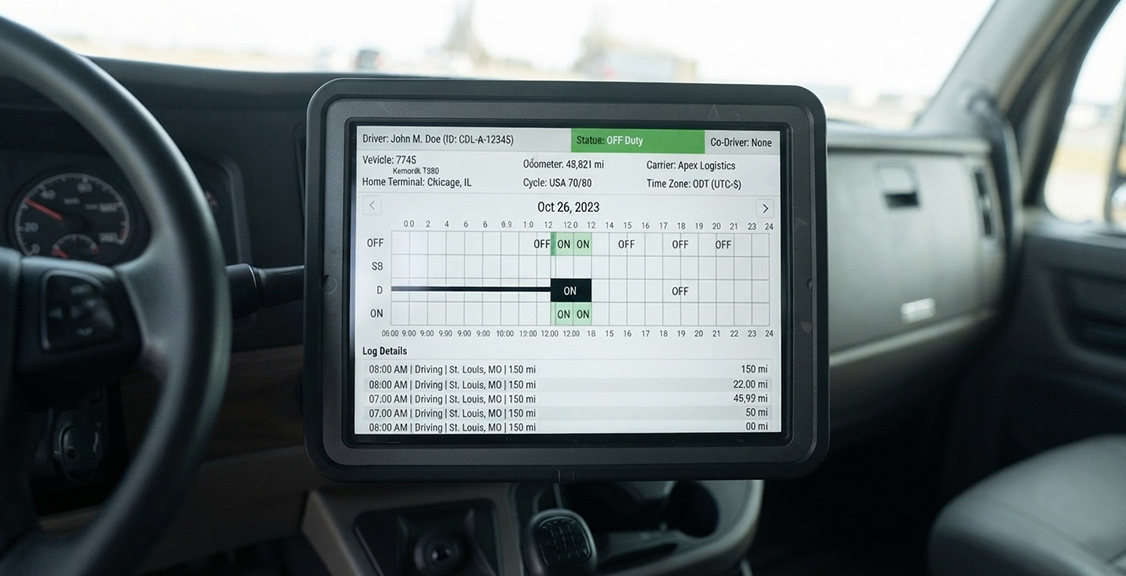
Every daily log needs a header showing who the driver is, who they drive for, and what truck they’re in, matched against the recorded duty status events for that day, as part of the ELD rule’s roadside display requirements.
At a minimum, that header includes the driver’s name as it appears on their license, the carrier’s name and USDOT number, the vehicle or power unit number, and the 24-hour period starting time the ELD is set to, along with its time zone offset. If the ELD has access to the vehicle’s VIN, that shows up in the header too. Underneath the header, the duty status changes appear in sequence for the day, along with location, engine hours, and vehicle miles at each change.
This header is what an officer scans first, because it confirms the log actually belongs to the driver and vehicle sitting in front of them. A mismatch here, like a vehicle number that doesn’t match the registration, is one of the fastest ways to trigger extra questions during an otherwise routine stop.
How Do You Transfer ELD Data to an Inspector?
Your ELD has to support at least one telematics transfer method, wireless web services or email, and one local transfer method, USB 2.0 or Bluetooth, so a driver can hand over records however the officer’s setup requires, under the same ELD technical standard covering roadside data output.
When an officer asks for records, the driver initiates the transfer from a single-step interface on the ELD. With the telematics option, the device sends the file to FMCSA’s servers electronically, and the officer reviews it through the eRODS system. With a local option, the driver connects directly to the officer’s device using USB or Bluetooth, and the file transfers without going through a third party.
Most states have their own preferred combination of one telematics and one local method, so the ELD needs to genuinely support both categories rather than checking one box. During the transfer, a comment field lets the driver enter a code the officer provides, which links the file to that specific inspection.
Our support team is available around the clock if a driver needs help walking through either transfer method mid-inspection.
What Happens If Your ELD Cannot Transfer Data at Roadside?
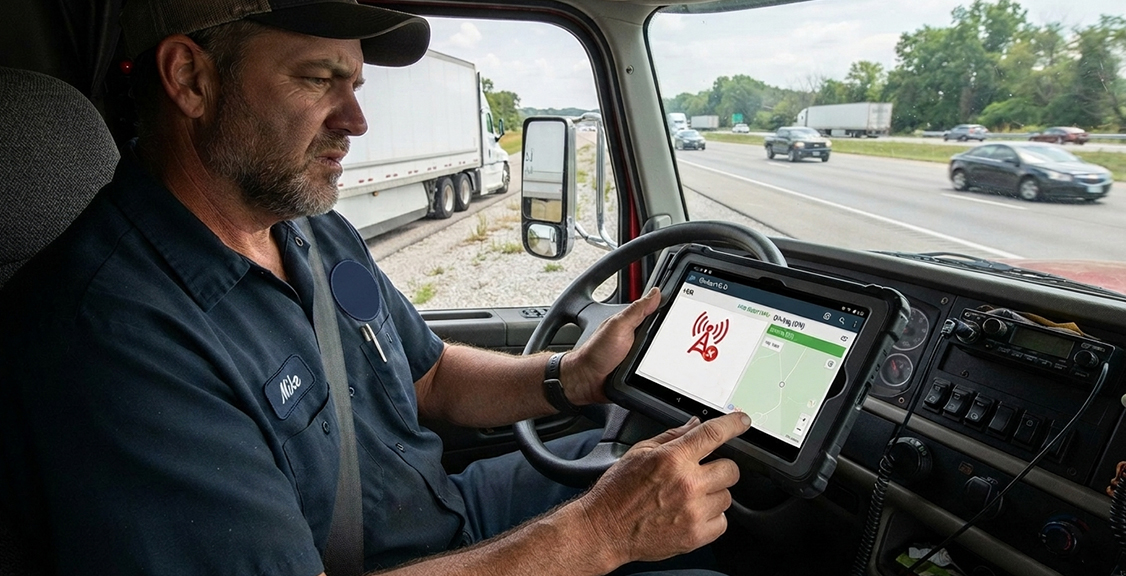
If the electronic transfer fails, whether from a cellular dead zone or a connection issue, the officer can fall back to reviewing the display screen or a printout instead, FMCSA advises carriers.
This backup exists because cellular coverage isn’t guaranteed everywhere a truck operates, and FMCSA built the rule around that reality. A failed transfer doesn’t automatically mean a citation. The officer works from whatever the device can show directly, so the display and printout functions need to work reliably even when wireless transfer doesn’t. If the display also can’t produce accurate records because the device itself has malfunctioned, that becomes a separate issue governed by 49 CFR 395.34, the ELD malfunction and repair rule, which requires the driver to reconstruct the record of duty status on paper for the current day and previous 7 days until the device is repaired or replaced.
A driver who can’t produce required information through any of these paths, transfer, display, or printout, risks a citation for no record of duty status.
What Must You Keep in the Cab Besides the ELD Itself?
Every truck needs an ELD information packet on board at all times, containing a user manual, a data transfer instruction sheet, a malfunction reporting instruction sheet, and 8 days of blank paper logs, under 49 CFR 395.22(h).
These materials can be digital, stored in the same app or tablet as the ELD software, as long as a driver can pull them up when asked. The user manual walks through basic operation. The transfer instruction sheet spells out, step by step, how to produce and send hours-of-service records to a safety official using whatever methods the ELD supports. The malfunction sheet covers what to do and how to keep records if the device stops working correctly. The blank paper logs exist as a fallback for reconstructing duty status by hand during a malfunction.
Carriers also have to retain a backup copy of ELD records for 6 months, stored on a device separate from wherever the original data lives, under 49 CFR 395.8(k)(1), so a single hardware failure doesn’t wipe out compliance history.
For a look at how these records connect to your broader safety documentation, our ELD and DVIR integration guide covers that overlap.
What Happens If Your Information Is Missing or Wrong?
If an ELD can’t display or transfer the required information at roadside, or the header data doesn’t match the vehicle and carrier, the driver risks a citation for no record of duty status and, in serious cases, an out-of-service order until the issue is resolved, per the 49 CFR Part 395 HOS rules.
Officers are trained to tell the difference between a genuine device malfunction, which has its own handling process, and missing data that reflects poor recordkeeping or an unregistered device. A properly documented malfunction with paper backups usually gets handled without penalty, while a device that simply can’t produce what’s required, or one that isn’t on FMCSA’s registered list at all, is treated as a compliance failure.
This is also where enforcement attention has sharpened. CVSA’s 2026 Roadcheck, held May 12 through 14, placed ELD tampering and log integrity at the center of its inspection priorities, following 58,382 falsification violations logged industry-wide in 2024. Officers are looking closely at whether the data on screen lines up with the vehicle’s actual engine hours and movement, not just whether a screen is present.
Before that becomes a roadside problem, confirm the device is on the FMCSA registered ELD list and that carrier information is entered correctly, that list keeps changing through 2026. FMCSA has confirmed 79 devices removed from the registered list since January 2025, with the most recent batch, 12 devices, removed on May 20, 2026. Carriers running any of those 12 devices have until July 20, 2026 to replace them, after which a citation for no record of duty status and an immediate out-of-service order become the standard response. Some drivers assume a smaller vehicle or a local route means these display and transfer rules don’t apply to them, which isn’t the case; our local drivers ELD guide covers who’s actually exempt from ELD use in the first place.
How Do the ELD Data Delivery Methods Compare?
Here’s how the required display and transfer options compare, so you know which one fits a given situation at roadside.
| Method | Category | Requires Cellular Signal | Requires Physical Connection | Best Used When | Common Limitation |
|---|---|---|---|---|---|
| Wireless web services | Telematics | Yes | No | Standard roadside stop with signal | Fails in dead zones |
| Email transfer | Telematics | Yes | No | Backup telematics option | Can delay officer review |
| USB 2.0 | Local | No | Yes | No cellular signal available | Officer must have compatible port |
| Bluetooth | Local | No | Yes | No cellular signal or USB access | Short pairing range |
| Display screen review | Direct | No | No | Any electronic transfer fails | Slower for multi-day review |
| Printout | Direct | No | Requires printer access | Backup when display isn’t practical | Not all ELDs support printing |
What Questions Should You Ask Before Choosing an ELD Provider?
Does the device support both a telematics and a local data transfer option?
An ELD needs at least one method from each category so a driver isn’t stuck if cellular coverage drops during a stop. Ask the provider directly which specific methods are built in, not just whether data transfer is supported in general.
How does the device handle a cellular dead zone at roadside?
A good provider can explain exactly what happens when wireless transfer fails, including whether the display and printout functions hold up as a genuine backup.
Is the device currently on the FMCSA registered ELD list?
Devices get removed from that list regularly, and using one that’s been delisted creates risk even if it seems to work fine day to day. Confirm current registration status before committing to hardware.
What does the in-cab information packet look like on this platform?
Ask whether the user manual, transfer instructions, and malfunction instructions are built into the driver app or tablet, since digital versions are acceptable as long as a driver can access them on demand.
How long does the backup retention period last, and where is it stored?
Carriers need a 6-month backup kept separate from the original data. Ask exactly where that backup lives and how you’d retrieve it during an audit.
Can your back office pull the same reports the device shows an officer?
If your team can’t see what a roadside inspection would show, you’re relying entirely on drivers to self-report problems. A platform with a back-office portal closes that gap.
What happens to the header data if a driver switches trucks mid-shift?
Ask how the device updates vehicle number, VIN, and carrier information when a driver moves between vehicles, since a stale header is one of the more common roadside red flags.
What kind of support is available if a driver runs into a transfer issue mid-inspection?
Confirm hours and response expectations before you buy. This is one feature worth checking before it’s needed, not after. A price calculator can help you compare that kind of support across different fleet sizes before you commit, and our shop has current hardware in stock once you’re ready to order.
About ELDs and Road Safety
Does my ELD have to show 7 days of logs or just the current day?
Yes, it has to show both. Your ELD must be able to display or transfer records for the current 24-hour period plus the previous 7 consecutive days during a roadside inspection.
Can an officer ask for more than 8 days of records at roadside?
No. At a standard roadside inspection, an officer is limited to the current day and the previous 7 days. Requests covering a longer period, up to 6 months, apply during a compliance review or safety investigation instead.
What happens if my ELD screen is hard to read in bright sunlight?
That’s worth raising with your provider before it becomes a roadside issue. A display an officer can’t read functions the same as one that isn’t working for inspection purposes.
Does my ELD need to show my carrier’s USDOT number?
Yes. The carrier’s name and USDOT number are required parts of the daily log header, along with the vehicle number and driver identification.
Why do officers care so much about log integrity right now?
CVSA’s 2026 Roadcheck made ELD tampering and log integrity its central focus following 58,382 falsification violations recorded in 2024. Officers are checking that displayed data matches actual vehicle activity, not just that a screen shows something.
Can I use a printed log instead of showing the display?
Yes, if the ELD supports printing, a printout is an acceptable way to show the required 8-day window. Not every device includes a built-in printer, so confirm this with your provider if you plan to rely on it.
Where can I check basic setup questions about my device?
Our FAQ covers common device and account questions if you want a quick reference before or after a stop.
About Choosing the Right ELD Provider
What should I look for in an ELD’s data transfer setup?
Look for support for both a telematics option, wireless web services or email, and a local option, USB or Bluetooth, so a dead zone at roadside doesn’t leave a driver without a way to hand over records.
Does the ELD need to be FMCSA registered?
Yes. Only devices on the FMCSA registered ELD list are compliant, and that list changes as devices get added or removed, so check current status before purchasing.
How do I know if a device’s in-cab information packet meets the requirement?
Ask whether the user manual, transfer instructions, and malfunction instructions are accessible from the driver app or tablet at any time, since digital formats are acceptable.
What kind of support should I expect if something goes wrong at roadside?
Look for a provider offering live support around the clock, not just business hours, since inspections don’t wait for office hours.
Does a tablet-based ELD hold up in real vehicle conditions?
Yes, a tablet built for vehicle use should be rated for temperature swings, vibration, and dust exposure rather than a standard consumer device. The Geosavi tablet is SAE J1455 certified for these conditions.
How does the ELD connect to my truck’s engine data?
It connects through J1939, J1708, or OBD-II, depending on the vehicle’s engine interface, so the device can pull accurate engine hours and vehicle movement directly from the ECM.
What if I decide the device isn’t a good fit after purchase?
Ask about the return policy before buying. Geosavi backs its hardware with a 30-day money-back guarantee.
Conclusion
An ELD’s job at roadside comes down to a handful of specific things: showing the current day plus the previous 7 days of duty status, transferring that data through at least one telematics and one local method, and displaying accurate header information that matches the truck and carrier. Miss any one of those pieces, and a routine stop can turn into a citation or an out-of-service order that didn’t need to happen.
With CVSA’s 2026 Roadcheck putting ELD tampering and log integrity front and center, and FMCSA having removed 79 devices from its registered list since January 2025, keeping hardware current and in-cab paperwork complete matters more in 2026 than it used to.
If you want to check whether your current setup meets every one of these requirements, reach out to our team at (800) 261-4361.