Key Takeaways
- Tracking driver compliance means watching measurable behavior over time, not just reacting to a single violation or event.
- HOS violations climbed from 410,000 in 2023 to more than 500,000 in 2025, according to RigDig data cited by Overdrive, April 2026.
- CVSA recorded 58,382 falsification violations in 2024, according to CVSA annual data.
- Motor carriers face maximum civil penalties up to $19,246 per HOS violation, under 49 CFR Appendix B to Part 386.
- The FMCSA Safety Measurement System already tracks HOS data at the carrier level, which makes internal tracking a way to catch problems before they show up there.
- DVIR completion is a measurable, trackable data point under 49 CFR 396.11.
- Driver tracking should never be used as leverage to get a driver to cut rest short, which touches the FMCSA coercion complaint process.
- You can confirm your ELD is still active on the FMCSA registered ELD list before trusting the data it feeds into any tracking process.
| Table of Contents |
|---|
| Compliance Tracking Basics |
| What to Track |
| Building the Process |
| Review Frequency |
| Using the Data Fairly |
| Common Mistakes |
| Common Questions |
Introduction
Your fleet, with ten trucks or a hundred, deals with the same basic problem every week. Violations, missed inspections, and log edits happen in small pieces, spread across different drivers and different days, and none of it looks urgent on its own. By the time a pattern becomes obvious, it usually shows up during a roadside stop or an audit, which is the most expensive place for you to find out.
Tracking driver compliance solves this by pulling those small pieces into one place. Instead of reacting to a single flagged violation, you get a running record of how each of your drivers performs against the standards that actually matter for compliance and safety. That record becomes something you can act on early, rather than something you have to explain after the fact.
This article walks through what to track, how to build a simple process from data you already have, how often to review it, and where fleets tend to get the process wrong. None of this requires new software if your ELD is already pulling the right fields. It mostly comes down to deciding what you want to measure and sticking to a schedule.
If any part of this raises a question specific to your fleet, our team is easy to reach through our contact form, and we are happy to talk through what would work for your setup.
What Does It Mean to Track Driver Compliance?
Tracking driver compliance means keeping a running, dated record of compliance and safety behavior for each of your drivers, built from data your fleet already collects. It is not a single grade handed down after one bad week, it is a pattern built over months.
Most tracking processes pull from three sources: your ELD logs, your DVIR records, and any roadside inspection results tied to a specific driver. Some fleets add fuel efficiency or on-time delivery rates, but those belong in a separate operational review, not your compliance tracking. Mixing performance metrics with compliance metrics makes it harder for you to spot the drivers who actually need a safety check-in.
We built your Geosavi platform to connect through J1939, J1708, or OBD-II depending on your vehicle, so most of this data is already sitting in your system waiting to be organized.
What Should Your Fleet Track for Driver Compliance?
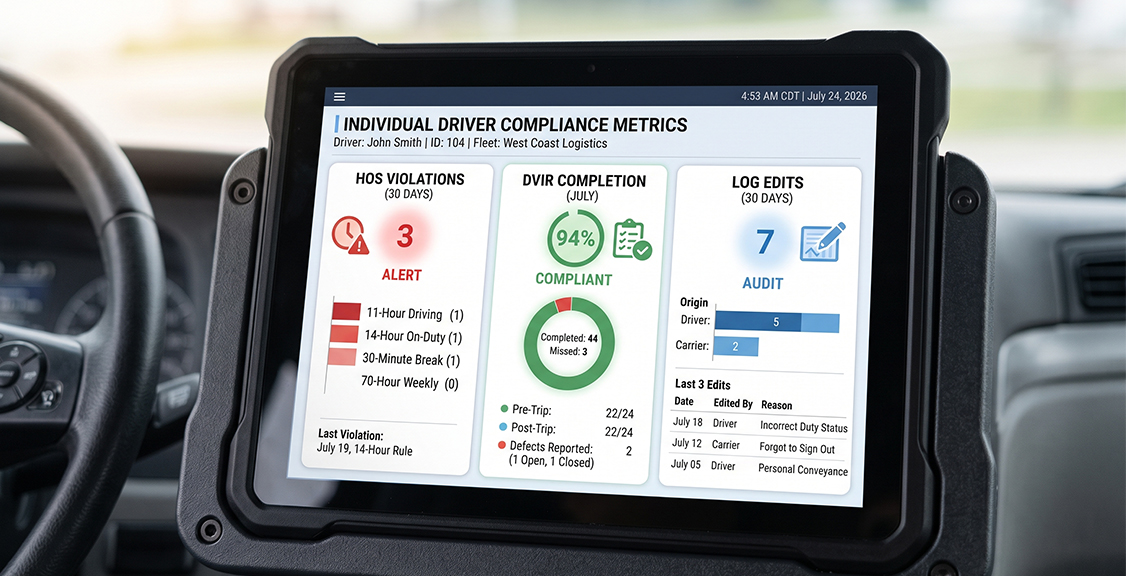
Track HOS violations, DVIR completion rate, log edit frequency, and any roadside inspection results, since these four categories cover the compliance risk that actually shows up during a roadside stop or an audit. Each one points to a different kind of problem, so keeping them separate matters more than it might seem at first.
HOS violations flag drivers who are running out of hours or misreporting duty status. DVIR completion rate flags drivers who are skipping pre-trip or post-trip inspections, which is its own violation risk under 49 CFR 396.11 regardless of whether a defect was ever found. Log edit frequency is worth watching closely, since a driver who edits logs often is either dealing with a recurring ELD issue that needs fixing or is adjusting records in a way that could raise falsification concerns. Roadside inspection outcomes round out the picture, since they show you how a driver performs under direct scrutiny rather than in routine daily logs.
In most fleets, two or three of these four categories end up surfacing the real problems, while the rest simply confirm a driver is on track. That is normal, and it is part of why this works better as an ongoing habit than a one-time audit.
How Do You Build a Driver Compliance Tracking Process from Your ELD Data?
You build this process by exporting the relevant fields from your ELD platform on a set schedule and organizing them by driver rather than by date or vehicle. Most ELD systems already store this data, so the real work sits in deciding what counts as a flag and setting up a consistent format for reviewing it.
Start by picking a small number of categories, four or five is usually enough, and define what triggers a flag in each one. A single late log edit might not need action from you, but three edits in one month probably does. Set these thresholds before you start reviewing the data, not after you notice a pattern, so your process stays fair and consistent across every driver. Once your thresholds are set, this becomes a short list you check on a schedule instead of a pile of raw data you have to interpret from scratch every time.
If your first export raises questions about which fields to pull, our support team is available day and night to walk you through it, since a compliance deadline does not wait for business hours.
How Often Should You Review Driver Compliance Data?
Most fleets get the best results reviewing this data monthly, with a lighter weekly scan for anything that needs your immediate attention. A monthly cycle gives you enough data to see a real pattern without waiting so long that a small issue turns into a habit.
Your weekly scans do not need to be a full review. A quick check for any HOS violation, missed DVIR, or roadside flag from the past seven days is usually enough to catch anything urgent. The monthly review is where you look at trends across all four categories, compare drivers against each other, and decide who needs a conversation, additional training, or closer monitoring. If you are preparing for CVSA’s 2026 Roadcheck focus on ELD tampering and log integrity, this cycle matters even more this year, since inspectors are paying closer attention to exactly the kind of data you are already tracking.

How Do You Use Compliance Data Fairly Across Your Drivers?
Consistency is what makes any tracking process credible in the first place. Every driver needs to be measured against the same standard, applied the same way, every time. Inconsistent enforcement, where one driver gets flagged for something another driver was never called on, undermines the entire system and creates real morale and legal risk for you.
Keeping the Process Fact-Based
Keep your tracking focused on facts your ELD and DVIR records actually show, not on assumptions about why a driver made a choice. A driver with several HOS violations in a month needs a conversation, but that conversation should start with questions from you, not accusations.
Where Coaching Ends and Coercion Begins
This kind of tracking exists for coaching, not for steering anyone toward shorter rest or altered logs to bring the numbers up. Any pattern that looks like pressure on a driver falls under the FMCSA coercion complaint process, and that puts your entire operation at risk far beyond one driver’s record.
What Mistakes Do Fleets Make When Tracking Driver Compliance?
Stale Thresholds
The most common mistake is setting thresholds once and never updating them as your fleet grows or changes. A flag setting that made sense for five trucks might miss real problems once your fleet grows to twenty, since the volume of data changes what counts as a pattern.
Treating It as Punishment Instead of a Warning System
The second common mistake is treating this tracking as a punishment tool instead of an early warning system. Drivers who feel like they are only being watched to catch mistakes tend to hide problems rather than report them, which defeats the purpose entirely.
Letting the Data Sit Disconnected from Compliance Files
The third mistake is letting this data sit disconnected from your actual compliance files. A pattern you catch should feed back into your training records and, where relevant, the driver’s file, not stay isolated in a spreadsheet nobody references again. Our ELD and DVIR integration guide covers how those two data sources connect, which is a useful place for you to start if your DVIR and ELD records currently live in separate systems.
Comparison: Manual Tracking vs. Platform-Based Reporting
| Factor | Manual Spreadsheet Tracking | Platform-Based Reporting |
|---|---|---|
| Data source | Manually pulled from ELD exports | Pulled automatically from live ELD data |
| Update frequency | Depends on your staff time available | Can update continuously |
| Risk of human error | Higher, especially with multiple drivers | Lower, since fields are pulled directly |
| Time to build monthly report | Several hours per cycle | Minutes, once set up |
| Consistency across drivers | Depends on the person compiling it | Applied the same way every time |
| Audit readiness | Requires manual formatting before use | Often exportable in a ready format |
| Cost | Your staff time only | Depends on platform and fleet size |
Questions to Ask Before Setting Up a Driver Compliance Tracking Process
What categories actually matter for your fleet’s risk profile?
Not every fleet needs to track the same four or five categories in the same way. If you run short routes, you might weigh DVIR completion more heavily, while a long-haul fleet might weigh HOS violations more heavily. Decide this before you build anything.
Can your current ELD platform export the data you need without manual work?
Some platforms make this simple with built-in reporting, while others require you to pull raw data and reformat it by hand. Ask specifically whether driver-level exports are available and how far back the data goes.
Who on your team owns the monthly review?
This process only works if someone owns it on a set schedule. Without a named person and a set date each month, the review tends to slip.
How will you document conversations that come out of a flag?
A flag that leads to a driver conversation should be recorded somewhere connected to that driver’s file. This matters both for your consistency and in case the pattern needs to be shown during an audit.
Does your process account for the short-haul exemption or other exempt status?
A driver who is legitimately exempt from RODS on certain days should not be flagged the same way as a driver who simply failed to log. Build that distinction into your thresholds from the start.
How will you keep this from turning into a punishment-only process?
Decide in advance how flags lead to coaching or training before they lead to any disciplinary step. This keeps your drivers engaged with the process instead of hiding problems from it.
What happens if a driver disputes a flag?
Have a clear path for a driver to raise a question about a specific entry, especially if it ties back to a data error rather than an actual violation. The FMCSA DataQs system is the formal channel for disputing inspection data at the federal level, and your internal process should mirror that same fairness.
Will your data hold up if FMCSA requests records during an audit?
Ask yourself whether your export format is something you could hand over directly or whether it would need reformatting first. Getting this right before an audit saves you time you will not have once one is scheduled.
Common Questions About Tracking Driver Compliance
About Driver Compliance and Fleet Safety
Why should a fleet track driver compliance data?
Tracking driver compliance means watching HOS violations, DVIR completion, log edits, and inspection results, so patterns show up before they become bigger problems for you. It gives your fleet an early view of risk instead of only reacting after a violation occurs.
Does internal tracking replace the FMCSA Safety Measurement System?
No. FMCSA’s system evaluates your carrier’s record after violations are already reported, while your own tracking flags patterns at the individual driver level before they reach that stage.
How many categories should a fleet track?
Most fleets do well with four or five core categories, such as HOS violations, DVIR completion, log edits, and roadside inspection outcomes. Adding too many categories makes the data harder to read and act on quickly.
Can compliance tracking data be used to justify termination?
It can document a pattern of repeated violations that supports a personnel decision, but it should never stand alone as the only step. Coaching and documented conversations should happen first, unless a violation is severe enough to require immediate action on its own.
Does log edit frequency always indicate a problem?
Not always. Some edits are routine corrections tied to normal ELD use, but a high frequency from one driver compared to others on your fleet is worth a closer look. The pattern matters more than any single edit.
How does tracking help during CVSA Roadcheck enforcement periods?
Data that already shows log integrity and inspection history gives you a head start on knowing which drivers and vehicles carry more risk heading into a heavier enforcement window like CVSA’s 2026 Roadcheck. That means you can address issues before an inspector finds them.
About Building and Managing the Process
What data feeds into driver compliance tracking?
It draws from your ELD system for HOS and log data, your DVIR records for inspection completion, and any roadside inspection results tied to a specific driver. All three sources together give you a fuller picture than any one on its own.
How often should this data be reviewed?
A monthly cycle works well for spotting real trends, backed by a quick weekly check so nothing sits unnoticed for too long. Waiting longer than a month risks letting a small pattern turn into a habit before you notice it.
Do small fleets need to track driver compliance, or is this only for larger operations?
Small fleets benefit as much as large ones, since even a handful of drivers can develop patterns that are easy for you to miss without a tracking process. The scale just needs to match the size of your fleet.
What is the difference between an internal flag and an official FMCSA violation?
An internal flag is a marker based on your own thresholds, while an FMCSA violation is an official citation tied to a specific regulation. Your tracking is meant to catch patterns before they become the kind of violation that shows up on your federal record.
Can this data be shared with drivers directly?
Yes, and many fleets find that sharing this information directly with drivers improves results, since drivers can see their own pattern and address it before a formal conversation is needed. Transparency tends to work better for you than data drivers never see.
What happens if the data shows a pattern tied to an ELD malfunction rather than driver behavior?
That distinction matters, since a string of flags caused by a malfunctioning device is a hardware issue for you, not a compliance issue. Checking the FMCSA registered ELD list for your device’s current status is a good first step if a pattern looks unusual across multiple drivers at once.
Should tracking include HOS regulation citations for context?
It helps to reference the underlying rule, such as the FMCSA HOS regulations, when you document a flag so the driver understands exactly which requirement was missed. This also makes your record clearer if it needs to be referenced later.
Conclusion
Tracking driver compliance turns data your fleet is already collecting into something you can actually use. Instead of finding out about a pattern during a roadside stop or an audit, you catch it during a routine monthly review, while there is still time for you to address it with training or a conversation instead of a citation.
With HOS violations rising nationally and CVSA’s 2026 enforcement focus centered on log integrity, your fleet is in a stronger position if you already track this data internally, rather than only finding out where you stand when an inspector tells you. Building the habit now, even with a simple four-category process, puts you ahead of that curve rather than behind it.
If cost is something you are weighing as part of this, the Geosavi price calculator is there whenever you want a specific number, and our team is also reachable at (800) 261-4361 if you would rather just ask us yourself.