Key Takeaways
- Video telematics pairs road-facing and driver-facing AI cameras with alerts for tailgating, lane departure, forward collision risk, and pedestrian detection.
- Driver fatigue is a documented safety risk in commercial driving, per FMCSA’s driver fatigue research, though how well any given camera detects it depends on the hardware.
- Footage can give your fleet a factual record during a disputed incident, which may support insurers, legal teams, and eligible crash-preventability reviews.
- Crash and inspection data feeds into the FMCSA Safety Measurement System, which reflects reported events rather than a determination of fault.
- Carriers can request a preventability review for eligible crash types through a separate FMCSA process, distinct from general SMS reporting.
- Cloud-based AI analysis aims to prioritize flagged events, which may reduce time spent reviewing footage that isn’t a genuine concern.
- Video telematics works alongside GPS fleet tracking rather than replacing it, giving you both location data and driving behavior in one place.
- No independent study has confirmed a specific accident-reduction percentage for video telematics. Treat vendor-cited numbers as positioning, not proof.
Introduction
A single crash rarely stays contained to the repair bill. Between downtime, a disputed insurance claim, and the hit to your safety record, one incident can affect your operation for months. Without a clear record of what caused it, everyone ends up arguing over fault instead of learning from it, and that argument tends to cost more time and money than the crash itself.
Video telematics exists to close that gap, and it is worth understanding what it actually changes before you invest in it. Fleet managers usually ask the same question up front: does it actually reduce accidents, or is that a claim every camera vendor makes? This guide takes that question seriously. It uses FMCSA’s own published data where that data applies, and it says where the evidence stops short of what marketing language often implies.
From here, the guide moves through the real gaps fleets face without camera monitoring, what the evidence supports and what it does not, how the hardware and AI actually function, the coaching work that turns footage into safer driving, how documentation supports insurance and legal review, and the privacy groundwork worth doing before installation. A full camera comparison, a buyer’s checklist, and a detailed FAQ close things out, so you can walk away with a specific answer for your own fleet rather than a general impression.
If you already run our ELD platform, pairing it with our video telematics platform extends the same compliance and safety records you are already keeping, just from a different angle. That connection matters more than it might seem, since the next section starts with exactly the kind of gap camera data is built to fill. If you want to talk through whether that pairing makes sense for your fleet before reading further, you can schedule time with our team or call us at (800) 261-4361.
What Problems Do Fleets Face Without Camera-Based Safety Monitoring?
Without a vehicle camera system, you are typically left reconstructing what happened after an incident from memory, witness accounts, and whatever physical damage is visible. None of that tells the full story, and all of it is open to interpretation.
That shortfall shows up in a handful of predictable ways. Fault disputes drag on because there is no footage to settle who had the right of way or who was following too closely. Coaching conversations happen only after something has already gone wrong, rather than catching a pattern of hard braking or lane drift while it is still a minor habit instead of a filed claim. Fatigue and distraction are two of the harder risks to observe from outside the cab, and they often go unnoticed until they surface as a near-miss or something worse. If you have already looked at how ELDs support safer roads by reducing driver fatigue, video telematics extends that same idea past hours-of-service data and into what is actually happening behind the wheel in real time.
None of this means a fleet without cameras is operating unsafely. It means the tools available to catch and document risk are more limited, and that limitation is the specific problem video telematics is designed to address. What is less clear, and worth examining honestly, is how much of a difference it actually makes once it is installed.
Does Video Telematics Actually Reduce Accidents?
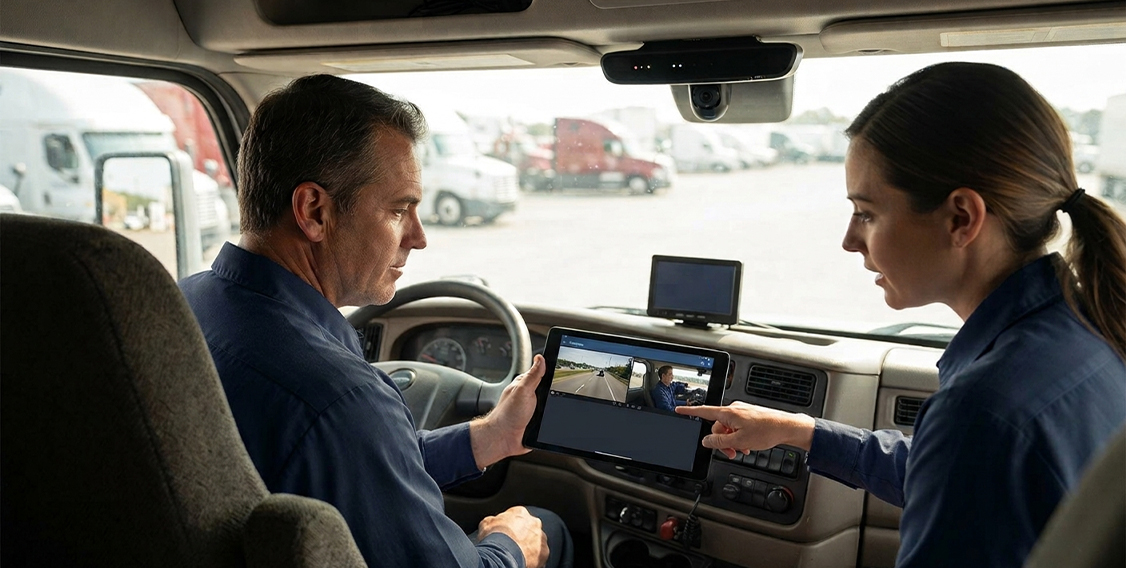
Camera-based systems are associated with lower driving risk in fleets that actively use footage for coaching. No independent study has confirmed a specific accident-reduction percentage, so treat any number a vendor cites as a claim to verify rather than a fact to repeat.
What holds up better is the reasoning behind why these systems may help in the first place. Fatigue and distracted driving are documented safety risks in commercial driving, per FMCSA’s driver fatigue research. That research establishes fatigue as a general risk across the industry. It does not verify how accurately any specific camera detects fatigue or distraction in the field, since that depends on the manufacturer’s own testing and the way the system is configured for a given fleet. ADAS-style alerts for forward collision, lane departure, tailgating, and pedestrian detection work on a similar logic. They are designed to flag situations a driver might otherwise miss, not to guarantee that every risky moment gets caught.
Our own stated goal for this technology is to help you monitor driving events and coach drivers more effectively. That is a description of what we are trying to build, not an independently verified outcome, and this guide treats it accordingly rather than dressing it up as settled fact. Understanding that distinction matters just as much once you get into the hardware itself, since specifications can sound more definitive on paper than they are in practice.
How Does AI-Powered Video Telematics Work in Your Truck?
At a basic level, these systems pair one or more cameras with onboard sensors and cloud-based AI analysis designed to flag the driving events that matter most.
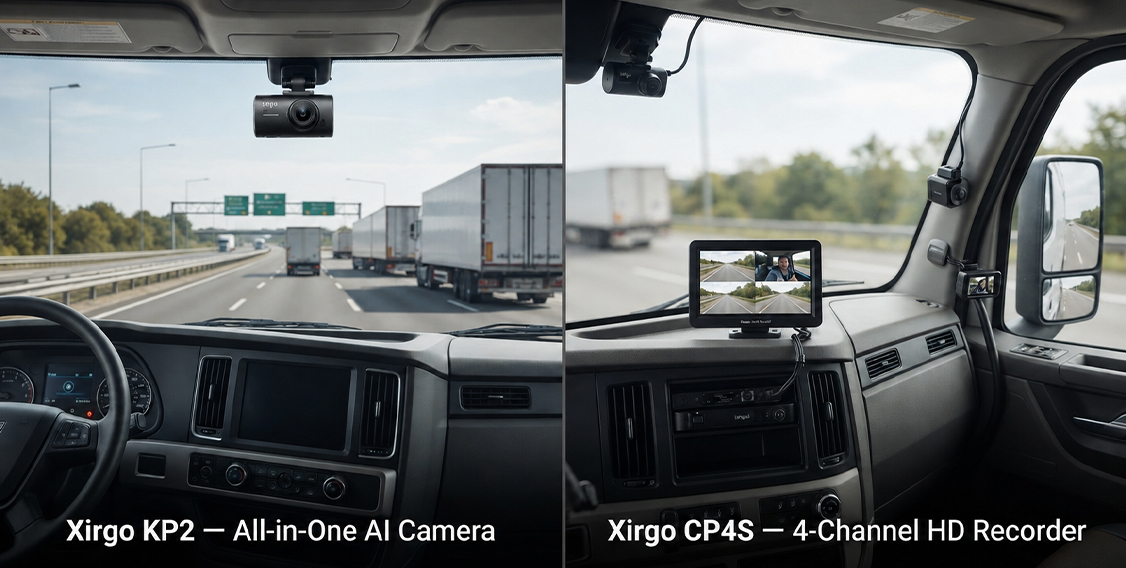
Our platform runs on Xirgo hardware, with a few configurations depending on how much coverage your fleet needs. The KP2 is an all-in-one camera that can be paired with an optional driver-facing add-on for distraction and fatigue detection, the same category of detection referenced above. The CP4S is a 4-channel recorder built for fleets that want visibility from multiple angles around the vehicle rather than just the road ahead. Standalone road-facing, driver-facing, and side or rear cameras round out the lineup for fleets that want a more targeted setup. The full specifications for each option are laid out in the comparison table further down, so you can compare them directly instead of parsing them out of a paragraph.
Cloud-based analysis is designed to filter and prioritize flagged events, which may reduce the amount of footage you need to review manually, though the actual reduction depends on your configuration and how your team uses the system day to day. It can also be paired with GPS fleet tracking for a combined view of vehicle location and driving activity, giving you both pieces of the picture in one place. As with any hardware, confirm the current specifications directly with your provider before purchasing, since configurations and features change over time. What the hardware captures is only half the equation, though. What happens with that footage afterward is where the actual safety improvement, if any, tends to come from.
What Role Does Driver Coaching Play?
Footage on its own does not change driving behavior. What happens after a risky event gets flagged is what has a real chance of making a difference over time.
When a system flags a hard-braking event, a lane departure, or a fatigue warning, the value comes from reviewing that clip with the driver, explaining what the system caught, and watching for whether the same pattern shows up again. Done consistently, this turns isolated incidents into an ongoing feedback loop, where drivers get specific, evidence-based coaching instead of vague reminders to drive more carefully. It can also work in a driver’s favor just as often as against it. Footage may clear someone of blame in a disputed event as easily as it points to something they need to adjust, which tends to keep the conversation feeling like a shared factual record rather than surveillance. That same record becomes especially useful once an incident has already happened and a claim needs to be resolved.
How Can Video Telematics Support Documentation and Claims?
When a collision happens, footage gives your fleet something factual to point to instead of relying on competing accounts of what occurred. That matters most in disputed-fault situations, where a driver is blamed for something outside their control, or a third party files a claim that does not match what actually happened on the road.
It is worth being specific about what this does and does not affect, since footage often gets credited with more influence than it actually has. Crash and inspection data feeds into the FMCSA Safety Measurement System, and that system reflects reported events rather than a fault determination on its own, so a crash can appear there regardless of which party was actually responsible. FMCSA’s Crash Preventability Determination Program is a separate process that lets carriers request a preventability review for certain eligible crash types. To start that review, a carrier submits a request for data review, along with a police accident report, through FMCSA’s DataQs system. Video documentation can support that request, but it does not change your SMS data or score by itself, and it does not guarantee a crash will be reclassified as not preventable. It supports your insurer’s or legal team’s review, rather than replacing their process entirely. That same footage, particularly when it involves the driver’s face rather than just the road, comes with its own set of considerations worth working through separately.
What Should Fleets Know About Driver Privacy and Recording Policies?
Driver-facing cameras raise real privacy questions, and those are worth resolving before installation rather than after a driver raises them on their own.
A written camera policy is one of the more effective ways to head off confusion once cameras are in the truck. At minimum, put the following in writing before rollout:
- Notification and consent – how drivers are told recording is active, and how that consent gets documented.
- Audio recording rules – many states apply stricter consent requirements to audio than to video alone, so this needs its own line item.
- Footage retention – how long footage is kept before deletion or overwrite, and whether flagged events are retained longer than routine footage.
- Access permissions – who inside your organization can view footage, under what circumstances, and how those requests get logged.
- State-specific recording laws – rules for a company vehicle can differ from personal-vehicle rules and vary meaningfully by state.
- Union or workforce agreements – whether any existing labor agreements already address in-cab monitoring.
- Driver acknowledgment – having drivers review and sign off on the policy in writing before installation begins.
Recording and privacy laws vary significantly by state, apply differently depending on whether audio is involved, and can change over time. This section is general information, not legal advice, and it is worth confirming current requirements with your own legal or HR counsel before rolling out driver-facing cameras across your fleet. Once that groundwork is in place, choosing the right hardware becomes a more straightforward decision.
How Do Video Telematics Camera Options Compare?
The two main configurations, the KP2 and the CP4S, cover most fleet needs, with standalone cameras available when a fleet wants more targeted coverage instead of a full package.
| Camera | Type | Key Features | Storage | Connectivity | Best For |
|---|---|---|---|---|---|
| Xirgo KP2 | All-in-one AI camera | Road-facing view, ADAS-style alerts, cloud AI analysis | 64GB microSD, roughly 50 hours | Cloud upload | A single all-in-one unit |
| KP2 + Driver-Facing Snap-In | All-in-one plus add-on | Adds fatigue and distraction detection | 64GB microSD, roughly 50 hours | Cloud upload | Fatigue and distraction monitoring |
| Xirgo CP4S | 4-channel HD recorder | Up to 4 angles, real-time alerts, optional in-cab LCD monitor | Up to 1TB SD card | 4G/LTE | Full vehicle coverage |
| SVA045-AM | Standalone camera | Road-facing view | Varies by configuration | Integrated with system | Targeted road-facing add-on |
| SVA050-A | Standalone camera | Driver-facing view | Varies by configuration | Integrated with system | Targeted driver-facing add-on |
| SVA035-A | Standalone camera | Side and rear view | Varies by configuration | Integrated with system | Blind-spot or side coverage |
Confirm exact configuration and availability directly with your provider before purchasing. Once you have a sense of which row fits your operation, the questions below help you narrow it down further.
What Should You Ask Before Choosing a Video Telematics System?
How many camera angles do you actually need?
A single road-facing or driver-facing unit covers the basics, but fleets dealing with frequent side-impact or blind-spot incidents usually get more value from a multi-channel setup like the CP4S.
Do you need fatigue and distraction detection specifically?
Long-haul routes and overnight shifts often justify the added hardware more than short local routes do.
How much storage do you need before footage overwrites?
Fleets that review footage regularly can often work with smaller storage, while fleets that only pull footage after an incident should lean toward higher capacity.
Do you need real-time alerts, or is periodic review enough?
Real-time notification matters more if you are actively managing risk across many vehicles at once, rather than reviewing footage after the fact.
How does the cost fit your budget?
Camera count, storage size, and connectivity all affect pricing, so it is worth running your specific configuration through our price calculator before deciding.
Who on your team will review flagged events and coach drivers?
A camera system only lowers risk if someone actually turns flagged events into real feedback, so it is worth deciding who owns that process before installation.
Do you have a written driver privacy and recording policy?
Cover consent, retention, access, and state-specific requirements before installation, and loop in legal or HR counsel early rather than after cameras are already in the trucks.
What installation and ongoing support does your fleet need?
Installation options vary by hardware, fleet size, and service arrangement. Our support team can walk through what fits your specific setup.
Video Telematics FAQs
About Video Telematics and Road Safety
What is video telematics?
It combines vehicle camera systems with AI-based event analysis to monitor driving activity, capture footage of incidents, and generate alerts for certain risky driving patterns.
Does video telematics reduce accidents?
It is associated with lower risk in fleets that pair it with active coaching, but no verified accident-reduction figure exists, so treat specific numbers with caution.
What is the difference between a dash cam and video telematics?
A dash cam records footage. Video telematics typically adds AI-based event detection, alerts, and cloud connectivity for fleet-wide review and reporting.
Can it detect driver fatigue?
Driver-facing cameras with fatigue detection are designed to flag signs associated with drowsiness, but accuracy depends on the hardware and configuration.
How does AI cut down on false alerts?
Cloud-based analysis is designed to filter and prioritize flagged events, which may reduce time spent on footage that is not a genuine concern, though results vary by configuration and workflow.
Is footage stored in the cloud or on the device?
Usually both, depending on the camera model and connectivity option in use.
Can drivers turn off the camera?
That depends on your fleet’s own policy and the specific hardware configuration. Cover this directly in your written camera policy.
What should our privacy policy for driver-facing cameras cover?
At minimum, consent, audio recording rules, retention timelines, access permissions, and state-specific laws. Involve legal or HR before rollout, since requirements vary by location and can change.
Do these alerts work the same way in all weather and lighting conditions?
Camera and sensor performance can vary in low light, heavy rain, or glare, so it is worth asking your provider directly about performance limits for your specific routes and climate.
About Costs, Installation, and Fleet Management
How much does video telematics cost for a fleet?
Cost depends on camera count, storage capacity, and connectivity needs, so it is worth pricing out a specific configuration rather than relying on a general estimate.
Does it work with GPS tracking?
Yes, it can be paired with GPS fleet tracking for a combined view of location and driving activity.
Can it integrate with my ELD?
Integration capability depends on the specific systems involved, so confirm compatibility directly with your provider before purchasing.
Who installs the cameras?
Installation options vary by hardware, fleet size, and service arrangement. Confirm the available method with your provider.
How much footage storage do I need?
That depends on how often footage gets reviewed. Fleets reviewing regularly can often work with less storage, while fleets reviewing mainly after incidents should lean toward higher capacity.
Does it help with insurance costs?
Video evidence can support a stronger position in a disputed claim, though the actual effect on premiums depends on your insurer’s own policies and your fleet’s loss history.
Does video telematics affect our FMCSA Safety Measurement System score?
Crash and inspection data feeds into SMS, which reflects reported events rather than a fault determination on its own. FMCSA’s crash preventability review process is a separate step for eligible crash types, and video documentation can support that review without directly changing your SMS score.
Ready to Schedule Your Fleet’s Video Telematics Setup?
Taken together, the picture is consistent across every section above: video telematics is associated with lower risk in fleets that use footage for active coaching, not a guarantee on its own. What the technology delivers more reliably is documentation and visibility you did not have before, alerts built to catch risky driving patterns, footage that can support insurance and legal review, and a factual record to reference in disputed events, including eligible crash-preventability reviews.
It works best as one part of a broader safety approach, paired with clear driver coaching and a written privacy policy, rather than as something you install once and forget about.
If you would like help figuring out which camera configuration fits your fleet, schedule time with our team or call (800) 261-4361.