Key Takeaways
- ELD platforms are required to maintain a record of your data separate from the tablet itself, under the ELD technical standard Appendix A.
- If your tablet is lost, stolen, or damaged, you must notify your carrier within 24 hours, per 49 CFR 395.34(a)(1).
- Once notified, your carrier has 8 days to repair or replace the device, per 49 CFR 395.34(d)(1).
- Drivers are expected to maintain a manual record of duty status while the ELD is out of service, per 49 CFR 395.34, until the device is repaired or replaced.
- Any manually entered or edited record must include an annotation explaining the change, per 49 CFR 395.30(c)(2).
- A replacement device needs to be an approved, working ELD, listed on the FMCSA registered ELD list.
- Carriers must retain ELD records for 6 months under 49 CFR 395.8(k)(1), a requirement tied to the account’s records regardless of which physical device was in use.
Introduction
Losing a tablet on the road is stressful enough on its own, and it gets worse the moment you start wondering whether months of duty status records went missing along with it. A truck gets broken into at a rest stop, a tablet slides off the dash and cracks on the floor, or a mount comes loose and the device ends up run over in a parking lot. It happens more often than most drivers expect, and when it does, the first question is always the same, which is whether the data is gone for good.
In most cases, the answer is no, and that’s because your records don’t live only on the device sitting in your cab. As long as the ELD was set up and syncing correctly before the loss, your records don’t disappear along with the tablet. Losing the tablet does trigger a specific process under federal ELD malfunction rules, one that covers notifying your carrier, switching to manual records for a short period, and getting a compliant replacement in place. Skipping any part of that process raises unnecessary risk during a roadside stop, which is worth avoiding even if the situation feels minor at the time.
Here’s what happens to your data, how a lost or damaged tablet is treated under FMCSA’s rules, and what you need to do about your records in the meantime. It also explains how a back office backup differs from a system that only stores data locally on the tablet. None of this replaces guidance from your own carrier’s compliance team or FMCSA directly for your specific situation.
If your tablet has already been lost, stolen, or damaged, don’t wait to sort it out on your own. Call us at (800) 261-4361, or get in touch with us, and we can help confirm your account status and walk you through next steps.
What Happens to Your ELD Data If Your Tablet Breaks or Goes Missing?
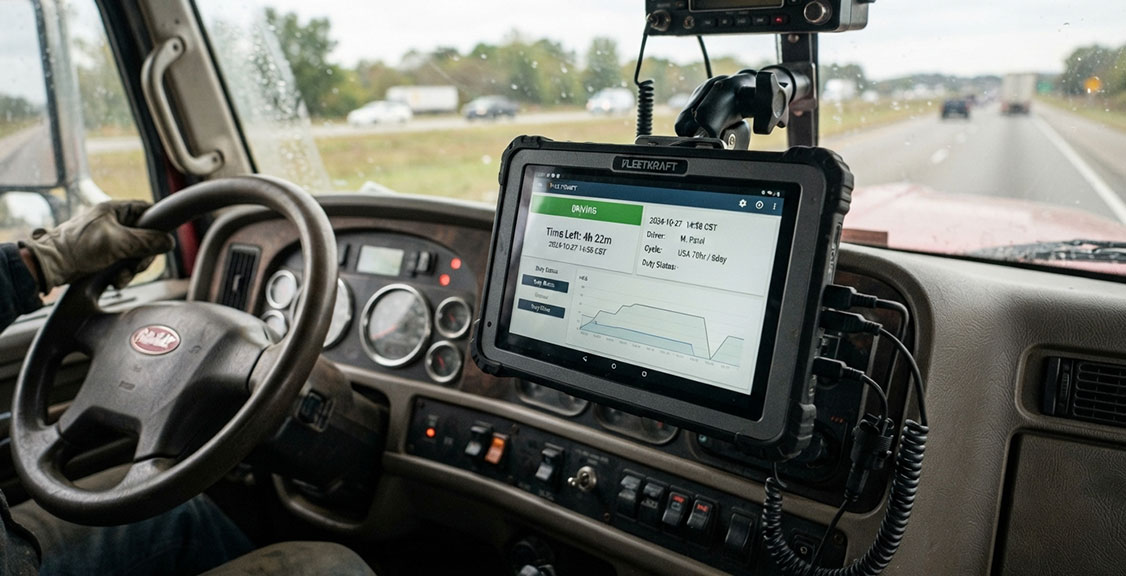
Losing the physical tablet is not the same thing as losing your records. Under the ELD technical standard, your data is required to sync to a back office system as it’s recorded, rather than being stored solely on the device in your cab. That’s what keeps a cracked screen or a stolen bag from wiping out your hours of service history.
Think of the tablet as the screen and the keyboard, not the filing cabinet. The actual record lives on a server your carrier or provider can access directly, which is how your compliance history stays intact even if the device that recorded it is gone or destroyed.
What you do lose, at least temporarily, is the ability to view your current logs from inside the truck or show them to an officer directly on the device during a roadside stop. That gap is real, and it’s part of why a lost or damaged tablet triggers a specific set of steps under federal ELD rules, covered in the next section. Our tablets are built to the SAE J1455 standard for vibration, dust, and temperature resistance, which cuts down on damage, though it obviously can’t prevent theft.
Does Losing Your Tablet Count as an ELD Malfunction?
This is one area where the exact classification depends on the specifics of your situation, and it’s worth checking with your carrier’s compliance team or FMCSA directly if you’re ever unsure how a particular case applies to you. FMCSA groups ELD malfunctions into defined technical categories, and a lost, stolen, or physically damaged tablet isn’t named as its own category the way something like a power compliance or data recording issue is. In practice, though, a missing or destroyed device produces the same outcome those categories are built to address: the ELD can no longer record or display your hours of service, so it’s commonly treated the same way for compliance purposes.
What matters practically, regardless of exact classification, is that the rule covering ELD malfunctions and repair, 49 CFR 395.34, applies to this situation and sets out defined obligations for both you and your carrier rather than leaving the timeline open-ended, starting with how quickly you’re required to report it.
How Long Do You Have to Report a Lost or Damaged ELD Tablet?
You must notify your carrier within 24 hours of knowing the device is unusable, per 49 CFR 395.34(a)(1). That window starts the moment you’re aware something is wrong, not whenever you next happen to be near a yard or terminal.
In practice, this means calling dispatch as soon as you notice the problem rather than waiting until the end of your shift. If the tablet was stolen, this is also a reasonable time to file a police report, since a provider or carrier may ask for documentation when processing a replacement or an insurance claim.
Once your carrier is notified, the responsibility for arranging a repair or replacement shifts to them. Your focus from here is keeping accurate manual records, covered next, until the new device is active.
What Records Do You Need to Keep During the Outage?
While your ELD is out of service, you’re required to maintain a manual record of your duty status, per 49 CFR 395.34, covering the period from when the problem started until the device is repaired or replaced. A manual log should follow the same basic format used before ELDs became standard: date, duty status changes, times, and locations for each stop and drive segment.
If you can reconstruct the day or two before the tablet was lost from memory, receipts, or dispatch records, do it as soon as possible, since those details get harder to pin down the longer you wait. Once the new ELD is active, the manually logged period needs an annotation explaining why, per 49 CFR 395.30(c)(2), so the record clearly shows which days were affected. If you’re ever unsure exactly how far back your manual record needs to go for your specific situation, confirm with your carrier’s compliance contact rather than guessing.
Getting that record right matters just as much as the timing, since your carrier is now working against its own clock to get you back on a working device.
How Long Does Your Carrier Have to Replace a Lost or Damaged ELD?
Carriers have 8 days from the date of notification to repair or replace a malfunctioning device, under 49 CFR 395.34(d)(1). For a lost or stolen tablet, repair usually isn’t an option, so this becomes a replacement order, and whatever replaces it needs to be a currently approved ELD. It’s worth checking the FMCSA registered ELD list if there’s ever doubt about whether a specific model is still valid, since FMCSA periodically removes non-compliant devices from that list.
8 days sounds like plenty of runway, but every extra day on manual records is a day with more friction at a roadside inspection. Ordering the replacement the same day you report the loss, rather than waiting to see how things shake out, keeps you well inside that window. And because your records already live on a server separate from the tablet, that replacement window is about getting your equipment back in working order, not about racing to protect data that was already safe.
Is Your ELD Data Backed Up Somewhere Besides the Tablet?
Yes. Beyond the point already covered above, the back office record also holds related data tied to the same tablet, such as vehicle inspection reports, so a lost device doesn’t put those records at risk either. Once a replacement tablet is set up under your existing account, your carrier or provider can confirm your prior records carried over correctly and remain available for the 6-month retention window required under 49 CFR 395.8(k)(1).
This is the practical reason a platform’s backup approach matters. A system that stores data only on the device, without real-time syncing to a server, puts the entire record at risk the moment that device is lost or destroyed. Continuous back office syncing treats the tablet as replaceable hardware rather than the sole copy of your compliance history.

What Should You Do Right After Your Tablet Is Lost, Stolen, or Damaged?
Pulling the sections above together, the short version is this: notify your carrier, start a manual log, and confirm your backup with support, in that order.
Note the time you realized the device was gone or broken, since that’s when your notification window starts. Call or message your carrier right away. If the tablet was stolen, file a police report and keep a copy. Start your manual log immediately, covering the full current day. Reach out to our support team, who can confirm your account’s backup status at any hour while your replacement is arranged. Hold onto your manual records until the new ELD is active and your carrier confirms the file is complete.
Not reporting the issue promptly raises the risk of a citation for no record of duty status, rather than the documented, defensible outage that a timely report and manual log are meant to support.
Lost, Stolen, or Damaged Tablet: How the Data Risk Compares
| Scenario | Risk With Tablet-Only Storage | Risk With Back Office Backup | Your Immediate Action | Carrier Responsibility | Typical Recovery Path |
|---|---|---|---|---|---|
| Tablet lost at a rest stop | High, records may be gone for good | Low, synced data stays on the server | Report promptly, start manual log | Order replacement, confirm backup | New tablet linked to same account |
| Tablet stolen from the cab | High, plus possible unauthorized access | Low, same server-side protection applies | Report promptly, file police report | Order replacement, review account access | New tablet, account security check |
| Cracked screen, device still powers on | Moderate, some unsynced data may be at risk | Low, most data already synced | Report the damage, attempt data transfer if possible | Assess repair versus replace | Repair or replacement, whichever is faster |
| Water damage, device won’t power on | High, unsynced data likely lost | Low to moderate, depends on last sync | Report promptly, start manual log | Replace device, confirm last sync date | New tablet, gap annotated on logs |
| Dead battery, no backup power source | Moderate, temporary loss of display access | Low, data already recorded before failure | Note the time of failure, switch to manual log | Diagnose power issue, repair or replace | Repair if isolated, replacement if recurring |
| Software crash or data corruption | High, local data may be unreadable | Low, server copy unaffected | Report issue, avoid restarting repeatedly | Coordinate on device reset or swap | Reset or replace, confirm backup integrity |
Questions to Ask Before Choosing an ELD Provider
Does the ELD store your data on a server, or only on the tablet itself?
This is the single most important question to ask if losing a device worries you. Continuous server syncing protects your records if the tablet is ever lost, stolen, or destroyed.
How does the provider recover your logs if a tablet is lost or stolen?
Ask how quickly a new tablet can be linked back to your existing history, since a provider without a clear answer here likely doesn’t have real back office backup in place.
Is there a backup battery in case the truck loses power?
A device that shuts down the moment power drops can leave gaps in an otherwise normal day. A backup battery keeps the ELD running through short interruptions.
What is the tablet built to handle out on the road?
Ask whether the device is rated for vibration, temperature, and dust, since a tablet built for those conditions is less likely to end up damaged in the first place.
How fast can a replacement actually reach you?
Carriers are given 8 days to fix or replace a malfunctioning ELD under 49 CFR 395.34(d)(1), so ask upfront how quickly a provider can genuinely ship a working replacement.
Is support available outside standard business hours?
Devices don’t go missing or fail on a convenient schedule, so ask whether help is available nights and weekends too.
How are manual log annotations handled once the new device is active?
Ask whether the platform makes it simple to document the outage period clearly, since accurate paperwork after an outage matters as much as getting the hardware back.
Common Questions
About ELDs and Road Safety
Does losing an ELD tablet put a driver out of compliance right away?
Not if the driver reports the issue within 24 hours and switches to a manual record, which is the process federal rules require during a malfunction.
Can an officer still see a driver’s hours if the tablet is gone?
If the carrier’s platform backs up records to a server, yes, since prior hours of service data remains available independent of the original tablet.
Does a stolen tablet expose a driver’s hours of service history to whoever took it?
No, since a properly backed up ELD stores duty status data on a server rather than on the physical device, so someone with the tablet alone doesn’t get access to the underlying records.
Is a driver responsible for the cost of a lost or stolen ELD?
That depends on the carrier’s own policy and any device agreement in place, not on federal ELD rules, which address the compliance process rather than repair or replacement costs.
How does CVSA view ELD malfunctions during an inspection?
A properly documented malfunction, supported by manual records and carrier notification, is generally viewed differently than an unexplained gap or a falsification issue, though outcomes can depend on the specifics of each stop.
Does a lost tablet affect a driver’s DataQs record?
Not directly, but a citation received during the outage period can potentially be challenged through the FMCSA DataQs system if the driver followed the required malfunction process.
About Choosing the Right ELD Provider
Here are some straightforward answers to the questions we hear most from fleet managers comparing providers, and you can check our full FAQ if you want more detail on any of these.
What should a fleet manager look for in an ELD’s backup process?
A platform that syncs to a server in real time, rather than one relying on manual uploads from the device.
How quickly can a small fleet get a replacement tablet?
This varies by provider, so ask directly, since the federal 8-day window under 49 CFR 395.34(d)(1) puts real pressure on how fast a replacement needs to ship.
Does a more durable tablet reduce the chances of needing a replacement?
Yes, a tablet built to a recognized standard like SAE J1455 is less likely to fail from vibration or rough handling than a consumer-grade device.
Can a fleet manager check a replacement device’s status remotely?
In most cases, yes, through an online portal showing device status and sync history.
What should a compliance manager confirm after a device swap?
That pre-loss records were transferred correctly and that the 6-month retention requirement under 49 CFR 395.8(k)(1) continues without interruption.
Does a money-back guarantee matter here?
It’s more relevant to initial setup confidence than to a lost tablet later on, but a 30-day guarantee reflects how a provider stands behind its hardware.
Can a replacement tablet be ordered directly?
Yes, you can order one through our shop, which shortens the time between reporting a loss and getting a working device back in the cab.
Is support available around the clock?
Yes, and that matters most exactly when a tablet goes missing or fails without warning.
Conclusion
A lost, stolen, or damaged ELD tablet is stressful, but the process for handling it is well defined: notify your carrier within 24 hours, keep manual records in the meantime, and get a compliant replacement in place within 8 days. None of that works as smoothly if a provider’s system only stores data on the tablet itself, which is why a back office backup matters so much in this exact scenario.
Enforcement in 2026 continues to focus on log integrity, and a properly documented outage reads very differently to an inspector than an unexplained gap does. If you want a straight answer on what a replacement would cost before you’re ever in this situation, our price calculator can give you that in a couple of minutes, or call us at (800) 261-4361 if you’re dealing with a lost or damaged tablet right now.