Key Takeaways
- Federal hours of service rules under 49 CFR Part 395 HOS rules require your drivers to record every duty status change in real time, not after the fact.
- Missing or incomplete duty status records can result in a citation under 49 CFR 395.8(a)(1).
- Any change made to an ELD record after the fact must include a written annotation explaining why, under 49 CFR 395.30(c)(2).
- Driving time that isn’t linked to a logged-in driver gets flagged as unidentified driving and must be reviewed under 49 CFR 395.32(c).
- According to CVSA’s 2026 Roadcheck, which focused on ELD tampering and log integrity, inspectors recorded 58,382 falsification violations in 2024, according to CVSA annual data.
- Based on FMCSA’s own published estimates, ELD compliance is projected to prevent 1,844 crashes, reduce injuries by 562, and save 26 lives a year.
- Your drivers can check the FMCSA-registered ELD list to confirm a device stays certified, since FMCSA has removed 79 devices from the list since January 2025.
- Maximum civil penalties for HOS violations reach up to $19,246 per violation for motor carriers, adjusted annually for inflation under 49 CFR Appendix B to Part 386.
Introduction
Most hours of service problems don’t happen in the middle of a run. They happen in the first two minutes of a shift, when a driver rushes the login screen, or in the last two minutes, when they forget to switch their status before walking away from the truck. A missed duty status change or a skipped logout can turn a clean log into a record that raises questions at the next roadside stop.
Enforcement has tightened heading into the back half of 2026. CVSA’s Roadcheck put ELD tampering and log accuracy at the center of its inspection focus this year, and hours-of-service violations have climbed from 410,000 in 2023 to more than 500,000 in 2025 according to RigDig data cited by Overdrive. A driver who starts and ends a shift correctly on their ELD avoids most of that risk without doing anything extra.
Here’s what a correct shift start and shift end actually look like on an ELD, what your drivers should check before they move the truck, what happens when a step gets missed, and how edits and annotations affect the record. You’ll also find what to do if the device itself has a problem partway through a shift. Everything here reflects how the process works on an FMCSA-registered platform, which is the baseline every ELD your fleet uses should meet.
If you want to see how a simple login screen and a clear duty status menu can cut down on these mistakes, Geosavi’s support team can walk your drivers through it directly, whether they’re new to ELDs or just new to your fleet.
What Does Starting a Shift Mean on an ELD?
Starting a shift means your driver logs into the ELD under their own driver profile and sets their duty status before the truck moves, not after. This single step is what ties every mile driven that day back to the correct driver.
When a driver climbs into the cab, the ELD should already be running off the vehicle’s engine power. The driver logs in with their own username, not a shared or generic profile, and selects the correct starting duty status, usually on-duty not driving while they do a pre-trip inspection. Logging in late or under the wrong profile is one of the most common reasons unidentified driving time shows up on a log later.
A correct shift start also means confirming the truck and trailer numbers are right in the system before driving begins. If a driver switches trucks, the ELD needs to reflect that change immediately, not at the end of the day from memory.
How Do You Log In and Choose the Correct Duty Status?
Your driver logs in with their own credentials, then selects one of four duty statuses: off duty, sleeper berth, on duty not driving, or driving. The status only changes to driving once the truck is actually in motion, which most ELDs handle automatically.
Getting this right matters because the ELD builds the entire day’s record from these status changes. If a driver forgets to switch from on duty not driving to driving, the system may auto-correct once the truck moves, but any gap before that point can look like unrecorded time during a roadside check. If your drivers have questions about which status applies to a specific task, like fueling or waiting at a dock, our FAQ covers common duty status scenarios drivers run into on the road.
Local and short-haul drivers sometimes assume different login rules apply to them. They don’t, the same login and duty status steps apply whether a driver is running long haul or staying within a 150 air-mile radius under the short-haul exemption.
What Should You Check Before You Start Driving?
Before the truck moves, your driver should confirm three things on the ELD screen: the correct driver profile is active, the duty status matches what they’re actually doing, and the vehicle information matches the truck they’re in. Skipping this check is where most login errors start.
A quick pre-trip check also means glancing at the device to confirm it’s mounted where the driver can read it and where an officer can view it during an inspection, which is a requirement under 49 CFR 395.22(g). If the tablet was moved, unplugged, or swapped between trucks the day before, this is the moment to catch it, not fifteen minutes into a run. A tablet built for vehicle conditions, like Geosavi’s SAE J1455-certified hardware, holds up to the vibration and temperature swings that come with being mounted in a cab every day, which cuts down on the false glitches that make drivers second-guess a clean login.
Vehicle type changes this check slightly, since a driver switching between a straight truck and a box truck should confirm the correct vehicle profile is loaded, especially on fleets that run mixed equipment under one ELD account. Our guide on ELD requirements for box trucks breaks down how vehicle type affects logging for drivers who move between vehicle classes.

How Do You End a Shift and Log Off Correctly?
Ending a shift correctly means switching the duty status to off duty or sleeper berth before stepping away from the truck, then logging off the driver profile so the next driver, or the same driver the next day, starts with a clean record. Leaving the ELD logged in under on duty not driving after a shift is one of the fastest ways to create a log that doesn’t match reality.
The order matters here, your driver should first bring the truck to a stop, second update the duty status to reflect what they’re actually doing next, whether that’s ending the day or taking a break, and third log out if the truck is being handed to another driver. Any certification of the day’s record should happen before the driver logs off, since an uncertified log is treated differently during a review than a certified one.
A shift doesn’t fully end until the record for that day is accurate from login to logout. A driver who forgets to log off before walking away leaves the door open for the truck’s next movement, even a short one in a yard, to attach to their name.
What Happens If You Forget to Log Off or Switch Status?
Forgetting to log off or switch status creates what FMCSA calls unidentified driving time, meaning driving minutes that aren’t tied to a specific logged-in driver. Under 49 CFR 395.32(c), carriers are required to review and assign or annotate this time, not just ignore it.
Unidentified driving usually shows up when a truck moves in a yard after a driver logs off, when a second driver uses the cab without logging in under their own profile, or when a login glitch causes a gap. It doesn’t automatically mean a violation happened, but it does mean someone in your back office has to review it, match it to the correct driver if possible, and document the reason if it can’t be matched.
If your drivers occasionally need to fall back on paper logs, whether from a device issue or a short lapse, our guide on log book rules for local drivers explains when a paper record is acceptable and how it should be handled alongside the electronic one.
How Do Edits and Annotations Affect Your Shift Records?
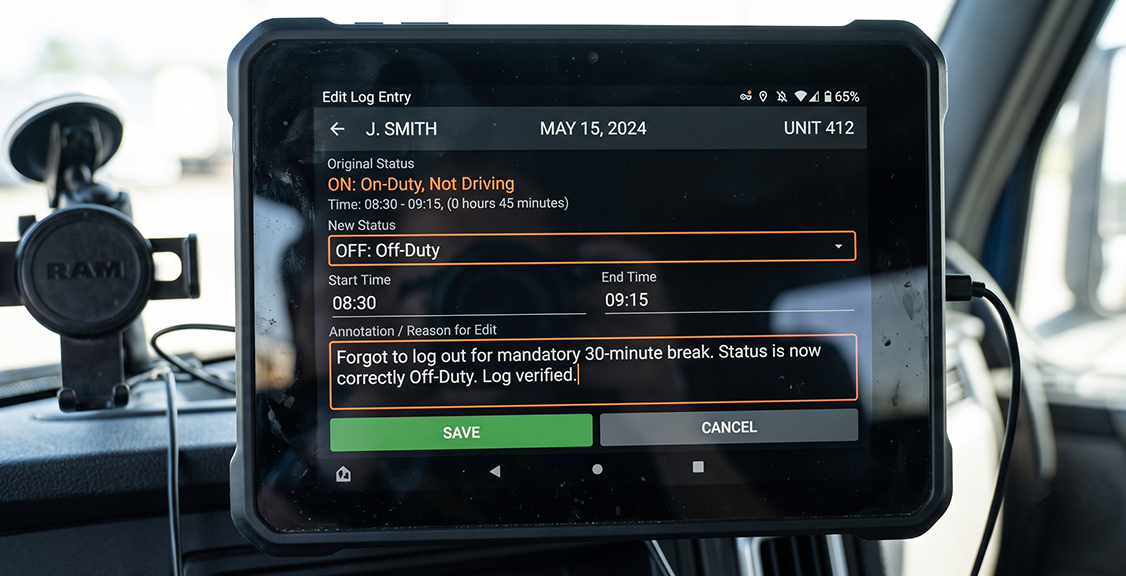
Edits are allowed on ELD records, but every edit must include an annotation that explains what changed and why, under 49 CFR 395.30. The original entry stays in the record permanently, even after an edit is made, so an edited log always shows both versions.
This matters most around shift starts and ends because that’s where drivers most often need to fix a mistake, like a login that happened a few minutes late or a status that was set incorrectly before the truck moved. A short, factual annotation, for example noting that the driver logged in late while the truck was stationary, keeps the record credible. An unclear or missing annotation is what draws attention during a review. FMCSA’s own guidance on ELD editing and annotations lays out what counts as an acceptable edit versus what looks like an attempt to alter the record after the fact.
Carriers cannot edit a driver’s record before it’s certified, and drivers should know that any edit made to their log, by them or by dispatch, should be visible and explained, not silent.
What Should You Do If Your ELD Has a Problem During a Shift?
If the ELD stops recording mid-shift correctly, your driver should note the date, time, and issue, then switch to paper logs for the rest of that day if needed. This keeps the shift’s record intact even if the device itself isn’t working. A malfunction during a shift start or shift end is more disruptive than one in the middle of a run, since the login or logout step is exactly what fails to save. If this happens, drivers should still write down their duty status changes manually and report the issue as soon as possible.
It’s also worth confirming the device itself is still on the FMCSA-registered ELD list, since a small number of devices have been removed from the registry this year and carriers using a removed device are required to replace it within the grace period FMCSA sets. If a shift-ending glitch keeps happening on the same device, reach out to Geosavi so the hardware can be checked. Support is available 24 hours a day, seven days a week, so this doesn’t have to wait until Monday morning to get sorted.
What Do Correct and Incorrect Shift Habits Look Like Side by Side?
Most of the mistakes covered above come down to one of six habits. Here’s how the correct version compares to the one that tends to cause problems.
| Situation | Correct Habit | Incorrect Habit |
|---|---|---|
| Starting the shift | Log in under your own profile before the truck moves | Start driving before logging in |
| Duty status at login | Select on duty not driving during pre-trip | Leave status on off-duty while working |
| Switching trucks | Update vehicle info immediately in the ELD | Keep the old truck number active |
| Ending the shift | Switch status, then log off | Walk away while still logged in as on duty |
| Handling an edit | Add a short annotation explaining the change | Edit the record with no explanation |
| Device issue mid-shift | Switch to paper logs and note the time | Keep driving without recording anything |
What Questions Should You Ask Before Choosing an ELD for Shift Tracking?
Does the login process work the same way for every driver on the fleet?
A consistent login screen across trucks means less retraining every time a driver switches vehicles. If your fleet mixes truck types, check that the device handles vehicle profile changes without extra steps.
How does the device flag unidentified driving time?
Ask whether the system flags this automatically or requires someone in your office to catch it manually. Automatic flags catch problems the same day instead of weeks later.
Can drivers add annotations directly from the screen, or does it require a call to the office?
A device that lets a driver explain an edit on the spot, right when it happens, produces cleaner records than one that requires a follow-up call.
Does the platform support Hours of Service rules for both U.S. and Canadian drivers?
If any part of your fleet crosses the border, confirm the device handles both rule sets without a separate login or app.
What happens to the record if the device loses power mid-shift?
Ask specifically how a power interruption during login or logout is recorded, since this is a common source of unidentified driving time.
Is the device connected to a DVIR system, or is that separate?
Shift start is also when most pre-trip inspections happen, so a device that ties duty status to the vehicle inspection record, like the setup covered in our ELD and DVIR integration guide, saves a step for the driver.
What support is available if a driver has trouble logging in during a shift?
A driver stuck on a login screen at a weigh station needs help fast. Confirm the vendor offers support your drivers can reach any time of day, not just during business hours.
Is the device listed on the current FMCSA-registered ELD list?
Confirm this directly before purchase, and ask how the vendor handles a device removal if one happens later.
Common Questions
About ELDs and Road Safety
What is the difference between starting a shift and starting to drive on an ELD?
Starting a shift means logging in and setting an on-duty status, usually before the truck moves. Starting to drive means the ELD detects the truck is actually in motion and the status changes to driving on its own.
Why does an incomplete login cause problems later?
An incomplete login leaves a gap where driving time isn’t tied to a specific driver. That gap becomes unidentified driving time, which someone has to review and explain later.
Can a driver fix a duty status mistake after the shift is over?
Yes, through an edit with an annotation explaining the change, under 49 CFR 395.30(c)(2). The original entry stays visible even after the fix.
Does a short device glitch during login count as a violation?
No, not automatically. A brief glitch that’s documented and doesn’t affect the accuracy of the record isn’t the same as a missing or falsified log.
What should a driver do the moment they notice unidentified driving on their own log?
They should flag it to dispatch or the back office right away rather than waiting for it to surface during a review. The sooner it’s matched to the correct driver or explained, the less it looks like something being hidden.
How does CVSA’s Roadcheck affect the login and logout habits covered in this article?
It means inspectors are looking closely at whether a driver’s login and logout times line up with the rest of their day. A shift that starts and ends cleanly on the ELD holds up fine under that kind of scrutiny, since there’s nothing inconsistent to flag.
About Choosing the Right ELD Provider
What should a fleet manager look for in a login screen?
Look for a simple, driver-specific login that doesn’t require memorizing complicated steps. Your drivers under time pressure make more mistakes on confusing screens.
Does your ELD track duty status changes automatically?
Yes. Once your driver logs in and the truck begins moving, the system updates the duty status without your driver needing to tap through extra menus.
How does the device connect to your truck?
It connects through J1939, J1708, or OBD-II, depending on your vehicle, and the tablet itself is SAE J1455 certified for use in your truck’s conditions.
What if you want to check pricing before switching providers?
You can check current pricing directly using our price calculator, which breaks down costs based on your fleet size without requiring a sales call first.
Is support available if your driver has trouble at the start of a shift?
Yes, technical support is available 24 hours a day, seven days a week, so a login issue at any hour doesn’t leave your driver stuck.
What if a device stops working shortly after you buy it?
Every device comes with a 30-day money-back guarantee, so you can test the login and shift-tracking process with your real drivers before committing long term.
Do local drivers follow different shift start and end rules than long-haul drivers?
No. The login, duty status, and logout steps are the same regardless of route length, though drivers using the short-haul exemption may have different logging requirements overall, which our guide for local drivers explains in more detail.
Conclusion
A shift that starts and ends cleanly on an ELD comes down to a few habits repeated the same way every time: log in under the right profile, set the correct duty status before moving, and log off only after the status reflects what’s actually happening. Most of the problems that show up during a roadside check trace back to one of those three habits being rushed or skipped.
This is the same standard the Geosavi Compliance Team in Tucson works from every day when helping fleets get their drivers set up right the first time, since a device that’s easy to use correctly gets used correctly far more often than one that isn’t.
If your current setup is making shift starts more complicated than they need to be, you can check what a simpler device would cost for your fleet using Geosavi’s price calculator, or give us a call at (800) 261-4361 to talk through what your drivers are running into right now.