Key Takeaways
- A tablet can be used as an ELD if the app running on it is registered on the FMCSA-registered ELD list.
- The tablet must be mounted in a fixed position and visible to the driver from a normal seated driving position under 49 CFR 395.22(g).
- The ELD app must connect to the truck’s ECM via J1939, J1708, or OBD-II to pull engine data automatically. An app on a tablet with no ECM connection does not satisfy the mandate.
- FMCSA removed 67 ELD devices from its registered list since January 2025, including Safe ELD and MyLogs ELD on May 7, 2026, giving carriers until July 7, 2026 to replace them, confirmed by FMCSA Administrator Derek Barrs.
- Motor carriers found using a non-registered ELD face citation under 49 CFR 395.8(a)(1) and an immediate out-of-service order.
- A tablet running a registered ELD app must support data transfer via USB, Bluetooth, telematics web services, and email for roadside inspection under Appendix A to Subpart B of Part 395.
- The Geosavi tablet is SAE J1455 certified, meaning it is built to withstand the temperature extremes, vibration, and shock conditions of commercial trucking.
- HOS violations rose from 410,000 in 2023 to more than 500,000 in 2025, according to RigDig data cited by Overdrive in April 2026, making device reliability a direct compliance risk.
Introduction
Drivers and fleet managers have been asking whether a tablet can run an ELD since the mandate took full effect in December 2017. The answer is yes, but the compliance depends entirely on the software running on it, how that software connects to your truck, and how the device is mounted and presented at a roadside inspection. Getting those three things right is what determines whether your tablet setup holds up when an officer asks to see your logs.
The stakes are higher in 2026 than they were even a year ago. FMCSA has removed 67 devices from its registered list since January 2025, including Safe ELD and MyLogs ELD on May 7, 2026, as confirmed by FMCSA Administrator Derek Barrs. Carriers using those devices have until July 7, 2026 to replace them. After that date, any driver still running a revoked device will be cited under 49 CFR 395.8(a)(1) and placed out of service immediately. Knowing whether your tablet setup meets the full mandate is not a secondary concern. It is what keeps your truck moving.
This article walks through every federal requirement a tablet ELD must meet under 49 CFR Part 395, explains the difference between a bring-your-own-device setup and a purpose-built ELD tablet, covers what officers look for at a roadside inspection, and explains what to check before purchasing any tablet-based ELD solution. You can review the full list of registered devices at the FMCSA-registered ELD list at any time to confirm your current device is still active.
What Is a Tablet ELD and How Does It Work?
A tablet ELD uses a tablet as the display and user interface for your electronic logging device. The tablet itself is not the ELD in isolation. The ELD is the registered combination of the software application, the hardware connection to the truck’s engine control module, and all supporting components working together. FMCSA permits apps as ELDs as long as they connect to the ECM bus and meet all technical specifications in Appendix A to Subpart B of 49 CFR Part 395.
This distinction matters because downloading a logging app to your personal tablet does not make you compliant. The app must be registered with FMCSA, the solution must include the ECM adapter or connector needed to pull engine data, and every component must be present in the cab during a roadside inspection. If any part of the system is missing, including the adapter cable or Bluetooth ECM connector, the driver is considered to be operating without an ELD.
Understanding this at the start prevents problems at the scale house. When you look at any ELD hardware or platform option, the key question is always whether the registered solution includes everything the officer expects to see working together in the cab. The sections that follow explain each requirement in order.

Does the FMCSA Require Your Tablet App to Be Registered?
Yes, without exception. Every ELD used by a driver required to keep records of duty status must appear on the FMCSA-registered ELD list. There is no grace period for unregistered apps, no exemption for small fleets, and no provision that allows a carrier to continue using a device after its grace period expires.
The registration requirement applies to the software provider, not to the individual tablet manufacturer. A provider building an app for Android must register the Android platform and the compatible version range. A provider building an app for iOS must register that platform separately. If your specific tablet model falls outside what the provider has registered, the carrier is operating without a compliant ELD. This is why carriers cannot rely on generic app store downloads and must verify the exact registered solution before deployment.
You can check any device against the FMCSA-registered ELD list at any time. Since January 2025, FMCSA has removed 67 devices from that list, as confirmed by FMCSA Administrator Derek Barrs on May 7, 2026. The agency has made clear it will continue removing devices that fall short of the minimum technical requirements in 49 CFR Appendix A to Subpart B of Part 395. Checking that list regularly is a practical compliance habit, not a formality. The next revocation announcement can come at any time.
How Does a Tablet Connect to Your Truck’s Engine?
A tablet running ELD software must connect to the truck’s engine control module to automatically record the engine data the mandate requires. That connection pulls vehicle miles, engine hours, vehicle speed, and engine power status directly from the ECM rather than relying on manual driver input. Without that connection, the app has no way to automatically detect when driving begins, which is the core function the mandate requires.
The connection method depends on the vehicle. Most commercial trucks built after 2000 use the J1939 port, which is the standard 9-pin diagnostic connector found on Class 7 and Class 8 vehicles. Older trucks may use the J1708 protocol. Lighter commercial vehicles in the medium-duty range often connect through the OBD-II port. The Geosavi ELD connects via J1939, J1708, or OBD-II, covering the full range of vehicles a mixed fleet is likely to operate.
On a tablet-based setup, the ECM connection is typically made through a physical adapter that plugs into the diagnostic port and communicates with the tablet via Bluetooth or a direct cable. FMCSA confirms that both hardwired J1939 connections and Bluetooth are acceptable methods of receiving data from the ECM or vehicle data bus. If a Bluetooth link drops for more than 30 minutes in a 24-hour period, the ELD must record an engine synchronization malfunction, which is a compliance event the carrier must address and document under 49 CFR 395.34. If you have questions about which connection type works for your vehicles, the Geosavi support team can confirm compatibility before you order.
Where Do You Have to Mount a Tablet ELD in the Cab?
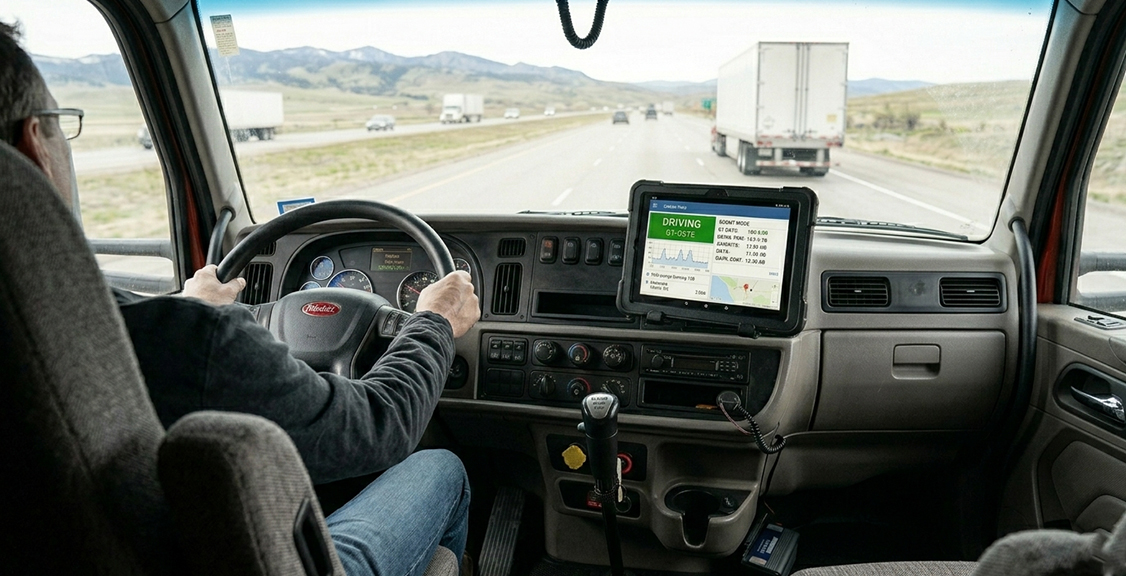
A portable ELD, including any tablet running ELD software, must be mounted in a fixed position during vehicle operation and visible to the driver from a normal seated driving position. This requirement comes directly from 49 CFR 395.22(g) and applies to every motor carrier whose drivers use portable devices. A tablet sitting loose on the dash, resting on the seat, or stored in a door pocket does not meet this standard regardless of whether the app is registered.
The practical side of this rule has more detail than it first appears. Officers at roadside inspections verify that the device is physically mounted and that the display is legible from the driver’s seat. The FMCSA technical specifications also state that the display must be designed so it can be reasonably viewed from outside the cab, which may require the device to be removed from its mount or passed through the window for the officer to review. A tablet in a fixed dashboard mount that cannot reach the window is worth thinking through before an inspection, not during one.
FMCSA does not approve or certify specific mount products. What the regulation requires is that the device is fixed, visible, and accessible. A heavy-duty suction or bolt-on mount rated for commercial truck vibration levels meets the practical standard. A consumer phone holder purchased at a fuel stop does not.
What Is the Difference Between a BYOD Tablet and a Dedicated ELD Tablet?
Bring-your-own-device setups use a personal or consumer tablet running a registered ELD app. A dedicated ELD tablet is a device designed and tested specifically for commercial trucking environments, often certified to standards like SAE J1455, and sold as part of the registered ELD solution. Both approaches can be legally compliant. The difference shows up in day-to-day reliability rather than in the regulation itself.
A consumer tablet in a commercial truck cab faces sustained vibration, temperature swings from sub-zero overnight parking to high cab temperatures during summer operation, and the dusty, wet conditions that come with many routes. Consumer devices are not tested for those conditions. A tablet built to SAE J1455 standards has been evaluated against the climatic, dynamic, and electrical environments that heavy-duty truck operations actually produce, covering temperature cycling, humidity, vibration, shock, and electromagnetic compatibility.
The compliance risk with a BYOD setup is largely practical: battery failure in cold weather, screen unresponsiveness when gloves are needed, Bluetooth connection drops in RF-heavy environments, and app crashes during a data transfer request at a scale house. None of those failures are automatic violations on their own, but a driver who cannot produce logs or complete a transfer during an inspection is in a difficult position regardless of the underlying cause. The Geosavi tablet is SAE J1455 certified, built for the conditions your truck operates in. You can review the full hardware specifications and available ELD products before making a decision. The price calculator can give you a cost picture for your fleet size before you commit.
What Data Transfer Methods Does Your Tablet ELD Need to Support?
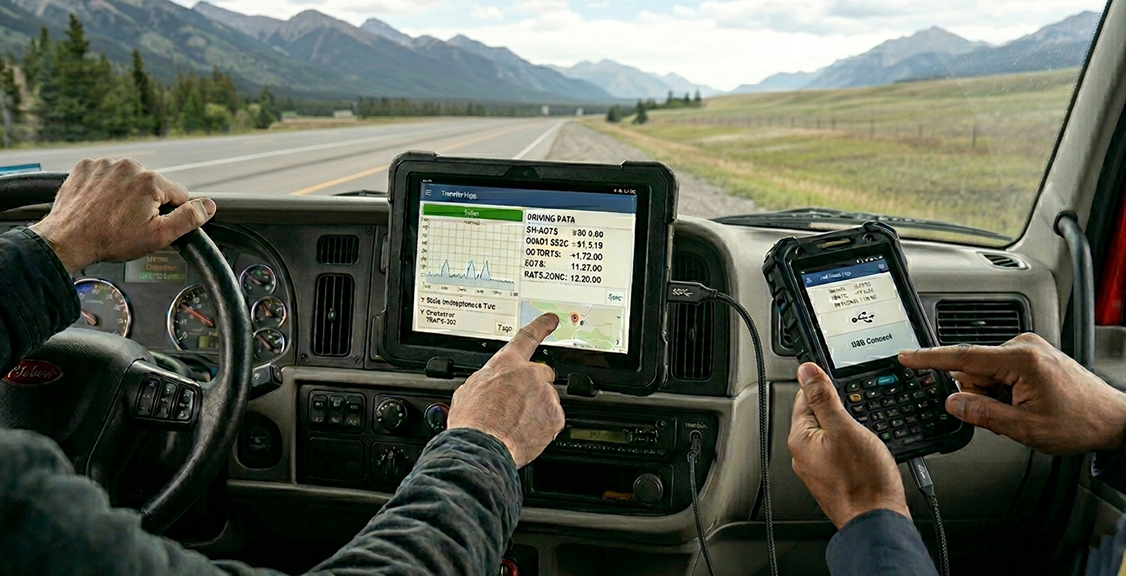
At a roadside inspection, your ELD must transfer the current 24-hour period and the previous seven consecutive days of records on request from a safety officer. That transfer must happen through one of the methods specified in Appendix A to Subpart B of Part 395: telematics transfer via web services and email, or local transfer via USB 2.0 and Bluetooth. Your device must support all four methods to be fully compliant.
On a tablet-based setup, this is straightforward in theory and occasionally problematic in practice. Telematics transfer sends your log file directly to the officer’s system through a cellular or Wi-Fi connection. Local transfer uses a USB cable or Bluetooth pairing between your tablet and the officer’s device. If the cellular signal is poor at the inspection location, telematics transfer may fail. If the Bluetooth pairing takes too long or fails, the situation can escalate into a malfunction event. Knowing which transfer method your device defaults to and how to trigger a manual transfer is basic inspection preparation.
Practicing a transfer in your yard once per quarter, and again any time an app update is installed or a device is swapped, removes the risk of discovering a broken transfer process at the scale house. The Geosavi FAQ page covers transfer procedures, and the support team is available 24 hours a day, seven days a week if a transfer issue comes up in the field.
Why Does Tablet Durability Matter for ELD Compliance?
Device failure is a compliance event, not just a technical inconvenience. HOS violations rose from 410,000 in 2023 to more than 500,000 in 2025, according to RigDig data cited by Overdrive in April 2026. A tablet that crashes, loses ECM sync, or cannot complete a data transfer contributes directly to that trend rather than working against it.
When an ELD malfunctions, the driver must notify the motor carrier in writing within 24 hours and revert to paper logs under 49 CFR 395.34. The motor carrier then has eight days from the driver’s notification, or from the carrier’s own discovery of the condition, to correct, repair, or replace the device. That eight-day clock runs regardless of whether a replacement is readily available, and the carrier must seek an extension from the FMCSA Division Administrator if more time is needed. Failing to act within eight days is a separate compliance violation on top of the original malfunction.
SAE J1455 covers thirteen categories of environmental factors affecting electronic equipment in heavy-duty vehicles, including temperature cycling, humidity, vibration, shock, and electromagnetic compatibility. A tablet evaluated against those categories is more likely to function correctly across the range of conditions your operation encounters than a consumer device that has never been tested against commercial truck cab conditions. The Geosavi tablet is SAE J1455 certified. If you want to understand the full setup before ordering, the Geosavi shop has the hardware details, and the support team can walk through any questions about your specific fleet.
What Are the Risks of Using an Unverified ELD App on Your Tablet?
The immediate risk is a citation under 49 CFR 395.8(a)(1) for no record of duty status. Motor carriers face a maximum civil penalty of up to $19,246 per HOS violation, and drivers face up to $4,812 per violation, under the FMCSA penalty schedule, with amounts adjusted annually for inflation. These are maximum figures, and actual penalties vary, but the citation itself becomes part of your compliance record and can trigger a review regardless of fleet size.
Beyond the citation, a driver found using a non-registered ELD at the roadside will be placed out of service immediately. The truck stops until the driver has reverted to paper logs and the situation is resolved. For owner-operators and small fleets where every driving hour counts, an out-of-service order carries a direct financial cost that goes well beyond the paperwork penalty.
The less visible risk is data integrity. An unregistered app may not meet the technical specifications for output file format, required data fields, or event recording accuracy. When a safety officer runs the output file through FMCSA’s file validator, a file missing required fields or containing values outside acceptable ranges will fail. A failed output file can make accurate hours look like no hours, creating the same enforcement problem as a missing log. Verifying your device against the FMCSA-registered ELD list before deployment is the only way to confirm your logs will hold up at the roadside. If you have questions about how a Geosavi setup handles output files and inspection transfers, the contact page connects you directly with the compliance team.
COMPARISON TABLE: Tablet ELD vs Dedicated Fixed ELD Unit
| Factor | Tablet-Based ELD | Dedicated Fixed ELD Unit |
|---|---|---|
| FMCSA registration | App must be registered; tablet is the display only | Entire unit registered as a single device |
| ECM connection | Via Bluetooth adapter or cable to J1939, J1708, or OBD-II | Typically hardwired directly to the diagnostic port |
| Mounting requirement | Must be fixed per 49 CFR 395.22(g); mount sourced separately | Factory-mounted or integrated into dash harness |
| Durability rating | Depends on tablet model; consumer tablets untested for truck cab | Purpose-built units often rated to SAE J1455 or IP54/66 |
| Response if removed from FMCSA list | App update or replacement app required; tablet may remain in use | Full hardware replacement required |
| Data transfer methods | USB, Bluetooth, telematics via app | USB, Bluetooth, telematics via unit |
| Cost structure | Lower hardware entry cost; subscription may apply | Higher hardware cost; often bundled with subscription |
| Driver familiarity | Familiar interface if using a common mobile OS | Learning curve for proprietary interfaces |
QUESTIONS TO ASK BEFORE YOU CHOOSE A TABLET ELD
Is the specific app and device combination on the FMCSA-registered ELD list right now?
The FMCSA registered list is updated continuously, and devices can be removed with 60 days’ notice. Before you purchase or deploy any tablet-based ELD, search the exact solution at the FMCSA-registered ELD list and confirm it appears as an active registration, not on the revoked list. Make this check a monthly routine.
Does the solution include all the components the officer needs to see in the cab?
If the ELD solution requires an ECM adapter, a Bluetooth connector, and a tablet app to function together, all three components must be in the cab during a roadside inspection. A missing adapter means the driver is considered to be operating without an ELD, even if the tablet and app are present and working.
What connection type does this solution use for your specific trucks?
J1939, J1708, and OBD-II are not interchangeable. Confirm which diagnostic port your trucks have and whether the ELD solution supports that connection before you order. A mismatch discovered during installation adds delay and cost.
How does the tablet handle temperature extremes and vibration?
If your drivers park overnight in cold climates or operate in high-dust environments, a consumer tablet will degrade faster than a device built to commercial vehicle standards. Ask specifically whether the tablet has been tested to SAE J1455 or a comparable standard for heavy-duty vehicles.
What is the process if this device is removed from the FMCSA list?
Ask the provider directly what happens when FMCSA flags their device for removal. You need to know how quickly you will be notified, what the replacement path looks like, and whether you can source and install a compliant replacement within the 60-day window FMCSA allows.
Does the solution support all four required data transfer methods?
Compliant ELDs must support telematics transfer via web services and email, plus local transfer via USB and Bluetooth. Ask the provider to confirm all four methods work on their registered tablet solution, not just the one they prefer to demonstrate in a sales call.
What support is available when a transfer fails at a scale house?
A compliance problem discovered at 2 a.m. during a roadside inspection needs an answer immediately. Confirm that your ELD provider offers 24-hour support and that drivers have a direct number to call in the field. Geosavi provides 24-hour, seven-day technical support as a standard part of the service.
Is a malfunction instruction sheet included with the device?
Under 49 CFR 395.22(h), every driver must carry an instruction sheet describing ELD malfunction reporting requirements and what to do during a malfunction. This is a required document. Confirm it is included with your solution and that drivers know where it is stored in the cab.
YOUR ELD TABLET QUESTIONS ANSWERED
Compliance and Legal Requirements
Can a tablet legally be used as an ELD?
Yes. FMCSA explicitly permits portable devices, including tablets, as ELDs under 49 CFR 395.22(g). The tablet must run a registered ELD app, connect to the truck’s ECM, and be mounted in a fixed position visible to the driver from a normal seated position.
Does a tablet ELD app need to be on the FMCSA-registered list?
Yes. The registered ELD solution, meaning the combination of app, ECM connector, and compatible device platform, must appear on the FMCSA registered ELD list. Using an app that is not on that list is treated the same as having no ELD at all.
What regulation covers tablet ELD mounting in the cab?
49 CFR 395.22(g) requires a portable ELD to be mounted in a fixed position during vehicle operation and visible to the driver from a normal seated driving position. No specific mount type is mandated, but the device must stay fixed while the vehicle is moving.
What happens if a tablet ELD app is removed from the FMCSA list?
FMCSA gives carriers 60 days from the removal announcement to replace the device. After that grace period ends, using the removed solution is a violation of 49 CFR 395.8(a)(1) and drivers face an immediate out-of-service order. Safe ELD and MyLogs ELD were removed May 7, 2026, with a replacement deadline of July 7, 2026.
Can a driver be placed out of service for a tablet ELD issue?
Yes. If the device is not registered, is on the revoked list, cannot transfer data, or is not properly mounted and connected to the ECM, a safety officer can cite the driver under 49 CFR 395.8(a)(1) and place the vehicle out of service under CVSA out-of-service criteria.
Does a tablet ELD need to support both USB and Bluetooth transfers?
Yes. Under Appendix A to Subpart B of Part 395, a compliant ELD must support local transfer via both USB 2.0 and Bluetooth, as well as telematics transfer via web services and email. The driver must be able to produce records using whichever method the officer requests.
Device Selection and Practical Setup
Does it matter what tablet brand or model you use?
It matters insofar as your specific tablet must be covered by the ELD provider’s registered solution. Providers register a platform such as Android or iOS with a compatible version range. If your device falls outside what the provider registered, you may not be covered. Confirm this before purchasing any tablet for ELD use.
What is SAE J1455 certification and why does it matter for trucking?
SAE J1455 is the standard developed by SAE International for the environmental performance and reliability of electronic equipment in heavy-duty on-road and off-road vehicles. It covers temperature cycling, humidity, vibration, shock, and electromagnetic compatibility. A tablet certified to SAE J1455 has been evaluated against the actual conditions inside a commercial truck cab. The Geosavi tablet carries this certification.
Can a driver use a personal phone or tablet as an ELD?
A driver can use a personal device if the ELD app running on it is part of a registered FMCSA solution that covers that device. The same rules apply: registered app, ECM connection, fixed mounting, and all data transfer methods are functional. Consumer devices not tested for commercial trucking environments carry a higher failure risk.
What is the difference between a BYOD ELD and a dedicated ELD tablet?
A BYOD setup uses a consumer device running a registered ELD app. A dedicated ELD tablet is a purpose-built device sold as part of the registered ELD solution, typically built to commercial vehicle durability standards. Both can be compliant. The difference is in long-term reliability under truck cab conditions.
Do you need a data plan to use a tablet ELD?
Many tablet ELD solutions rely on cellular connectivity to relay data to the back-office system and to support telematics transfer to officers at the roadside. FMCSA advises carriers to consider the areas their drivers travel and the ability to maintain a cellular connection when selecting a portable ELD solution. Local transfer via USB and Bluetooth does not require a cellular connection.
What paperwork does a driver need to carry alongside a tablet ELD?
Under 49 CFR 395.22(h), every driver must carry an ELD information packet in the cab. This includes a user manual, a data transfer instruction sheet, a malfunction instruction sheet, and at least eight days of blank paper log graph grids. These are required regardless of whether the ELD is a tablet or a fixed unit.
How often should you check that your tablet ELD is still on the FMCSA-registered list?
Monthly checks are sound practice. FMCSA has removed 67 devices since January 2025. A device can be removed at any time if the provider fails to meet minimum technical requirements in 49 CFR Appendix A to Subpart B of Part 395. Checking the FMCSA-registered ELD list monthly and keeping a record of those checks removes the risk of an undetected removal catching your fleet off guard.
What should a driver do if the tablet ELD malfunctions at the roadside?
The driver must note the malfunction, provide written notice to the motor carrier within 24 hours, and revert to paper logs under 49 CFR 395.34. The carrier has eight days from the driver’s notification, or from the carrier’s own discovery, to repair or replace the device. The malfunction instruction sheet required under 49 CFR 395.22(h) should be in the cab and walk the driver through each of those steps.
Conclusion
A tablet can run your ELD legally and, for many fleets, is a practical way to meet the mandate. What a tablet cannot do is meet compliance on its own. The registered app, the ECM connection, the correct mounting position, and the working data transfer methods all have to be in place together before your driver is covered at a roadside inspection.
In 2026, the enforcement environment has changed. FMCSA has removed 67 devices from its registered list since January 2025, including Safe ELD and MyLogs ELD on May 7 of this year. The CVSA Roadcheck inspection blitz ran May 12 to 14, 2026 with a specific focus on ELD tampering and log integrity. A motor carrier facing a maximum civil penalty of up to $19,246 per HOS violation under the FMCSA penalty schedule has every reason to confirm that each tablet in the fleet is running a registered, ECM-connected, properly mounted solution before the next inspection.
If you want to talk through which setup fits your trucks, confirm which connection types your vehicles support, or understand what SAE J1455 certification means for your routes, reach out through the contact page and the compliance team will walk you through it.